OCR, matching and bank rules in reconciliation: what each one does in QuickBooks Online and Xero
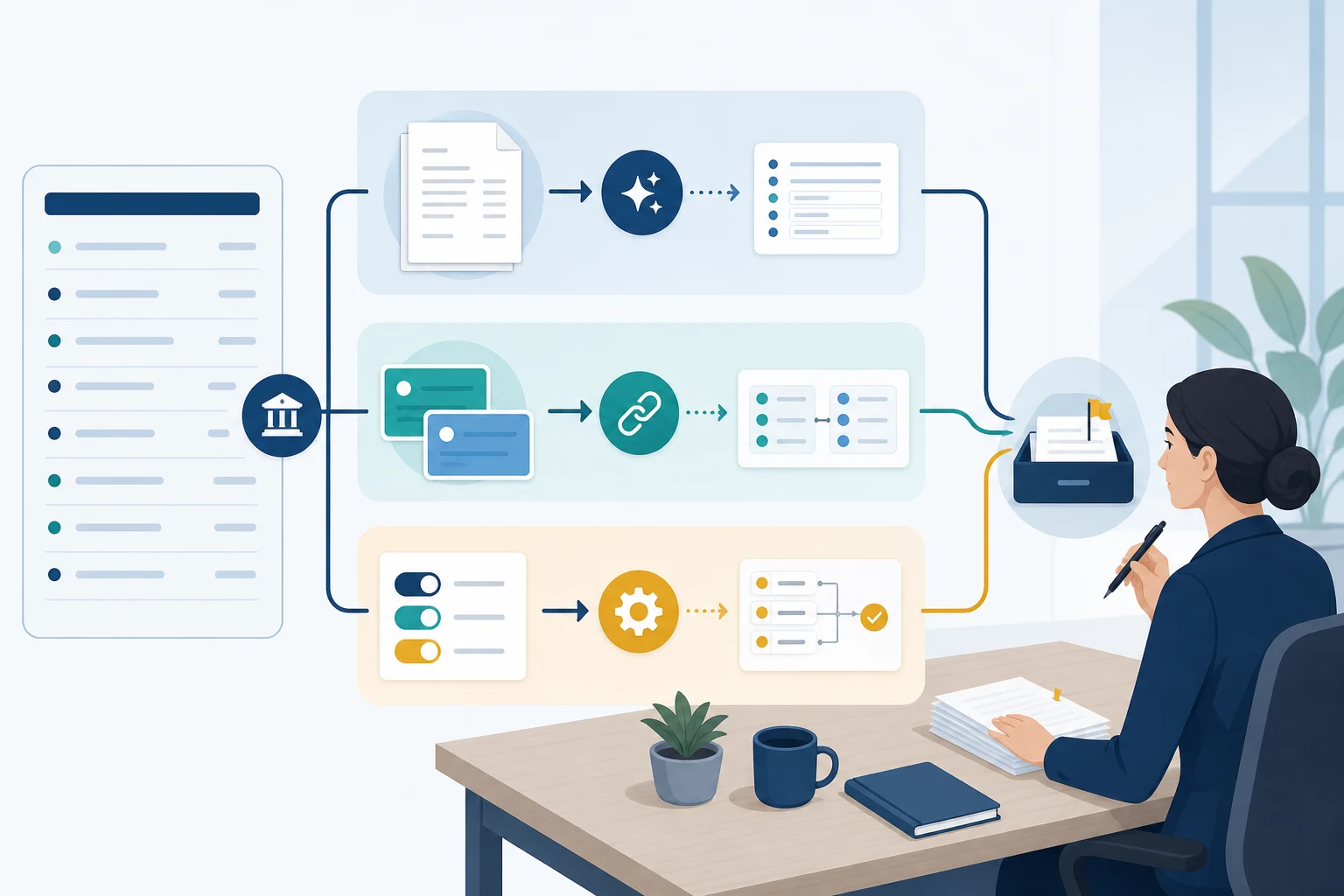
OCR, AI matching, and bank rules are sold under one label. Each does a different job and stops at a different point, and a person still finishes the reconciliation.
Reconciliation delays usually come from three small jobs repeated hundreds of times across a client file, rather than from one hard transaction: reading what a document says, deciding which record a bank line belongs to, and applying a coding decision the team has already made. OCR, AI matching, and rule-based automation each take one of those jobs. Knowing where each one stops is what keeps automation from producing a faster mess.
Quick answer: In bank reconciliation, OCR extracts fields from documents such as receipts, bills, and bank statements. AI compares a bank-feed line with ledger records, documents, and coding history, then proposes a match or a category with a confidence level. Rule-based automation repeats fixed decisions the team has already approved. All three prepare work. A person still verifies proposed matches, investigates differences, and completes the reconciliation in Xero or QuickBooks Online, which remain the system of record.
Three jobs, three technologies
Reconciliation makes the books and the bank statement agree, allowing for bank charges, outstanding items, and recording errors. Inside that outcome, the repeated work splits into three jobs, and each technology owns one of them.
Reading documents: a receipt, bill, invoice, or statement arrives as an image or PDF, and someone has to turn it into a supplier, a date, an amount, and a tax line. That is OCR's job.
Deciding what a bank line is: a feed line such as "SQ *COFFEE HOUSE 4471" has to be matched to an invoice, a bill, or a prior pattern, or given a category. AI matching and categorization work here.
Repeating a decision: the monthly software subscription always goes to the same account, and a rule can do that without asking again.
Keeping the three apart matters because a vendor's "AI-powered reconciliation" may be any one of them. Ask which of the three jobs it does.
OCR: turning a document into fields
Optical character recognition reads the text on a scanned or photographed document and returns structured fields: supplier, date, total, tax, sometimes line items. In accounting it is used at two points of the reconciliation, and the two are often confused.
Receipt and invoice capture
Receipts, bills, and invoices become the evidence behind a bank line. QuickBooks Online's receipt capture extracts information from uploaded, emailed, or photographed receipts and creates a transaction for the user to review, with suggested matches to existing transactions. Xero's document capture prepopulates records from photographed or emailed documents and highlights bank matches for the user to review before posting. Both platforms describe the same sequence: extract, then review.
Bank statement OCR
When an account has no live feed, such as a closed account, a catch-up period, or a bank the feed does not cover, the statement itself has to be turned into transaction lines. QuickBooks Online accepts an account statement as a PDF or image, or a transaction list as a QBO, QFX, or CSV file, up to 1,000 lines per upload. Imported lines still need to be matched, categorized, and reconciled afterwards. Xero imports statement files in CSV, OFX, or QIF format, so a PDF statement first goes through a converter or a bank statement extraction tool. Either way, statement OCR replaces typing, and the imported lines then go through the same matching and reconciliation steps as lines from a feed.
Where Booke fits
Booke's OCR is built for invoices, bills, and receipts, which arrive by upload or forwarded email as PDFs or photos. Extraction runs as separate stages. The file is prepared and previewed first. An OCR pass then pulls out the document type, supplier, dates, currency, totals, tax, and line items. A second pass checks those fields against the client file's chart of accounts and tax rates, flags likely duplicates, and attaches a confidence level and any warnings. AI Bookkeeper then matches the document to the bank-feed transaction in QuickBooks Online or Xero. Booke does not read bank statements: the feed already connected to the client file supplies those lines, and Booke works inside that feed rather than adding a second bank connection.
Where OCR stops
OCR extracts fields without interpreting them. It cannot tell a quote from an invoice, or notice that a receipt total includes a personal item, and it cannot produce a receipt that was never sent. A blurred total or an unfamiliar currency shows up as a low-confidence field, which tells the reviewer where to look rather than confirming the number. The accounting treatment is still a separate decision.
AI matching and categorization: a proposal with a confidence level
AI matching compares a bank-feed line with what already exists: open invoices and bills, documents, prior transactions, and the way similar lines were coded before. It returns a proposed match or category with a confidence level. The confidence level routes the item, and the reviewer still decides the accounting treatment.
In QuickBooks Online
Downloaded transactions do not affect the books until they are matched or categorized. QuickBooks suggests matches for them, and on Plus, Advanced and Intuit Enterprise Suite its Accounting AI also helps find possible issues while you reconcile. Intuit's own guidance is to verify a suggested match before posting.
In Xero
Xero's JAX reconciles through four methods it calls Rule, Match, Memory, and Prediction. Its automatic bank reconciliation, in beta and rolling out by region and plan, reconciles a statement line only when it is highly confident. Lower-confidence suggestions stay unreconciled for the user, any JAX match can be challenged or rejected, and an incorrect reconciliation can be undone.
Where Booke fits
Booke works through a fixed sequence before it proposes anything:
It sets aside transaction types that need separate handling.
It looks for a matching document and checks whether one is missing.
It applies any bank rules the file already has in QuickBooks.
It rewrites the noisy bank description using the amount, date, bank account, and business profile.
It looks for the payee among existing vendors and customers.
Only then does it search the client file's own confirmed transactions for similar examples.
Document matching in the standard flow needs the direction, the amount to the cent, the currency, and a date window to line up. Partial, grouped, and split payments go through advanced matching or to review.
In QuickBooks Online the result is eligible categorization and matching, with the rest prepared for reconciliation and review. In Xero, Booke can also perform supported reconciliation actions for eligible, configured cases. What happens to a confident result is a setting on the file: it either waits for review, or, when auto-approval is switched on, is approved above a confidence threshold and logged as its own activity. Low-confidence and policy-sensitive items go to the review queue, and every item carries a status and an explanation of what Booke did.
Where AI matching stops
Three inputs decide the quality of a proposal, and the model is the least important of them.
The description: "PAYPAL *" or "ZELLE TO J" carries almost no context, and no amount of history fills an empty description.
The history: if two staff coded the same vendor to two accounts, the model inherits the disagreement. Consistent history improves automation, and inconsistent history creates more review work.
The document: a payment with no bill behind it can be categorized from history but cannot be matched. A missing receipt is an evidence gap, and no categorization step closes it. Booke marks the line as needing a document, and where the client-question workflow is set up it sends the request to the client with the transaction attached.
Transfers between accounts, one deposit that covers several invoices, and timing differences around period end survive most matching passes. That is normal. They should reach a person with the context to decide.
Rules and workflow automation: repeating a decision you already made
In 2023 this layer was called robotic process automation: a bot that clicked through the accounting screen the way a person would. Most of that work now runs in two other places.
Native bank rules
QuickBooks Online bank rules apply conditions to downloaded transactions. Its auto-add option can post qualifying transactions without the usual confirmation, which is why the scope of each rule needs to be decided before it is switched on. In Xero, bank rules are the "Rule" method inside JAX. Booke checks a file's existing QuickBooks rules before its own matching and categorization steps, so a rule the firm already trusts is not second-guessed by the model.
Workflow automation inside the feed
Booke runs on the schedule set for each client file against the bank feed already connected to it. The architecture is hybrid. Official QuickBooks Online and Xero APIs synchronize the file and carry supported write-back, and a Booke-hosted browser session performs the native workflow steps that need the platform's own screens. The books stay in QuickBooks Online or Xero, and no local computer has to stay open for the run. Each run respects the file's start date, close date, excluded accounts and transaction types, and pause state, so automation does not reopen a closed period.
Where rules stop
A rule that is wrong is wrong every time it fires. The common failures are ordinary. A vendor changes its bank descriptor and the rule stops matching. A rule written too broadly catches a personal purchase, or the chart of accounts changes and the rule still points at the old account. Rules need an owner and a review date, the same as any other control.
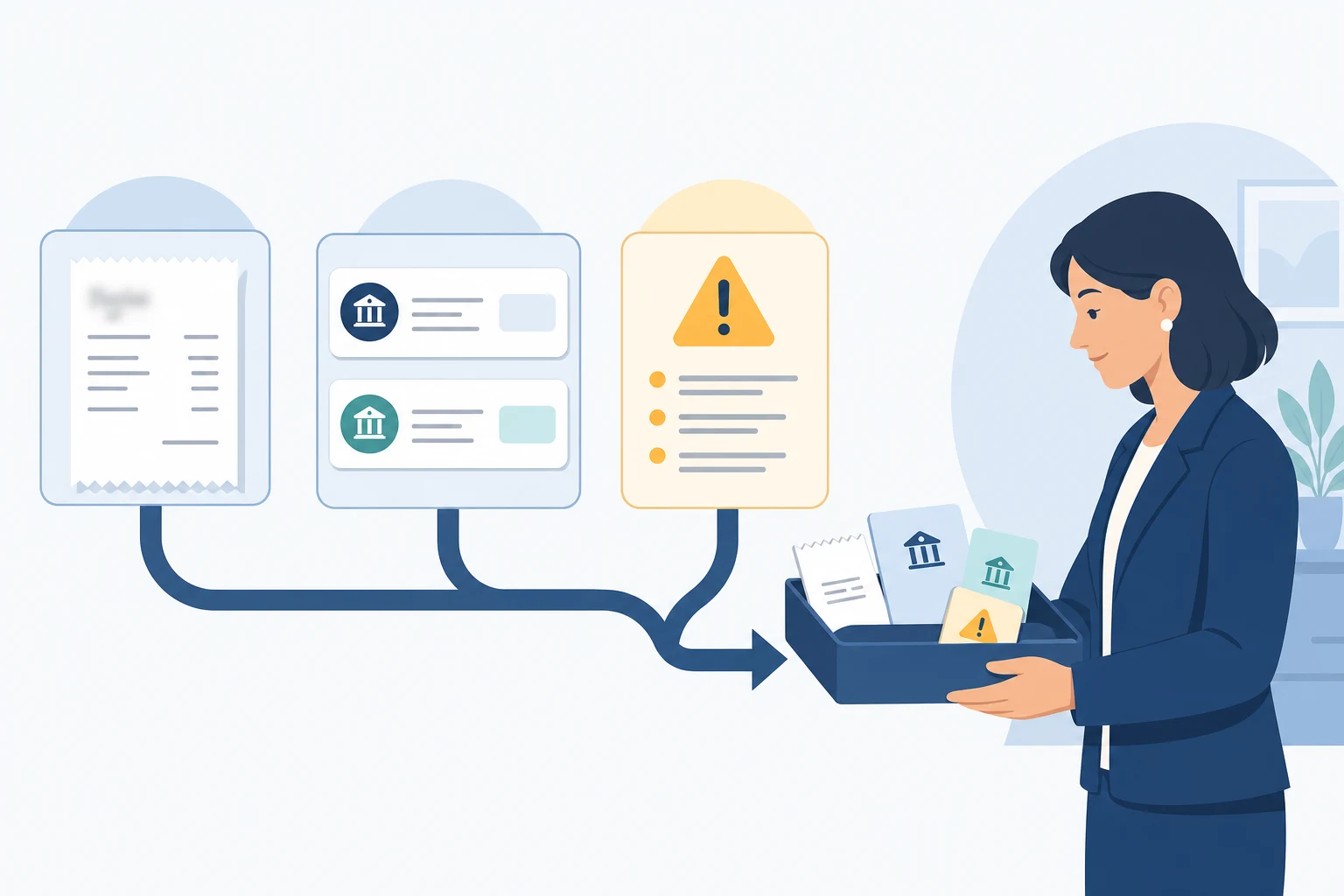
What each technology cannot resolve goes to the same place: a person with the context to decide.
What each one hands to a person
OCR hands over low-confidence fields, documents that are not what they appear to be, and the gap where a document should exist.
AI matching hands over ambiguous descriptions, new vendors with no history, grouped deposits, timing differences, and anything below the confidence threshold. Transfers, bill payments, sales receipts, and refunds have their own handling and skip the standard categorization flow.
Rules hand over the exceptions to the rule, and the rule itself when it drifts.
All three hand over the reconciliation itself, because a proposed match is still an unreconciled line. In QuickBooks Online, reconciling still requires statement details, a comparison of transactions, a zero difference, and a finish action. In Xero, a reconciled line is associated with one or more transactions and can be unreconciled if wrong.
For the full workflow, including how to set eligibility, evidence, and review policy before switching automation on, see the bank reconciliation automation guide.
A worked example
The scenario is illustrative, not a measured result, and assumes a file with auto-approval switched on. Five lines land in a client's QuickBooks Online bank feed on a Tuesday morning.
"AMZN Mktp US", $184.20. OCR has already read a forwarded Amazon invoice with three line items and the same total. AI matching links the bank line to the document and proposes the account this file has used for that vendor for the past eleven months. The confidence is above the file's threshold, so the line is approved with the document attached and the approval is logged.
"ADOBE *CREATIVE CLD", $59.99. A rule already covers this subscription, so it fires and there is nothing to review.
"ZELLE PAYMENT TO J", $2,500.00. There is no document, no matching bill, and no history for that payee, so the line goes to review.
"STRIPE PAYOUT", $4,112.70. A payout normally matches a group of invoices, but this month it includes a refund and the amounts do not add up. It goes to review with the reason recorded against the line.
"TRANSFER TO SAVINGS", $5,000.00. A transfer between two accounts in the same file. Transfers sit outside the standard categorization flow, so the line goes to review.
Two lines moved. Three went to the queue with a reason attached, which is the output the three technologies are supposed to produce: a smaller, clearer queue.
When the automation "did nothing"
The model is rarely the reason. Check, in this order:
the subscription, connection, and permissions on the client file;
whether the initial sync finished for every entity, since accounts, vendors, documents, and transactions sync as separate tasks;
the start date and any closed period;
whether the account or transaction type is excluded;
whether automation is paused or the file runs review-first, in which case results are waiting, not missing;
whether a document is missing;
whether the native action failed after the decision was made.
A completed sync and a completed action are different stages, and whoever investigates should name the one that failed.
Who this fits
The three-layer approach fits teams that already work in QuickBooks Online or Xero, repeat the same bank-feed decisions across businesses or client files, have enough consistent history to establish patterns, and keep a named person responsible for exceptions and close. A file with many split, partial, batch, or transfer transactions, or a chart of accounts that changes often, still benefits but needs more setup and more review.
It is a poor fit for a team that wants to replace the general ledger, needs an outsourced finance function rather than software, or has a new file with little history and nobody available to confirm early decisions. That file will spend its first weeks mostly in review, and it should.
Frequently asked questions
What is bank statement OCR?
Bank statement OCR reads a PDF or scanned statement and turns each line into a date, description, and amount that accounting software can import. It is used when a live bank feed is not available. The output is a list of transactions that still has to be matched and reconciled.
Can OCR reconcile a bank statement?
No. OCR turns a statement or receipt into fields. Matching those fields to ledger records is a separate step, and reconciliation is a third. In QuickBooks Online an uploaded PDF statement still has to be matched, categorized, and reconciled afterwards.
Does QuickBooks Online have OCR?
Yes, in two places. Receipt capture extracts information from uploaded, emailed, or photographed receipts and creates a transaction to review. Manual upload accepts a bank statement as a PDF or image and turns it into transactions for the bank feed, up to 1,000 lines per file. Third-party OCR, including Booke's, adds invoice and bill extraction and document matching on top.
Does Xero have OCR?
Xero's document capture extracts data from photographed or emailed receipts and bills and shows matches against bank records for review. For bank statements, Xero imports CSV, OFX, and QIF files rather than reading PDFs directly. Booke's OCR covers invoices, bills, and receipts for Xero and matches them to bank-feed transactions; it does not read statements.
What is the difference between OCR and AI in bookkeeping?
OCR reads documents and returns structured data. AI compares that data, together with bank-feed lines and coding history, and proposes a match or category. OCR extracts, AI suggests, and a person approves.
Does AI matching work in QuickBooks Online?
QuickBooks Online suggests matches for downloaded transactions, which do not affect the books until they are matched or categorized. Booke adds categorization, document matching, and reconciliation preparation for eligible bank-feed transactions inside that feed, with uncertain items sent to review. Completing the reconciliation stays a native QuickBooks action. For a side-by-side of the AI options and our test of an AI agent on QuickBooks, see AI bank reconciliation in QuickBooks Online and Xero.
Does JAX reconcile automatically in Xero?
Xero's JAX can automatically reconcile high-confidence statement lines in its beta, rollout-dependent feature and leaves lower-confidence lines for the user. Booke categorizes and matches eligible transactions in Xero and can perform supported reconciliation actions for eligible, configured cases. Items outside that path remain visible for review.
Does AI make bank reconciliation error-free?
No. OCR can misread a field, matching can propose the wrong record, and a rule can fire on the wrong line. What automation changes is where the errors surface: as low-confidence fields, unmatched lines, and rule exceptions that a person reviews before the account is reconciled. A vendor that promises error-free books is describing a review policy it does not control.
Is RPA still used for bank reconciliation?
Screen-driving bots have mostly been replaced by native bank rules and workflow automation that runs through the platform's supported interfaces. The job is the same: repeat a decision the team already made. The difference is that it no longer depends on a screen layout staying the same.
What happens to transactions the AI is not sure about?
They stay visible. In QuickBooks Online they remain unmatched in the feed; in Xero they remain unreconciled; in Booke they wait for review, for a document, or for the client's answer, each with a status and an explanation. Review is not a failure. It is where professional judgment belongs.
Can automation remove duplicate transactions?
It can surface them. QuickBooks Online's reconcile workflow shows paired transactions and extra uncleared entries, and a wrong match can be undone; Xero can unreconcile an incorrect association. Deleting a duplicate is a correction a person should make and document.
See how the three layers run inside your books
Booke handles the routine bank-feed work and your team handles the exceptions. See how the workflow runs in QuickBooks Online and Xero, and what stays in review.
Platform behavior described here was last checked on 3 September 2026. Plans, regions, labels, and beta rollouts change.
Sources
Set up bank rules to categorize online banking transactions, Intuit
About automatic bank reconciliation powered by JAX (beta), Xero Central
View bank reconciliation details, Xero Central
Import a bank statement in CSV format, Xero Central
Smart document capture, Xero
Publication 583, Starting a Business and Keeping Records, IRS
Bookkeeping automation software for QuickBooks Online and Xero, Booke AI
Invoice and receipt OCR AI, Booke AI