Hubdoc vs Dext vs Booke AI:OCR to bookkeeping workflow
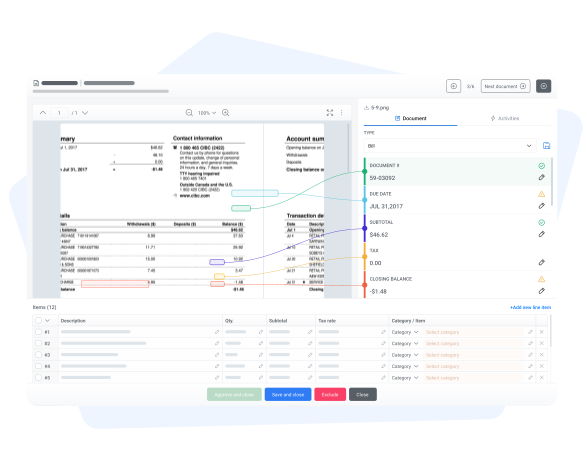
Hubdoc and Dext are document capture tools that help collect, extract, and sync bookkeeping documents. Booke AI belongs in the comparison when the buyer needs OCR AI connected to bank feed categorization, document matching, reconciliation prep, and client questions.
Use Booke AI when extraction needs to become booked work
Hubdoc and Dext help with document intake. Booke AI adds the next step: matching, categorization, and review.
- Turn OCR output into matched transactions
- Connect receipt and invoice data to QBO/Xero workflows
- Ask clients for missing context from the same workflow
Capture documents or finish the bookkeeping workflow?
This page should support the OCR AI money page. The conversion angle is not that Hubdoc or Dext are bad; it is that extraction alone does not finish the books.
Document collection and sync
Hubdoc focuses on collecting financial documents, extracting key bill and receipt data, and syncing documents into QuickBooks Online or Xero.
- Strong fit for getting paperwork into one place
- Useful for receipt, bill, and document capture
- Connects with QuickBooks Online and Xero workflows
- Best when the main pain is document intake
Document capture and pre-accounting
Dext is a mature option for receipt and invoice extraction, supplier document workflows, and publishing prepared data into accounting software.
- Strong fit for document-heavy accounting firms
- Receipt and invoice extraction is a core strength
- Practice and business pricing paths
- Bookkeeping review still depends on the downstream workflow
 Recommended
OCR AI plus AI Bookkeeper
Booke AI connects OCR to the rest of the bookkeeping job: normalize document data, match it to transactions, categorize bank feeds, prep reconciliation, and ask clients for missing context.
- Invoice and receipt OCR AI
- Line-item categorization and tax handling
- Document matching inside QBO and Xero
- AI Bookkeeper routes exceptions to humans
Hubdoc vs Dext vs Booke AI comparison table
Use this table to decide whether the buyer needs document intake, stronger extraction, or OCR connected to the full bookkeeping workflow.
If Hubdoc or Dext is on your shortlist, define where the workflow stops
Document capture is valuable, but the buyer needs to know whether they also need matching, categorization, and reconciliation prep.
Need document intake only?
If the team only needs collection and extraction, Hubdoc or Dext may cover the core requirement.
Check HubdocNeed OCR to feed bookkeeping?
If extracted documents still require manual matching and categorization, Booke AI is the stronger workflow comparison.
See OCR AINeed the full bookkeeping path?
Compare how document capture connects to bank feed work, reconciliation prep, and exception review.
See AI bookkeepingOCR should feed matching, categorization, and review
This comparison is designed to support OCR AI demand. Hubdoc and Dext can collect and extract documents; Booke AI's angle is what happens after extraction.
OCR AI turns receipts and invoices into structured bookkeeping data with support for tax details, languages, and currencies.
Prepared document data can move into the bookkeeping workflow instead of stopping as a file in a capture inbox.
AI Bookkeeper connects supporting documents to the right transaction inside QuickBooks Online or Xero.
When a receipt, invoice, or transaction still needs explanation, Booke AI can turn it into a client question.
Who should choose Hubdoc, Dext, or Booke AI?
Choose Hubdoc or Dext if
- The bottleneck is collecting receipts, bills, and supplier documents
- You mainly need extraction and publishing into accounting software
- Your team already has a strong downstream bookkeeping review process
Hubdoc and Dext are strongest when document intake is the job.
Choose Booke AI if
- OCR needs to connect to matching and categorization
- You want bank feed work and reconciliation prep handled in QBO/Xero
- Missing document context should become client questions, not inbox chaos
Booke AI is strongest when extraction needs to become completed bookkeeping work.
How this comparison was built
This page supports the Dext and OCR AI cluster. It uses public Hubdoc and Dext positioning for document capture, then maps the buyer's next job to Booke AI's OCR AI and AI Bookkeeper money pages.
Hubdoc vs Dext vs Booke AI FAQs
Is Booke AI a Hubdoc or Dext replacement?
Booke AI can be compared when the buyer wants OCR AI connected to matching, categorization, reconciliation prep, and client questions. Hubdoc and Dext are more document-capture-first tools.
When should I choose Hubdoc or Dext instead of Booke AI?
Choose Hubdoc or Dext if the main bottleneck is collecting and extracting bookkeeping documents and your team already has the downstream review workflow covered.
How does Booke AI use OCR after extraction?
Booke AI extracts and normalizes invoice and receipt data, then AI Bookkeeper matches documents to bank transactions, categorizes work, prepares reconciliation, and routes exceptions.
Turn document capture into finished bookkeeping work
If Hubdoc or Dext solves only the intake problem, Booke AI shows what happens next: OCR, matching, categorization, reconciliation prep, and review.

