
AI bookkeeping software for QuickBooks Online and Xero 
AI bookkeeping is a category, not one operating model
The phrase AI bookkeeping covers products and services that solve different jobs. Buyers should first decide where the books will live, who performs the work, and what still requires professional review.
A search for bookkeeping AI may surface workflow software, replacement accounting platforms, outsourced services, and document tools together, so compare the operating model before comparing feature lists.
Workflow automation inside existing books
AI bookkeeping software supports repeatable work in the accounting workflow a team already uses. This model fits buyers who want to keep their current accounting system while adding controlled automation for categorization, matching, documents, and exceptions. People continue to review judgment calls and close the books.
AI-native accounting platform
A new platform becomes the ledger and combines bookkeeping with a broader accounting product. This model can fit a team willing to migrate its books, adopt new processes, and evaluate the entire accounting stack rather than add software to an existing QBO or Xero workflow.
Managed bookkeeping service
A provider combines software with a bookkeeping or finance team. The buyer is purchasing an ongoing service relationship, defined responsibilities, and a level of operational coverage, not only software that an internal team controls.
Document capture and pre-accounting
OCR and intake tools collect documents or extract data from invoices, bills, and receipts. They can reduce data entry, but another workflow still has to match the evidence, determine the accounting treatment, apply it to the books, and review exceptions.
Booke AI belongs in the first model. QuickBooks Online or Xero remains the accounting system of record, and AI Bookkeeper works with the bank feeds already connected there. The firm provisions it as a user, while people retain final review and close responsibility. Each client has an isolated AI Brain, and client data is protected with encryption.
Choose the Booke AI path that matches your decision
QuickBooks Online
Review the QBO-specific scope for eligible bank-feed categorization, matching, reconciliation preparation, and exception review. Use this path when you need to understand what AI Bookkeeper can do without treating QBO reconciliation as universally automatic.
See the QuickBooks Online workflowXero
Review the Xero-specific scope for eligible categorization, matching, supported reconciliation actions for eligible configured cases, and exception review. Use this path to assess the Xero workflow on its own supported terms.
See the Xero workflowImplementation and rollout
See the inputs, processing boundaries, review policy, platform differences, and operating-model trade-offs involved in deploying bookkeeping automation inside existing books.
Explore bookkeeping automationProduct and service comparison
Compare native workflow software, AI-native ledgers, managed bookkeeping services, and document-capture products using a consistent framework based on system ownership, responsibilities, review requirements, and scope.
Compare AI bookkeeping optionsHow Booke AI works inside an existing bookkeeping workflow
Build client-file context
- Use up to two years of available chart-of-accounts, vendor, transaction, document, and confirmed-correction history, depending on the platform and configuration.
- Keep historical evidence and client-specific learning associated with the relevant business through its isolated AI Brain.
- Treat limited or inconsistent history as a reason for additional review, not as a reason to invent certainty.
Keep the accounting system in place
- Work with the selected QuickBooks Online or Xero organization and the bank feeds already connected to it.
- Run through a Booke-managed hosted virtual browser after the firm provisions AI Bookkeeper as a user, with nothing running on the customer's computer.
- Keep QuickBooks Online or Xero as the system used to maintain, review, and close the books.
Process eligible bank-feed work
- Categorize supported recurring transactions using available bookkeeping context, account settings, and confirmed historical patterns.
- In QBO, support eligible categorization, matching, reconciliation preparation, and exception review.
- In Xero, support eligible categorization, matching, configured reconciliation actions, and exception review while leaving unsupported or uncertain cases open.
Match transactions and supporting documents
- Use available invoices, bills, receipts, payments, and accounting records as evidence when matching bank-feed activity.
- Keep document capture, matching, accounting treatment, and approval as distinct parts of a controlled workflow.
- Route partial, split, duplicate, foreign-currency, or otherwise unresolved cases to people when the supported path cannot resolve them.
Route exceptions to people
- Surface low-confidence, missing-document, unusual, and policy-sensitive items instead of treating them as automatically complete.
- Keep questions, approvals, corrections, decision rationale, and supporting historical transactions connected to the bookkeeping context where configured.
- Leave accounting judgment, policy decisions, final review, delivery, and close responsibility with the accounting team.
Improve from confirmed corrections
- Use approved corrections, direct changes in the books, and confirmed client history as evidence for future work in that client file.
- Keep learning client-specific rather than blending one client's bookkeeping patterns with another client's activity.
- Improve how similar work is handled over time without presenting a confidence score or historical pattern as an accuracy guarantee.
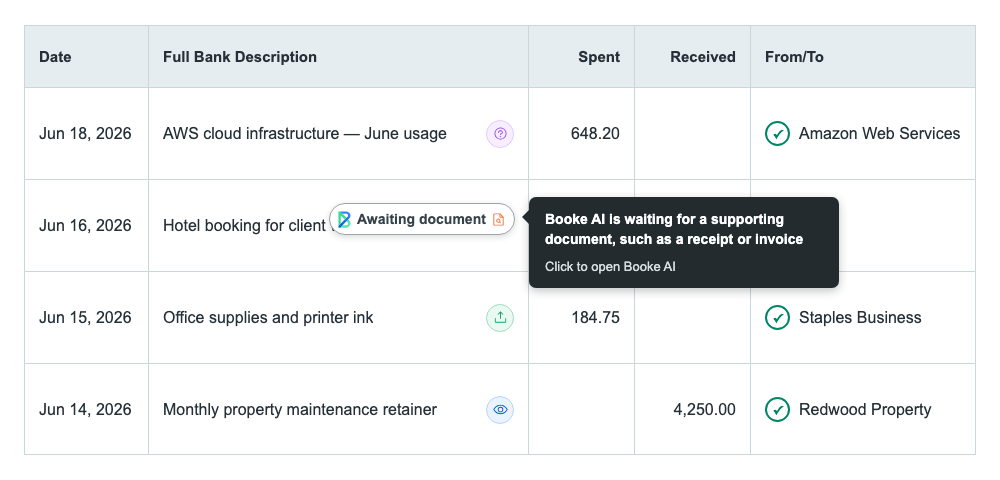
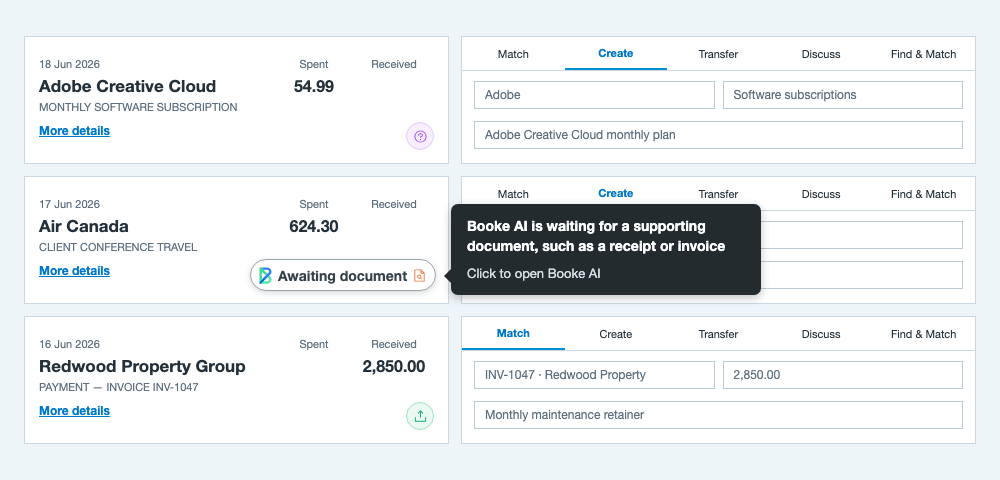
Review AI Bookkeeper status by platform
- See the status displayed for supported bank-feed items.
- Read the explanation associated with each displayed state.
- Open the related transaction detail in Booke AI.
What AI bookkeeping can automate — and what still needs judgment
Booke AI is designed to replace up to 80% of repetitive manual bank-feed work. Actual coverage depends on client history, transaction complexity, document availability, platform configuration, and accounting policy. The operating boundary should be clear before a team relies on any result.
Eligible repeatable work
- Transaction categorization within the verified supported scope
- Matching available accounting records and supporting documents
- Missing-document and exception routing when configured
- QBO reconciliation preparation and supported Xero reconciliation actions
Human review and control
- Low-confidence, unusual, and policy-sensitive decisions
- Incomplete documents and complex or unsupported payment structures
- Closed-period, tax, audit, and client-policy judgments
- Final review, delivery, and close responsibility
The sound promise is that repeatable work can be handled within a defined scope while unresolved work remains visible to people. AI bookkeeping does not remove every accounting decision, make missing evidence irrelevant, or transfer professional responsibility to software.
Who Booke AI is a strong fit for
Accounting and bookkeeping firms
Booke AI fits firms managing recurring QBO or Xero bank-feed work across multiple client files. It is especially relevant when staff repeatedly categorize transactions, match documents, prepare work for reconciliation, and follow up on exceptions. Each client retains separate learning context, while the firm keeps control of access, review policies, corrections, and final delivery.
Businesses with a bookkeeping owner
For buyers evaluating AI bookkeeping for small business, company size alone is not the deciding factor. A strong fit is a business that already maintains its books in QBO or Xero, has recurring bank-feed activity and supporting documents, and can assign a person to review exceptions and final outputs. The software adds processing capacity without requiring a replacement ledger.
Consider another model when
Consider another model if the actual requirement is a new accounting platform, a fully outsourced finance team, an unsupported ledger, or someone to assume tax or audit responsibility. Booke AI is also a poor fit when no reviewer is available, the books provide little reliable context, or the buyer expects every transaction to be completed without evidence or judgment.
AI bookkeeping FAQs
What is AI bookkeeping?
AI bookkeeping uses software, accounting data, rules, and AI models to reduce repeatable bookkeeping work. It may include transaction categorization, document matching, reconciliation workflows, and exception routing. A controlled implementation still defines which work is eligible, what evidence is required, how uncertainty is handled, and who reviews the final books.
What is an AI bookkeeper?
An AI bookkeeper is software that handles supported parts of a bookkeeping workflow. The term is a product description, not a professional license or a guarantee that all accounting work is autonomous. Booke AI performs eligible actions inside QBO and Xero, rather than stopping at suggestions, while people remain responsible for exceptions and final review.
How is ChatGPT different from AI bookkeeping software?
General-purpose ChatGPT responds to prompts but does not own or answer for the books. See what it can do, where it stops, and how connected tools differ.
Check ChatGPT bookkeeping boundariesDoes AI bookkeeping replace an accountant or bookkeeper?
AI can reduce repeatable processing, but it does not remove the need for professional judgment. People still own exceptions, accounting policies, tax and audit decisions, ambiguous client context, closed-period questions, and final review. Evaluate each product according to its verified software or service responsibilities instead of assuming that the word AI transfers accountability.
Does AI bookkeeping replace your accounting system?
Not necessarily. Some AI-native platforms become the new ledger, while workflow software operates inside an existing accounting system. Booke AI follows the second model. QuickBooks Online or Xero remains the system of record, and the team continues to maintain, review, and close the books there.
Does Booke AI require a new bank connection?
No duplicate bank connection is required. AI Bookkeeper works with the bank feeds already connected to QuickBooks Online or Xero. The firm provisions it as a user with the permissions required for selected books. Exact onboarding and access requirements depend on the platform, account, and current configuration.
What happens when Booke AI is unsure?
Low-confidence, unusual, missing-document, and policy-sensitive cases remain available for review or clarification instead of being treated as complete. AI Bookkeeper can show relevant context and decision rationale, while exact routing depends on account configuration. Confirmed corrections can then become client-specific evidence for similar future work.
Which platforms does AI bookkeeping support?
Platform support depends on the product. Booke AI supports QuickBooks Online and Xero, but their reconciliation scope is different. QBO is described using reconciliation preparation. Xero can include supported reconciliation actions for eligible configured cases. Both workflows retain human review for exceptions and final close.
Review the QBO and Xero implementation detailsHow much does AI bookkeeping cost?
Booke AI Business is $129/business/month as listed for the US. Pricing is per business. Accounting firms are priced by request, with white-label available. Other regions and current plans are on the pricing page.
Review current Booke AI pricingNeed the implementation details?
See the bookkeeping automation guide for rollout requirements, QBO and Xero workflow differences, processing boundaries, fit and non-fit, and operating-model trade-offs. It covers implementation questions without changing the category distinctions explained here.
Explore bookkeeping automation softwareMore on AI bookkeeping

