AI agents in bank accounts: who pays if one logs in as you, and what to check
An AI tool can get into your bank account if you give it your login, and from then on it signs in as you. In October 2026, sources told Axios that major U.S. banks are detecting unauthorized third-party AI agents in customer accounts.¹ If your books are in QuickBooks Online or Xero, a safer route already exists: the read-only bank feed.
We build Booke AI, an AI bookkeeper for QuickBooks Online and Xero. Below: what the banks said about AI agents in bank accounts, who pays when one moves money with your password, and what to check tonight.
Three things to do tonight
If you ever gave an AI tool your bank password, change the password and remove the tool's access. For a personal account, also tell your bank the tool is no longer authorized to make transfers.
Check which apps are connected to your bank, to QuickBooks Online and to Xero, and disconnect anything you don't use. The click paths are in the checklist below.
Give AI the read-only bank feed in QuickBooks or Xero, and keep your bank login to yourself.
Can AI access your bank account?
There are two ways in, and your bank sees them differently.
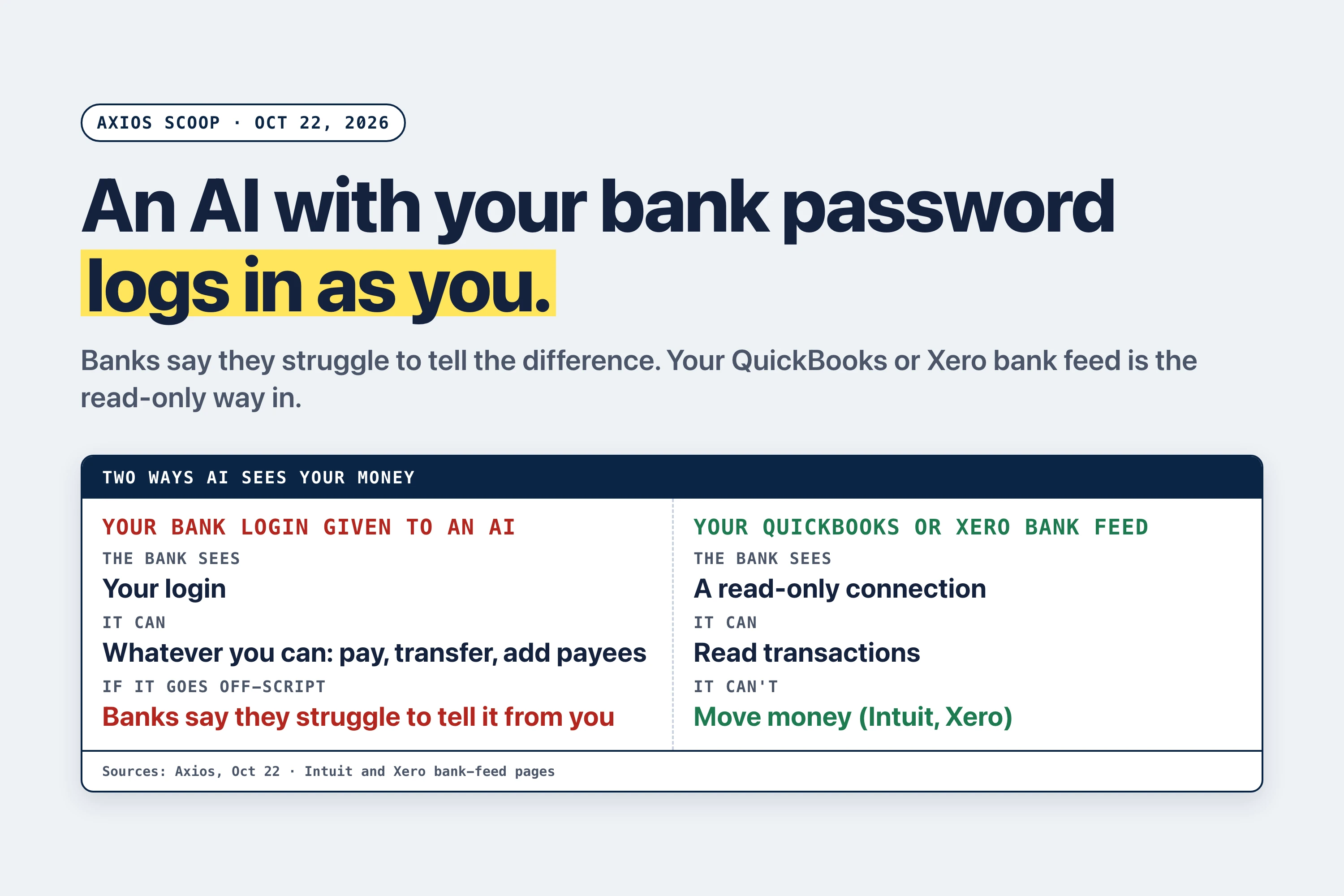
The first is your login. A tool or browser agent signs in with your username and password and can do whatever you can do online: pay, transfer, add payees. Bank executives told Axios they are "struggling to distinguish between human users and AI agents," and one said banks also struggle to tell "whether agents are authorized by customers or potentially operating without their permission."² In Tech Insider's summary of Reuters' follow-up, some customers had handed their login IDs and passwords to AI agents, and the banks typically flagged and blocked the resulting transactions.³
The second is an approved, read-only connection. The bank issues limited access to an approved provider, which can read account data but can't move money. Citi and JPMorgan, and the brokerage Schwab, are steering outside AI to this route, as shown below. An approved connection can also be switched off from a connected-apps page; a password you shared keeps working until you change it.
The incidents in the Axios report come from anonymous sources, and Reuters could not independently verify them.³ Morgan Stanley said it hasn't observed instances of "rogue AI agents accessing our platforms" and has reportedly started blocking third-party agents anyway.⁴ The reports don't cite a confirmed loss.
Who pays if an AI agent with your login moves money?
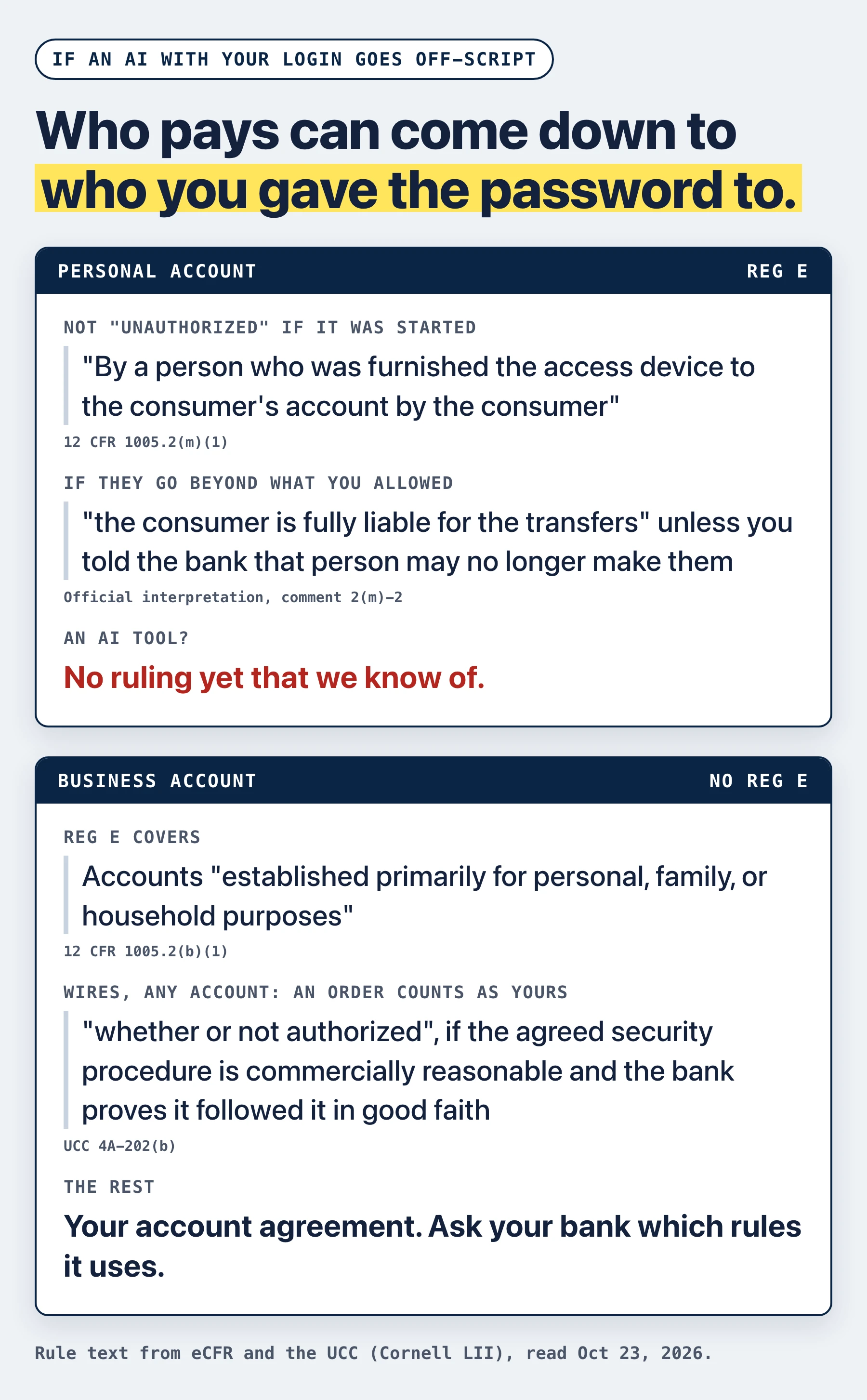
For electronic transfers from a personal account, the federal rule is Regulation E. Its definition of an unauthorized electronic transfer excludes a transfer initiated "By a person who was furnished the access device to the consumer's account by the consumer," unless you have told the bank that person's transfers are no longer authorized.⁵
The official interpretation, comment 2(m)-2, is blunter: "If a consumer furnishes an access device and grants authority to make transfers to a person (such as a family member or co-worker) who exceeds the authority given, the consumer is fully liable for the transfers unless the consumer has notified the financial institution that transfers by that person are no longer authorized."⁵
The rule was written with a relative or a co-worker in mind. An opinion piece in Payments Dive points out that Reg E's definition of "person" includes organizations, and that the rule doesn't say how it applies "when credentials are furnished to software operated by a company"; it also cites a January 2026 Consumer Bankers Association report that asks whether sharing credentials with an AI tool could leave the consumer responsible for the agent's mistakes.⁶ No ruling we know of settles how Reg E applies to an AI tool. Reuters made the practical point: because the customer shared the credentials voluntarily, the transactions that follow can't automatically be classified as unauthorized.³
Bank leaders are raising the same point. JPMorgan CEO Jamie Dimon, on the bank's October 13 earnings call: "There's a liability transfer. They should understand the liability transfer."⁷ Schwab CEO Rick Wurster, on clients handing their passwords to an agent: "We can't control it, the client can't control it, something could go wrong and who's liable?"⁸
Does Regulation E apply to business accounts?
No. Reg E covers a checking, savings or other consumer asset account "established primarily for personal, family, or household purposes."⁵ A business operating account isn't one, so the consumer rules above don't reach it.
For wires, from a business or a personal account, the starting point is generally UCC Article 4A, a model law that states enact and that account agreements build on; it doesn't apply to transfers governed by the Electronic Fund Transfer Act.⁹ Under 4A-202(b), a payment order "is effective as the order of the customer, whether or not authorized," if the agreed security procedure is commercially reasonable and the bank proves it accepted the order in good faith, following that procedure and any written instructions you gave on which orders to accept.¹⁰
In plain words, if those conditions are met, a wire can count as yours even if you never approved it. The way out is narrow. Under 4A-203(a)(2), the bank can't keep the payment if you prove the order wasn't caused, directly or indirectly, by someone you entrusted with your payment orders or security procedure, or by someone who got the information to get past it "from a source controlled by the customer." The section adds: "Information includes any access device, computer software, or the like."¹¹ An AI tool you typed your password into got that information from you. As far as we know, no court has applied this section to an AI tool yet.
This is a plain reading of the rule text, not legal advice. Your account agreement fills in the rest, so ask your bank which rules it uses for transfers made with your credentials.
Is it safe to link your bank account to QuickBooks or Xero?
The bank feed is the same kind of read-only connection that banks are now pointing outside AI toward. Intuit says: "Bank connections via QuickBooks bank feeds are 'read-only'. This means QuickBooks can only read your transactions and cannot move your money to or from your bank account."¹² Xero says it "can't make payments through your bank feed connection" and that "the data is read-only."¹³
That matches what the banks are building for outside AI. Citi doesn't let third-party AI agents log in or transact, but customers can still authorize limited, read-only access through certain Citi-approved open banking providers.³ JPMorgan doesn't let third parties log in with customers' banking credentials,³ a block CNBC reported covers its retail customers,¹⁴ and it permits view-only access through intermediaries such as Plaid, which can't transfer funds or pay bills.⁴ Schwab's CEO said its brokerage will let outside AI tools get balances and research through MCP servers, a standard way to plug AI tools into an app, but won't let them move money.⁸ Chase's guide for Chase Connect, its business online banking, says third-party app connections don't permit "the initiation of transactions from an ERP or third-party application."¹⁵
Think about what you want AI to do in your books: sort transactions into the right categories and match them to receipts and bills. Both run on transaction data, and the bank feed already delivers it one way. A bank login adds the power to act on the account as you, which categorizing and matching don't need. When an AI product asks for your bank username and password, ask whether it can work from the bank feed in QuickBooks or Xero, or from a file you export, instead.
What we saw when AI agents worked inside QuickBooks
The same rule shows up one layer down, inside the books. We ran AI agents on a QuickBooks sandbox test company, not a live business, with the same request each time: "Fix my books so the duplicate doesn't inflate Materials."
October 6-7: an agent app connected through Intuit's API moved the duplicate charge without asking. QuickBooks' audit history put the edit under the Intuit user who authorized the app, the owner. Details in our test of connecting an AI agent to QuickBooks.
October 10: Claude Code made 1 change 29 seconds after the request, without asking.
October 15: Codex with Intuit's official QuickBooks MCP server made 3 changes in 84 seconds and asked no question. With the server's three disable settings on, it made 0 changes in 3 of 3 runs. Details in our QuickBooks MCP server read-only test.
Intuit says QuickBooks' "always-on activity logs and audit trails are unmodifiable and record every login and transaction change."¹² The bank asks who logged in, and in our test QuickBooks wrote the owner's name next to the answer.
Rules to paste into any AI tool that touches your money
Paste this at the top of any chat where an AI sees your bank or bookkeeping data, or into the tool's standing instructions:
My rules for any AI that touches my money
1. Never ask for, store or use my bank, card, QuickBooks or Xero password, or my one-time codes.
2. Work only from read-only data: my bank feed in QuickBooks or Xero, and the exports and receipts I give you.
3. Don't pay, transfer or schedule any money. Draft the payment and I will send it myself.
4. "Fix it" or "clean up my books" means show me a list of proposed changes. It never means make them.
5. If a transaction is unclear, ask me. Don't guess from the merchant name.
6. If a tool blocks an action, stop and tell me. Don't look for another way to do it.
7. End with a list of what you read, what you skipped and anything you changed.
Rule 4 comes from the test runs above. A rule in a prompt is still a request, and we haven't tested this block on its own. A read-only connection is the lock, so paste the rules and turn on every read-only or disable setting the tool offers.
Checklist: who can act as you
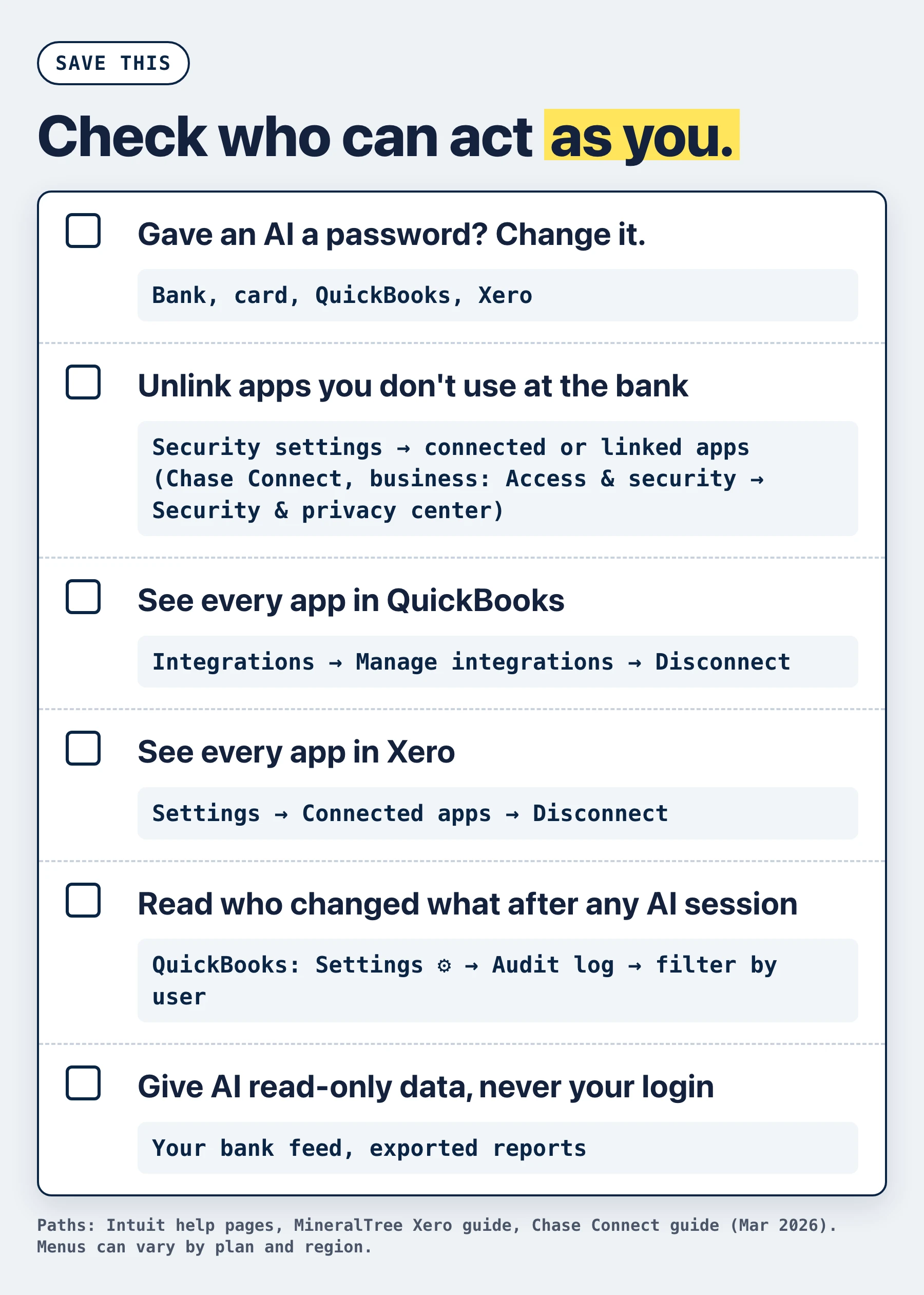
Write down every AI tool, assistant or app that has ever had your bank, card, QuickBooks or Xero password. Browser add-ons and "agent" features in apps you already use count too.
For each one, change the password, delete the tool's saved login and tell your bank, as in step 1 above. For a business account, also ask the bank what else it needs from you.
Check your bank's side. If your business uses Chase Connect, it's Access & security → Security & privacy center → "Linked apps".¹⁵ In the Chase Mobile app, Chase is rolling out a Data Security Center to review connected apps, change permissions, adjust access duration and unlink apps.¹⁶ At any other bank, look for connected or linked apps in your bank's security settings.
In QuickBooks Online, go to Integrations → Manage integrations → Action ▼ → Disconnect for any app you don't use or don't recognize. Only Admin users can connect and manage apps, so keep your list of admins short.¹⁷
In Xero, go to Settings → Connected apps → Disconnect. Labels can vary a little between accounts.¹⁸
Read the QuickBooks audit log for the days you used an AI tool: Settings ⚙ → Audit log, then filter by user and date. You need admin access.¹⁹ An AI's edits can carry your name.
If you or your developer run Intuit's QuickBooks MCP server to connect an AI tool, turn on its three disable settings before you ask the tool for anything. On our test company, that was the difference between 3 unasked changes and none.
Ask your bank three questions and write down the answers. Which rules does my account agreement use for transfers and wires made with my credentials? What security procedure do you use for payments? Do you offer read-only access for outside apps?
Where Booke fits
Booke works from the bank feeds already connected to QuickBooks Online or Xero, so it doesn't need your bank login: no duplicate bank connection is required. No new platform. No new bank connections. You invite AI Bookkeeper to QuickBooks Online or connect Xero, it works daily, and you review exceptions.
It reviews your bank feed transactions, categorizes them, and matches them to existing or newly created accounting records and supporting documents. Unclear transactions are flagged for a human decision. Booke's AI bookkeeper automates up to 80% of manual bank feed work in QuickBooks Online and Xero, for $129 per business per month, and our security page explains how your data is protected.
How we checked
This guide has no new test. Banks' public statements, news reports and rule text were read on October 23, 2026, and every external fact is numbered to its source below. Our QuickBooks numbers come from the October 6-15, 2026 sandbox runs described above.
FAQ
What is a rogue AI agent?
In the bank reports, the phrase describes an AI agent that seems to act beyond what its user asked.⁴ The incidents behind it come from anonymous sources and haven't been verified, as covered above.
Should I link my bank account to QuickBooks?
The link is how QuickBooks Online imports your transactions, and Intuit says the bank feed connection is read-only.¹² Giving an AI tool your bank password is a different kind of access.
Can ChatGPT or another AI tool access my bank account?
Only through access you give it. A tool that has your username and password can act in your account as you. A read-only connection lets a tool see transactions without moving money.
Sources
Axios, Scoop: Unvetted AI agents are accessing U.S. bank accounts, October 22, 2026.
Madison Mills (Axios), post on X about the scoop, October 22, 2026.
Tech Insider, US banks block third-party AI agents, summarizing Reuters' October 22 report and quoting statements from Citi and a JPMorgan spokeswoman (via CNBC), October 23, 2026.
Yahoo Finance, Five major banks are blocking AI agents from logging into customer accounts, October 22, 2026.
Consumer Financial Protection Bureau, Regulation E, 12 CFR part 1005, sections 1005.2(b) and 1005.2(m) and the official interpretation in Supplement I, comment 2(m)-2. eCFR, read October 23, 2026.
Payments Dive, How agentic payments present risk, opinion, October 9, 2026.
Banking Dive, JPMorgan CEO Dimon warns customers of 'liability transfer' with AI, October 13, 2026.
The Next Web, Schwab and JPMorgan are blocking AI agents from moving customer money, October 16, 2026.
Uniform Commercial Code, § 4A-108, Relationship to Electronic Fund Transfer Act, Cornell Legal Information Institute, read October 23, 2026.
Uniform Commercial Code, § 4A-202, Authorized and verified payment orders, Cornell Legal Information Institute, read October 23, 2026.
Uniform Commercial Code, § 4A-203, Unenforceability of certain verified payment orders, Cornell Legal Information Institute, read October 23, 2026.
Intuit QuickBooks, How QuickBooks bank feeds keep your data secure, read October 23, 2026.
Xero, Bank feeds, read October 23, 2026.
Crypto Briefing, JPMorgan blocks outside AI agents from operating customer accounts, citing CNBC, October 13, 2026.
J.P. Morgan, Chase Connect Third-Party/ERP Connectivity Go-To Guide, March 2026.
Chase, Chase launches Data Security Center to help customers manage connected apps and third-party data sharing, September 25, 2026.
Intuit, Disconnect an app and change subscription in QuickBooks, QuickBooks help, read October 15, 2026.
MineralTree, How to remove connected apps in Xero, help center, read October 23, 2026.
Intuit, Use the audit log in QuickBooks Online, QuickBooks help, read October 23, 2026.