Jev AI for small business bookkeeping: we tested TypeSafe's decision model on 40 QuickBooks transactions
Jev is a new AI model from TypeSafe that picks answers instead of writing them. That makes it look like a natural fit for bookkeeping, where most of the work is small decisions made over and over. We tested it on 40 synthetic bank-feed transactions designed for a fictional small business using QuickBooks Online. It matched our answer on the account for all 40. The weak spot was deciding what should not be posted: it recommended posting a possible duplicate payment.
This article walks through that test, what other people found when they ran Jev on accounting work, and what it means if you run a small business on QuickBooks Online and want to spend less time on bookkeeping without losing track of what still needs a person.
Why we tested Jev on bookkeeping
TypeSafe launched Jev on September 15, 2026. It is a model built to choose between defined answers rather than write text, and within a week it was all over X, with demos for SEO audits, ad libraries and customer support.
Bookkeeping got its own viral moment on September 22. Finta founder Andy Wang posted that "the bookkeeping services industry is dead" after running Jev over 34 months of work that a firm had billed more than $20,000 for. By his account, Jev did a better job in 20 seconds for $0.32.
We build Booke AI, an AI bookkeeper for small businesses that keep their books in QuickBooks Online, so the question is close to home: can a model like this do small business bookkeeping, and where does it break? We ran our own test to find out.
What is Jev? TypeSafe's decision model in bookkeeping terms
Think of ChatGPT as the new hire who writes you a memo. Jev is the one who fills in multiple-choice forms, very fast, and never explains an answer. You give it the facts (a bank line, how the business coded similar transactions before, the list of accounts in its books) and a question with defined answers. It returns the answer with a probability for each option.
It has three question types, and each has an obvious bookkeeping use:
Choice: which of these accounts does this transaction belong to?
Score: how complete is the evidence, from "nothing" to "receipt, invoice and history all agree"?
Noul, a yes or no returned as a probability: does the owner need to tell us what this was?
TypeSafe publishes pricing of $0.042 per million tokens of text sent in, and the answers are free. That makes it cheap enough to ask a question about every transaction.
Which bookkeeping decisions suit a model like Jev
Most small business bookkeeping is a stack of small decisions, repeated every month:
which vendor a cryptic bank description belongs to
which account a transaction goes to, based on how the business coded it before
whether a receipt, bill or invoice is on file
which open invoice a customer payment covers
whether class, location or project fields are filled in and consistent
what to ask the owner when nobody else can know the answer
what can be posted now and what needs an accountant
These are good candidates for AI when the options are known and the evidence is on the page. Our test measured two of them: choosing the account and choosing the next step. Categorizing a monthly supplier charge that has gone to the same account for two years is easy. So is matching a customer payment to the one open invoice with the same amount.
The harder decisions look similar on the surface but need judgment or context the bank line doesn't carry: a transfer to the owner, a loan payment that needs splitting between principal and interest, a large equipment purchase that should be recorded as an asset rather than an expense, a charge that might be a duplicate. That's where our test focused.
Can Jev do bookkeeping? Our test on 40 QuickBooks transactions
The setup
We built a fictional small business: Greenline Landscaping LLC, an Austin S-corp with one owner and six field employees, books in QuickBooks Online, bank feed from a Chase business checking account. Jev got 19 accounts from the business's chart of accounts plus a "cannot tell from the evidence" option, and eight notes on how the business categorized things before, like the two-year pattern of coding SiteOne to Materials & Plants.
Then 40 bank-feed lines. About half are routine: fuel, Gusto payroll, the landscape supplier the business uses every month, insurance, software, a customer payment that matches an open invoice. The rest are the ones a bookkeeper would stop on:
a second SiteOne charge for $1,284.55 with the same vendor, amount and date as one already matched to a receipt
a $5,000 transfer to the owner's personal checking
a monthly payment on a financed tractor
an $8,950 zero-turn mower
a Stripe payout that needs its fees split out
an IRS payment memoed as the owner's personal estimated tax
Zelle, Venmo and a $12,000 wire, all with no memo
Amazon, Best Buy, Walmart, H-E-B and an ATM withdrawal, with no receipts
For each transaction Jev got two questions. Which account? And what happens next: post it (record it in the books as is), send it to an accountant for review, or ask the owner? Before the run, our team wrote down the right answer for every transaction, like an answer key for a test. We ran it once and didn't tune anything afterwards.
The results
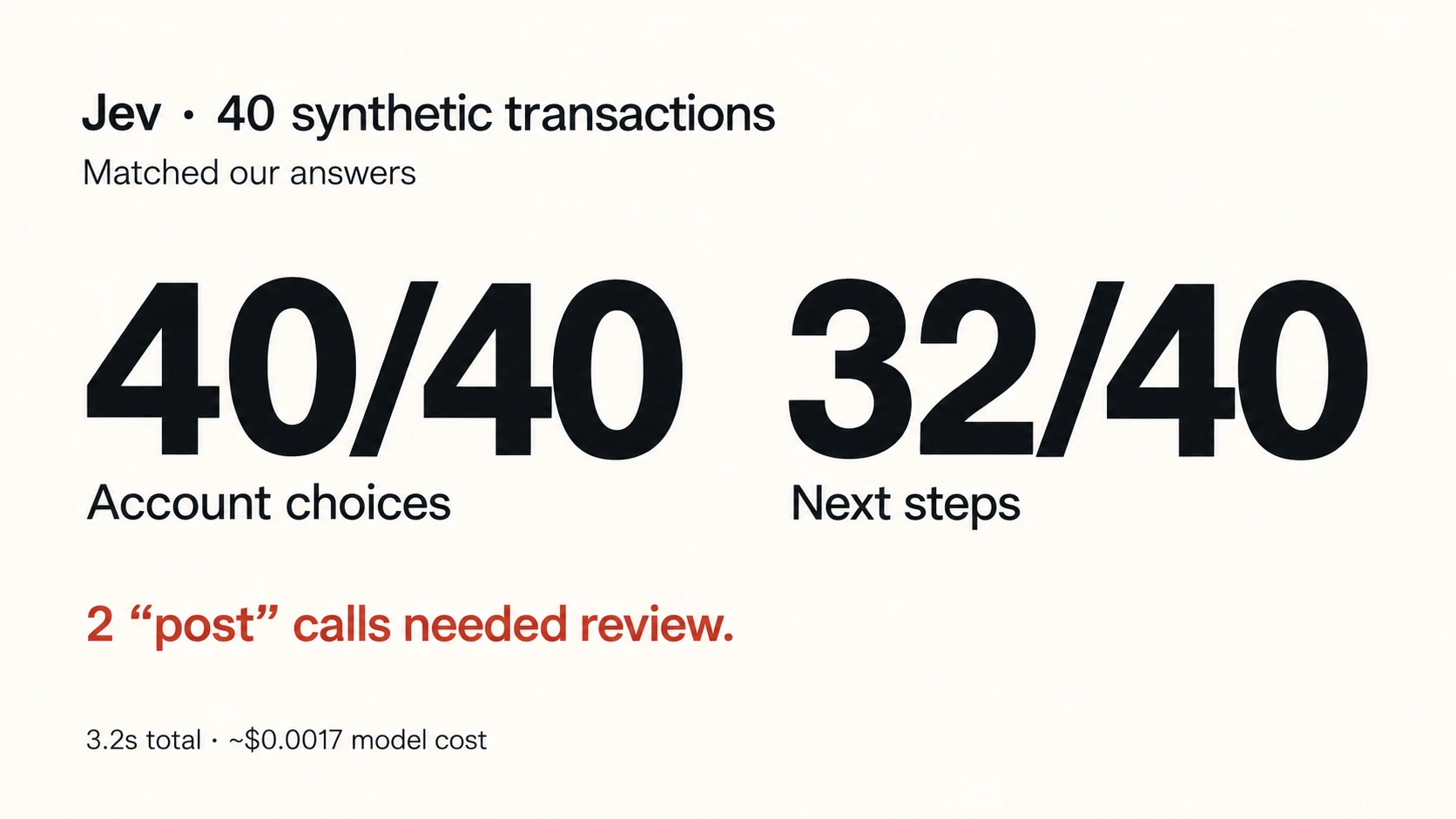
Account: 40 of 40 matched our answers (a few transactions had more than one acceptable answer), including 11 "cannot tell" answers on items only the owner could explain
Next step: 32 of 40 matched our answers
Time: 3.2 seconds for all 40, eight requests at a time
Model cost: about $0.0017 at Jev's published price
Here is every transaction, with the answer we wrote down before the run and what Jev chose:
# | Bank-feed line | Amount | Our answer: next step | Jev: next step | Jev: account | Result |
|---|---|---|---|---|---|---|
1 | SHELL OIL 57442 AUSTIN TX | −84.12 | Post | Post | Fuel | Match |
2 | EXXONMOBIL 4471 AUSTIN | −96.30 | Post | Post | Fuel | Match |
3 | GUSTO PAYROLL 091526 | −18,442.10 | Post | Post | Payroll Expenses | Match |
4 | GUSTO TAX 091526 | −5,120.44 | Post | Post | Payroll Expenses | Match |
5 | SITEONE LANDSCAPE SUPPLY #212 | −1,284.55 | Post | Post | Materials & Plants | Match |
6 | SITEONE LANDSCAPE SUPPLY #212 | −2,960.00 | Post or Ask owner | Post | Materials & Plants | Match |
7 | HOME DEPOT 6532 | −412.87 | Ask owner | Ask owner | Cannot tell | Match |
8 | AMAZON MKTPLACE PMTS | −238.19 | Ask owner | Ask owner | Cannot tell | Match |
9 | STRIPE TRANSFER ST-8812 | 7,812.40 | Accountant review | Ask owner | Landscaping Services Income | Wrong destination |
10 | CHASE CREDIT CRD AUTOPAY | −3,410.22 | Post | Post | Credit Card Payment (transfer) | Match |
11 | ZELLE TO M TORRES | −650.00 | Ask owner | Ask owner | Cannot tell | Match |
12 | VENMO *DAVIDKIM | −1,200.00 | Ask owner | Ask owner | Cannot tell | Match |
13 | ONLINE TRANSFER TO CHK ...8841 | −5,000.00 | Accountant review | Post | Owner Distributions | Said post, needed review |
14 | KUBOTA CREDIT CORP | −1,146.00 | Accountant review | Accountant review | Loan Payable / Interest | Match |
15 | SUNBELT RENTALS #0456 | −560.00 | Post | Accountant review | Equipment Rental | Extra review |
16 | AUSTIN OUTDOOR POWER | −8,950.00 | Accountant review | Accountant review | Equipment (Fixed Asset) | Match |
17 | AUSTIN OUTDOOR POWER | −189.50 | Post | Post | Small Tools & Equipment | Match |
18 | STATE FARM INSURANCE | −742.00 | Post | Ask owner | Insurance | Extra review |
19 | GOOGLE *ADS8812 | −300.00 | Post | Ask owner | Advertising & Marketing | Extra review |
20 | INTUIT *QBOOKS ONLINE | −90.00 | Post | Post | Software & Subscriptions | Match |
21 | JOBBER.COM SUBSCRIPTION | −169.00 | Post | Ask owner | Software & Subscriptions | Extra review |
22 | CHICK-FIL-A #1123 | −64.18 | Post or Ask owner | Post | Meals | Match |
23 | TEXAS COMPTROLLER SALES TAX | −1,322.75 | Post | Post | Sales Tax Payable | Match |
24 | AT&T MOBILITY | −312.44 | Post | Ask owner | Telephone & Internet | Extra review |
25 | SHERWIN-WILLIAMS #3301 | −144.20 | Ask owner | Ask owner | Cannot tell | Match |
26 | SITEONE LANDSCAPE SUPPLY #212 | −1,284.55 | Accountant review or Ask owner | Post | Materials & Plants | Said post, needed review |
27 | MOBILE DEPOSIT | 2,400.00 | Ask owner | Ask owner | Cannot tell | Match |
28 | ATM WITHDRAWAL 7-ELEVEN | −300.00 | Ask owner | Ask owner | Cannot tell | Match |
29 | BEST BUY 00012 | −1,899.99 | Ask owner | Ask owner | Cannot tell | Match |
30 | WAL-MART SUPERCENTER 1180 | −76.42 | Ask owner | Ask owner | Cannot tell | Match |
31 | TX DMV REGISTRATION | −215.00 | Post | Post | Licenses & Fees | Match |
32 | LOWES #0215 | −58.60 | Post | Post | Materials & Plants | Match |
33 | SITEONE LANDSCAPE SUPPLY REFUND | 212.00 | Post | Post | Materials & Plants | Match |
34 | MONTHLY SERVICE FEE | −15.00 | Post | Post | Bank & Merchant Fees | Match |
35 | H-E-B #452 | −187.33 | Ask owner | Ask owner | Meals | Match |
36 | IRS USATAXPYMT | −6,500.00 | Accountant review | Accountant review | Owner Distributions | Match |
37 | PAYPAL *EBAY | −420.00 | Ask owner | Ask owner | Cannot tell | Match |
38 | QBO PAYMENTS DEPOSIT | 3,150.00 | Post | Post | Landscaping Services Income | Match |
39 | O'REILLY AUTO PARTS 3321 | −134.77 | Post | Post | Vehicle Repairs & Maintenance | Match |
40 | WIRE OUT ACME HOLDINGS LLC | −12,000.00 | Ask owner or Accountant review | Ask owner | Cannot tell | Match |
Where Jev got it wrong
Five were caution. State Farm, Google Ads, Jobber and AT&T went to "ask the owner," and a Sunbelt equipment rental went to review. None of that gets posted wrong. It just adds questions for the owner and work for whoever reviews the books. One went to the wrong place: the Stripe payout went to the owner instead of to an accountant. Payouts like this land in the bank as one net amount, after fees and sometimes grouped across several customer payments, so the deposited amount may differ from any single invoice. QuickBooks' own matching help calls out fees, discounts and grouped deposits for this reason.
The other two are the ones we'd show a reviewer.
The duplicate first. Same vendor, same $1,284.55, same day, and a receipt already matched to the first charge. All of that was in the prompt. Jev picked the right account, Materials & Plants. Then it said: post it. If it really is a duplicate, posting it puts the same $1,284.55 in the books twice, with no question asked. The right call was to send it to an accountant or ask the owner. Duplicates are a familiar problem in QuickBooks Online: Intuit's help on duplicate transactions lists reconnected accounts, overlapping imports and choosing Add instead of Match as common causes.
The second was the $5,000 transfer to the owner's personal account. Jev coded it to Owner Distributions, which matched our answer, and recommended posting it. Our rule for this business sends owner transfers to an accountant first, because at an S-corp the same transfer could be an owner distribution, a shareholder loan or pay that should have gone through payroll.
How sure Jev was
Jev also says how sure it is about each answer, as a number from 0 to 1. On those two calls it was low: 0.46 for the duplicate and 0.57 for the owner transfer. Looking back at this run, a rule of "only post at 0.6 or higher" would have caught both, and it would also have sent nine correct postings to review. We picked that cutoff after seeing the results, so it needs a fresh set of cases before anyone relies on it.
The number tells you how sure the model is, not whether the books are right. Jev was 0.12 sure about a sales tax payment it sent to the right place. That makes the score useful for deciding what goes to a person, and nothing more. QuickBooks Online's own AI suggestions now come with confidence badges for the same reason.
The fine print
One fictional business, 40 made-up (synthetic) transactions, one run with no tuning, answers written by our team and not yet reviewed by a CPA. No real business data, and nothing written to a ledger. This tested Jev on its own. It shows how Jev behaved on cases we designed, not how it would do on your books. It isn't Booke's product and says nothing about Booke's accuracy or how Booke is built.
Jev in accounting: what other tests found
In the replies to his post, Andy listed what he compared against the firm's work: transaction categories, departments, amortization entries, accrual entries, uncollected invoices that needed writing off, and reconciliations (checking the books against the bank statements). Asked how Jev handled the edge cases and whether the output was audit-ready, he answered that it didn't handle them. It flagged those transactions because there wasn't enough documentation to decide with high accuracy, and he filed them under "should've asked more questions."
Charlie Barmore, a CPA, CFE and CVA, ran a more controlled test a few days earlier. He gave Jev 250 synthetic bank transactions, a simplified chart of accounts, bookkeeping rules and an evidence summary for each. Jev chose a category and decided whether an accountant should review it. It matched his answer key on both decisions for 215 of 250 (86%), in 1 minute 54 seconds, for about $0.02.
In 31 of his 35 misses, Jev sent a transaction to review when his answers said the evidence was enough. Two misses weren't flagged at all, and he wrote that those are the ones he'd want to understand before letting a workflow act without review.
Barmore's test and ours show the same two kinds of error: extra reviews, and a few items that should have been reviewed and weren't. They cost very different amounts. An extra review costs a few minutes. A posting nobody looks at can surface months later, during a reconciliation or at tax time.
Two out of forty sounds small. Do the math.
In our run, the account was the easy part: 40 of 40. The slip was in deciding what not to post: 2 of 40.
Now picture a small business with 300 bank-feed lines a month. If that rate held and the model posted on its own, that's about 15 postings a month nobody looks at, around 180 a year. It was one synthetic test, so treat those numbers as a thought experiment. The question behind them is real: who catches them?
The fifth of a cent pays only for the model call. Pulling data out of QuickBooks, writing down the right answers, reviewing and fixing mistakes all cost extra.
What this means for your small business bookkeeping bill
For a small business, the number that matters is how much of the bookkeeping work goes away, and who handles what's left.
Start with what you already pay for. QuickBooks Online now uses AI to suggest a category or a match for each bank transaction, based on your history and the transaction details, and shows confidence badges so you can tell which suggestions need a closer look. It also has bank rules that can categorize repeat transactions, and in the US Intuit offers human expert help: Smart Expert Categorization on the Plus plan and Expert Books Upkeep on Advanced. Any AI bookkeeping tool, Booke included, should be judged on the work left after those are set up.
Then compare what you'd pay against what you'd stop paying. Bookkeeping services are priced in the hundreds of dollars a month: Bookkeeper360, for example, lists monthly packages from $399, with people doing the work. A software subscription like Booke's $129 a month costs less than those packages, but the scope differs: software doesn't take responsibility for the books, and any human review you still need costs extra. The math looks like this:
Savings = what you pay now − what you'll still pay a person − the software − any other new costs.
Here's a made-up example to show the arithmetic. It isn't a real case or an offer. If a business pays a bookkeeper $400 a month and, with routine coding automated, agrees a $100 monthly review instead, then a $129 tool leaves $171 a month in savings. If the bookkeeper's fee stays at $400, the same tool adds $129 a month. And if you do the books yourself, the gain is your time, which is real but isn't cash.
How to use Jev for bookkeeping: 7 workflows to test
Our run tested two decisions: the account and the next step. Here are seven small business bookkeeping jobs we'd test, in the order we'd try them. Start with the one that eats the most of your month.
1. Clean the bank description and find the payee
"SQ *GRNLN 4471 AUSTIN" means nothing to most people reading a bank feed. Ask which existing vendor this is, and allow "none of them." The "none" answers go to a person.
2. Suggest the account from your own history
Give the model your chart of accounts and how the business coded the same vendor before, and make "cannot tell" a valid answer. In our run Jev used it 11 times, on the items only the owner could explain. This is the job AI auto-categorization is built around: learning a business's patterns and leaving uncertain items for review. If your accounts need tidying first, our guide to business expense categories is a good starting point.
3. Find transactions missing a receipt or bill
Ask whether the evidence on file meets your documentation rules. It's a yes or no, cheap enough to ask on every transaction instead of saving it for month-end or tax time.
4. Match payments to bills, invoices and receipts
Hand the model the candidates you've already found (amount, date, reference, counterparty) and ask which one matches, or whether two look plausible. Two plausible matches go to a person, and so do partial payments, payouts that arrive with fees already taken out, and splits. Matching done well also makes the monthly bank reconciliation faster, because fewer items are left unexplained.
5. Check class, location and project
These are the tags some businesses use in QuickBooks to track jobs, locations or departments. If you track them, ask whether an assignment is missing or doesn't fit the vendor's usual pattern.
6. Turn a gap into one specific question for the owner
First the decision: does the owner need to tell us what this was? Then a separate step writes the question with the transaction attached. "For the $412.87 Home Depot purchase, were these job materials or tools? Please attach the receipt." is a question an owner can answer from their phone, without knowing any accounting.
7. Keep a short list of what still needs a person
Sort everything into postable, missing documents, needs an accountant, and needs the owner, each with the evidence and the reason attached. Pick the cutoff, how sure the model has to be before it acts on its own, on one set of transactions, then check it on a fresh set before it decides anything.
How to test Jev on your own books
This is the version we'd run before trusting any AI with a business's books, including ours:
Export 50 to 100 bank-feed lines from a month you've already closed.
With your bookkeeper or accountant, write the answer before you run anything: the account, and whether each line gets posted, reviewed or needs your input.
Include the ugly ones on purpose: owner transfers, loans, equipment purchases, payouts net of fees, duplicates, transfers with no memo.
Count the silent errors separately. One item posted that should have gone to review outweighs a pile of items sent to review for nothing.
Choose your cutoff on that set, then test it on a different month before it posts anything.
After a month of corrections, run a fresh month and compare missed reviews and unnecessary reviews.
Time how long each leftover item takes, so you know what the automation really saves.
If you'd rather not build that yourself, this is what Booke does day to day in QuickBooks Online. It prepares the routine items, keeps the uncertain ones in a review list with the evidence attached, and you decide whether eligible items are approved automatically or wait for a person. See how it works with QuickBooks Online.
Where human review still matters in bookkeeping
These tests support keeping a person in the loop, and it helps to split the work by who can answer it.
Questions only the owner can answer:
what a purchase was for, when there's no receipt
who a Zelle, Venmo or wire payment went to
whether a charge was personal or for the business
Decisions for your accountant or bookkeeper:
whether an owner transfer is an owner draw, a distribution, a loan or payroll
splitting loan payments and recording big equipment purchases as assets
spotting a duplicate that looks like an ordinary repeat purchase
signing off on the month and standing behind the numbers
Andy's own replies say the hard cases were flagged, not solved. Barmore's two unflagged misses and our two "post" calls are the kind a reviewer is there to catch. For the job-market side of the same question, see will AI replace accountants, and for how businesses and firms are adopting AI, our roundup of AI in accounting statistics.
Where Booke fits
That split is what we build Booke around. Booke is an AI bookkeeper for small businesses that works inside QuickBooks Online, in the books you already use. It learns how you've categorized transactions before, cleans up bank descriptions and finds the payee, matches payments to bills, invoices and receipts, flags missing documents, and asks you short questions with the transaction attached. Anything uncertain stays visible in a review list, and your settings decide what can be approved automatically.
Booke is software, not a bookkeeping service, so the leftover decisions stay with you or your accountant. The business plan is US$129 per business per month. The Jev test in this article is separate from all of this and doesn't measure Booke.
If you run your business on QuickBooks Online, you can get started or check the pricing.
FAQ
Can Jev do bookkeeping?
Jev can make many of the small decisions inside bookkeeping, such as picking an account from a chart or deciding whether a transaction needs review, when you give it the facts and a defined set of answers. In our test it matched every account and 32 of 40 next steps. It doesn't connect to your books or post entries by itself. It answers the questions your software asks.
Can AI do bookkeeping for a small business?
AI can do much of the routine work: coding recurring transactions, matching payments to documents, flagging missing receipts and asking you short questions. It still needs a person for judgment calls such as owner transfers, loans, equipment purchases and possible duplicates, and for signing off on the books.
Do I still need a bookkeeper if I use AI?
Usually you still need someone to review the exceptions and close the month, whether that's you or a bookkeeper. What can change is how much routine work they do. You only save money if the human part of your bill shrinks. If it doesn't, a new tool is an extra cost.
Does QuickBooks Online already use AI to categorize transactions?
Yes. QuickBooks Online uses AI to suggest categories and matches from the transaction details and your history, and shows how confident it is. The features you see depend on your plan. It also has bank rules, and in the US Intuit offers human expert help: Smart Expert Categorization on Plus and Expert Books Upkeep on Advanced. Check what your plan includes before paying for another tool, and compare against the work that's left.
Does Jev work with QuickBooks Online?
Not on its own. Jev is a model you call through TypeSafe's API. You can evaluate it on transactions exported from QuickBooks Online, the way we did. Pulling transactions automatically or posting approved results back requires a separate QuickBooks integration, and a person should still review the items it isn't sure about.
How much does Jev cost?
TypeSafe publishes $0.042 per million tokens of text sent in, and the answers are free. Our 40 transactions cost about $0.0017. That covers the model call, not the data work or the review around it.
How accurate is Jev for accounting?
It depends on the evidence and the business's history. In our synthetic test, Jev matched our answer on the account for 40 of 40 transactions and on the next step for 32 of 40. In Charlie Barmore's test of 250 synthetic transactions it matched his key on both category and review decisions for 86%. Neither test used real books, so run your own before relying on a number.
Jev vs ChatGPT for bookkeeping: what's the difference?
ChatGPT writes answers in text and can explain its reasoning. Jev picks from answers you define and returns a probability for each, and TypeSafe positions it as much faster and cheaper than general-purpose models for this kind of repeated decision. It doesn't explain itself or write the question for the owner. One possible setup uses both: Jev for the decision, a writing model for the message.
Is Jev the same as a JEV in accounting?
No. In accounting, JEV usually stands for journal entry voucher, the document that supports a journal entry, often used in government accounting. Jev in this article is the AI model from TypeSafe.
Will AI replace bookkeepers?
The tests so far point to AI taking over routine coding while people keep the review, the questions and the sign-off. Our article on will AI replace accountants covers the job projections.
Sources
Charlie Barmore, CPA, test of 250 synthetic transactions, September 19, 2026
Intuit, match bank and credit card transactions in QuickBooks Online
Intuit, fix duplicate transactions in QuickBooks Online bank feeds
Intuit, how AI suggestions help match and categorize bank transactions
Booke test data: 40 synthetic transactions, one run, September 25, 2026