
QuickBooks Desktop vs Online: is Desktop going away, and what does switching cost?

QuickBooks Desktop isn't going away for people who already pay for it, but it's closed to newcomers. Intuit stopped selling Desktop Pro Plus, Premier Plus and Mac Plus to new US customers after September 30, 2024, and existing subscribers can keep renewing¹. Desktop 2024 was the last yearly version². Renewals got more expensive: from October 1, 2026, Pro Plus costs $1,351 a year for one user³.
QuickBooks Online Simple Start costs $456 a year for one user, or $399 in the first year with Intuit's intro price⁴. With one to five people in the books, QuickBooks Online now costs less than renewing Pro Plus, which allows up to 3 users, or Premier Plus, up to 5⁵. The exception is a Pro Plus or Mac Plus business with one or two users that tracks inventory. In QuickBooks Online, inventory starts on the Plus plan, at $1,680 a year⁴.
We build Booke AI, AI bookkeeping software for QuickBooks Online and Xero. Desktop renewal prices come from Intuit's notices of December 2025 and July 14, 2026, as summarized by Insightful Accountant. Everything else comes from Intuit's own pages, as of November 11, 2026.
Is QuickBooks Desktop going away?
QuickBooks Desktop is still sold and supported, with limits. What you can do depends on where you start:
You are | What Intuit lets you do |
|---|---|
New US customer wanting Pro Plus, Premier Plus or Mac Plus | Can't buy it. Sales ended September 30, 2024¹ |
Existing Pro Plus, Premier Plus or Mac Plus subscriber | Can renew, with security updates and support¹ |
Anyone wanting Desktop Enterprise | Can buy and renew, from $2,210 a year¹,⁶ |
Still on Desktop 2023 | Support ended after May 31, 2026⁷ |
After May 31, 2026, Desktop 2023 lost live support. It can't download bank transactions, run Desktop Payroll, process card payments or email forms, and it gets no security updates⁷. Subscribers get version 2024 at no extra cost as part of their plan⁷.
Is there a QuickBooks Desktop 2026?
No. Intuit says Desktop Plus 2024 and Enterprise 24.0 "were our final annual platform releases"². Subscribers now get new features through updates during the year instead of a new version.
Will QuickBooks Desktop be discontinued in 2027?
As of November 11, 2026, Intuit hasn't published an end date for Desktop 2024. Its discontinuation page, updated August 5, 2026, covers only the 2023 versions. Intuit says it will announce changes by email, inside QuickBooks or on that page⁷.
QuickBooks Desktop vs Online at a glance
The two products keep the same kind of books but run differently. Desktop runs on your computer, Online runs in a web browser and the QuickBooks app.
QuickBooks Desktop Pro Plus | QuickBooks Online | |
|---|---|---|
Can you buy it new? | No, renewals only¹ | Yes |
Price | $1,351 a year for 1 user, $270 per extra user³ | Main plans $38 to $340 a month⁴ |
Users | Up to 3⁵ | 1 to 25, by plan⁴ |
Where it runs | Your computer | Web browser and app |
New features | Updates during the year² | Added automatically⁸ |
Bank transactions | Bank Feeds | Bank transactions⁹ |
Price levels, customer groups | Yes | Not in Online⁹ |
Desktop Enterprise is the one Desktop edition still sold to new US customers. Intuit aims it at businesses with complex inventory and up to 40 users¹⁰. It starts at $2,210 a year⁶, against $1,680 for QuickBooks Online Plus, the first Online plan with inventory⁴.
What QuickBooks Desktop and Online cost in a year
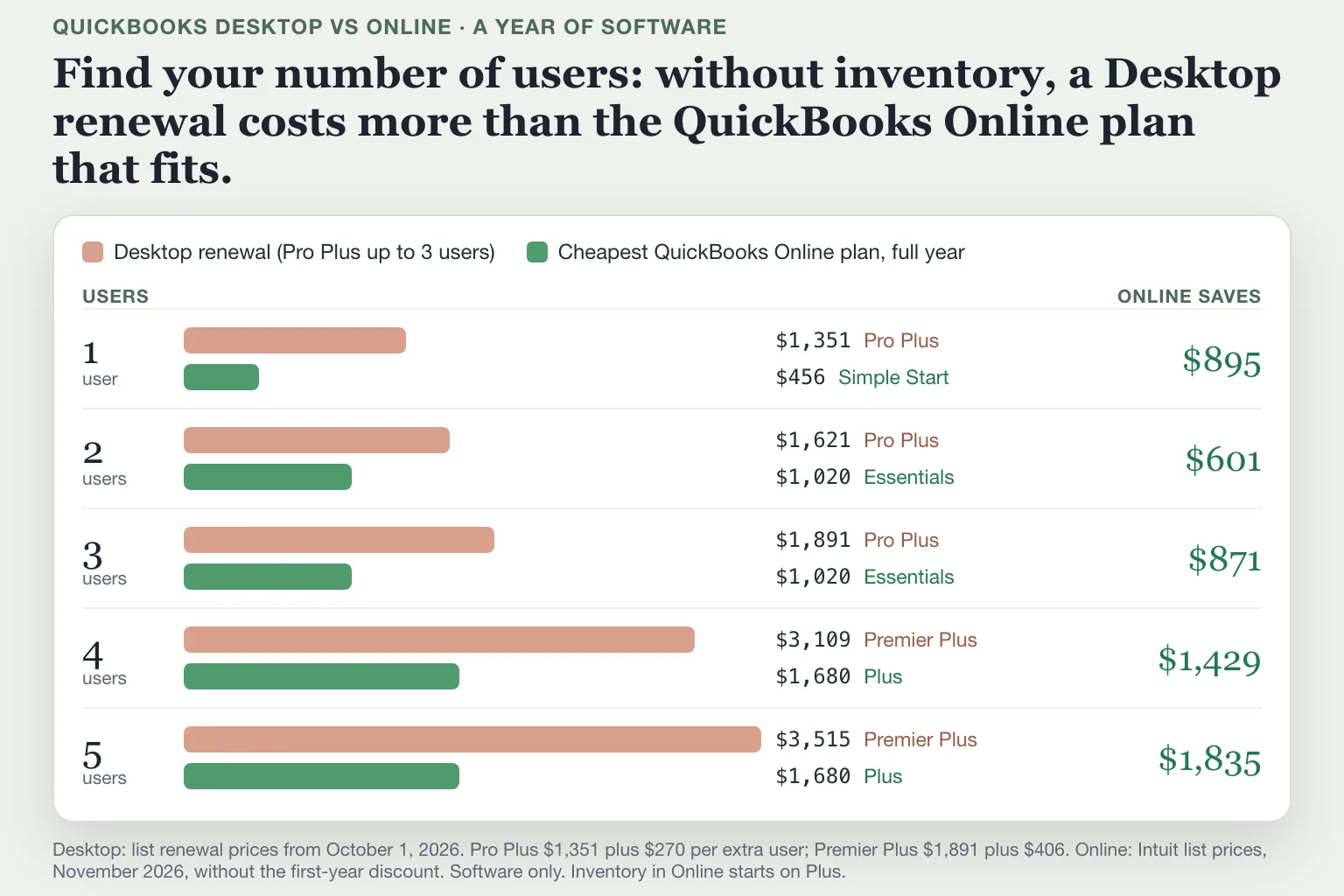
Pro Plus now renews at $1,351 a year for one user, 35% more than the $999 it cost before February 1, 2026¹¹,³. Each extra user adds $270, up to 3 users. Four or five users need Premier Plus, which renews at $1,891 plus $406 per extra user³,⁵. QuickBooks Online plans include 1, 3, 5 or 25 users⁴.
Users | Desktop renewal | Cheapest QuickBooks Online plan, full year | Online saves |
|---|---|---|---|
1 | Pro Plus, $1,351 | Simple Start, $456 | $895 |
2 | Pro Plus, $1,621 | Essentials, $1,020 | $601 |
3 | Pro Plus, $1,891 | Essentials, $1,020 | $871 |
4 | Premier Plus, $3,109 | Plus, $1,680 | $1,429 |
5 | Premier Plus, $3,515 | Plus, $1,680 | $1,835 |
Prices cover the software only, at list price; payroll is a separate subscription on both³,⁴. In the first year, Intuit's 50% off for three months brings Simple Start to $399, Essentials to $892.50 and Plus to $1,470⁴.
Inventory changes the math for small Pro Plus businesses. One or two Pro Plus users cost $1,351 or $1,621, less than QuickBooks Online Plus at $1,680, the first plan with inventory⁴. Intuit's August release post also lists Enhanced inventory as a $40-a-month add-on for Simple Start and Essentials¹². That would bring Simple Start to $936 a year, so ask Intuit what the add-on covers before you decide. Our QuickBooks pricing guide shows what each Online plan includes.
Take a small candle business with one person in the books, three bank and card accounts, an accountant and no stock tracked in QuickBooks. Simple Start covers it. Moving from Pro Plus saves $895 a year at list prices, $952 in the first year.
Stay on Desktop or switch to Online?
Staying on Desktop makes sense for now if you:
track inventory on Pro Plus or Mac Plus with one or two users;
rely on price levels or the Job Item Estimates vs Actuals report, which Online doesn't have⁹;
work where the internet is unreliable. Intuit calls Desktop Enterprise appropriate for companies with a limited internet connection².
Switching saves money in the other cases at list prices: one to three Pro Plus users without inventory, three Pro Plus users with it, and every Premier Plus renewal.
What moves when you switch to QuickBooks Online
Most of your books move: accounts and balances, customers, vendors, items, and your full transaction history⁹. Run your profit and loss and balance sheet on an accrual basis in both products and the totals match. Cash-basis reports may differ⁹.
Moves | Moves with changes | Set up again |
|---|---|---|
Chart of accounts and balances | Each account gets a detail type, the closest match⁹ | Bank and credit card connections |
Customers, vendors, transactions | Jobs become projects or sub-customers; 1099 vendors become contractors⁹ | Bank rules, including auto-recognized ones⁹ |
Attachments, with a report of what didn't⁹ | Inventory starts fresh on the move date, first in, first out⁹ | Users |
Budgets⁹ | Some sales tax moves as journal entries⁹ | Customer types and credit limits |
QuickBooks Payments account, if your Online admin is an admin on your Intuit account⁸ | Bank-feed lines you hadn't categorized |
Inventory, budgets and project profitability need QuickBooks Online Plus or Advanced⁴.
Two items need care. Bank-feed lines you haven't categorized don't move, so clear your queue in Desktop before you start⁸. Sales tax payments can land in the wrong filing period. Intuit says to delete the migrated payments and record them again in the Sales Tax Center⁹.
After the move, check your account detail types in the QuickBooks chart of accounts.
How to move from QuickBooks Desktop to Online
Intuit's migration tool does the move. You have 90 days from your QuickBooks Online sign-up to import your data, or 180 days if your accountant runs it⁸.
Buy the QuickBooks Online plan that fits before you start. If you skip this, the tool can set up a QuickBooks Online Advanced trial company⁸.
Update QuickBooks Desktop to the latest release. Press F2 and check Total Targets, Intuit's measure of file size; condense the file if it's over the limit. Then verify and rebuild your data⁸.
Save your Sales Tax Liability report, and categorize every line in Bank Feeds⁸.
If you run payroll, run it, wait 2 to 3 business days, and finish the move at least 7 business days before the next payday. Desktop Payroll moves to QuickBooks Workforce, Intuit's payroll for Online⁸.
In Desktop, open Company, then Move to QuickBooks Online. Without Desktop installed, sign in to QuickBooks Online and select Settings, then Import desktop data⁸. On a Mac, use File, then Export, then To QuickBooks Online⁸.
Choose your full transaction history, or only lists and balances for a very large file. Then choose whether to track inventory in Online⁸.
Pick the QuickBooks Online company to move into. If it already has data, the tool asks whether to replace it. Replacing can't be undone, so pick a new company if you need to keep that data⁸.
Intuit emails you when the company is online. The move takes longer for a large file⁸. You keep view-only access to your Desktop data for 12 months after you cancel Desktop⁸.
Your first month in QuickBooks Online
The first job after the move is the bank. Connect each bank and card account again; Intuit says it takes a few minutes⁹. New transactions then land in Bank transactions, the Online version of Bank Feeds, waiting for a category.
Your old bank rules don't come with you⁹. In September, the candle business had 26 bank and card lines. Nine came from regular vendors that a bank rule would file. Until you rebuild those rules, all 26 wait for you. Then reconcile your first month: our guide to reconciling in QuickBooks Online walks through it.
Where Booke fits
Your bank rules start from zero after the move, but your transaction history comes with you. Booke reads your chart of accounts, vendors and past categories, so its choices follow how your business already keeps its books. It works with the bank feeds already connected in QuickBooks Online, so you don't connect your bank again.
Every day it goes through your bank transactions, adds the ones it's sure about to your books and asks you about the rest. When you correct a line, it uses the correction the next time a similar one comes in. Booke automates up to 80% of the manual bank-feed work for $129 a month per business. See how Booke works in QuickBooks Online.
FAQ
Can you use QuickBooks Desktop and Online at the same time?
Yes. Moving copies your data to QuickBooks Online and leaves your Desktop file as it was⁸. You can keep Desktop until your first month in Online checks out; enter new transactions in only one of them. After you cancel Desktop, you can still view your Desktop data for 12 months⁸.
Is QuickBooks Desktop for Mac being discontinued?
New US customers can't buy Desktop Mac Plus, and Mac Plus 2023 lost support after May 31, 2026¹,⁷. Existing subscribers can renew, at the same price as Pro Plus³. Mac users move with File, then Export, then To QuickBooks Online, from Desktop for Mac 2020 or newer⁸.
Is it worth switching from QuickBooks Desktop to Online?
For one to three users, Online costs $601 to $895 a year less than a Pro Plus renewal at list prices. Four or five users need Premier Plus, at $3,109 or $3,515 a year, against $1,680 for Online Plus. The one case where Desktop costs less is inventory with one or two Pro Plus or Mac Plus users.
Sources
Intuit, Learn what the QuickBooks Desktop stop-sell means for your business, updated October 16, 2026.
Intuit, Understand the QuickBooks Desktop release process, updated October 19, 2026.
Insightful Accountant, Intuit Announces Desktop Pricing Changes for Fall 2026, July 14, 2026.
Intuit, QuickBooks Online plans and pricing, retrieved November 11, 2026.
Intuit, Add a user license to your QuickBooks software in QuickBooks Desktop, updated August 5, 2026.
Intuit, QuickBooks Desktop Enterprise pricing, retrieved November 11, 2026.
Intuit, QuickBooks Desktop 2023 service discontinuation policy, updated August 5, 2026.
Intuit, Move your QuickBooks Desktop company file to QuickBooks Online, updated November 5, 2026.
Intuit, Learn how features and data transfer from QuickBooks Desktop to QuickBooks Online, updated November 5, 2026.
Intuit, Explore QuickBooks Desktop solutions, retrieved November 11, 2026.
Insightful Accountant, Intuit Announces Pricing Changes for QuickBooks Desktop, December 2, 2025.
Intuit, QuickBooks Online August pricing changes and product updates, June 26, 2026.

