QuickBooks chart of accounts: how to set it up for a small business

Your QuickBooks chart of accounts is the list of every account your money is sorted into, with each account's balance¹. QuickBooks builds a starting chart from your business entity when you create the company², so setup is mostly editing: give each account the right account type, because the type decides whether it lands on the balance sheet or the profit and loss report, and keep one obvious home for each kind of spending. The detail type is a finer label and doesn't change the accounting³.
We build Booke AI, AI bookkeeping software for QuickBooks Online and Xero.
Where to find the chart of accounts in QuickBooks Online
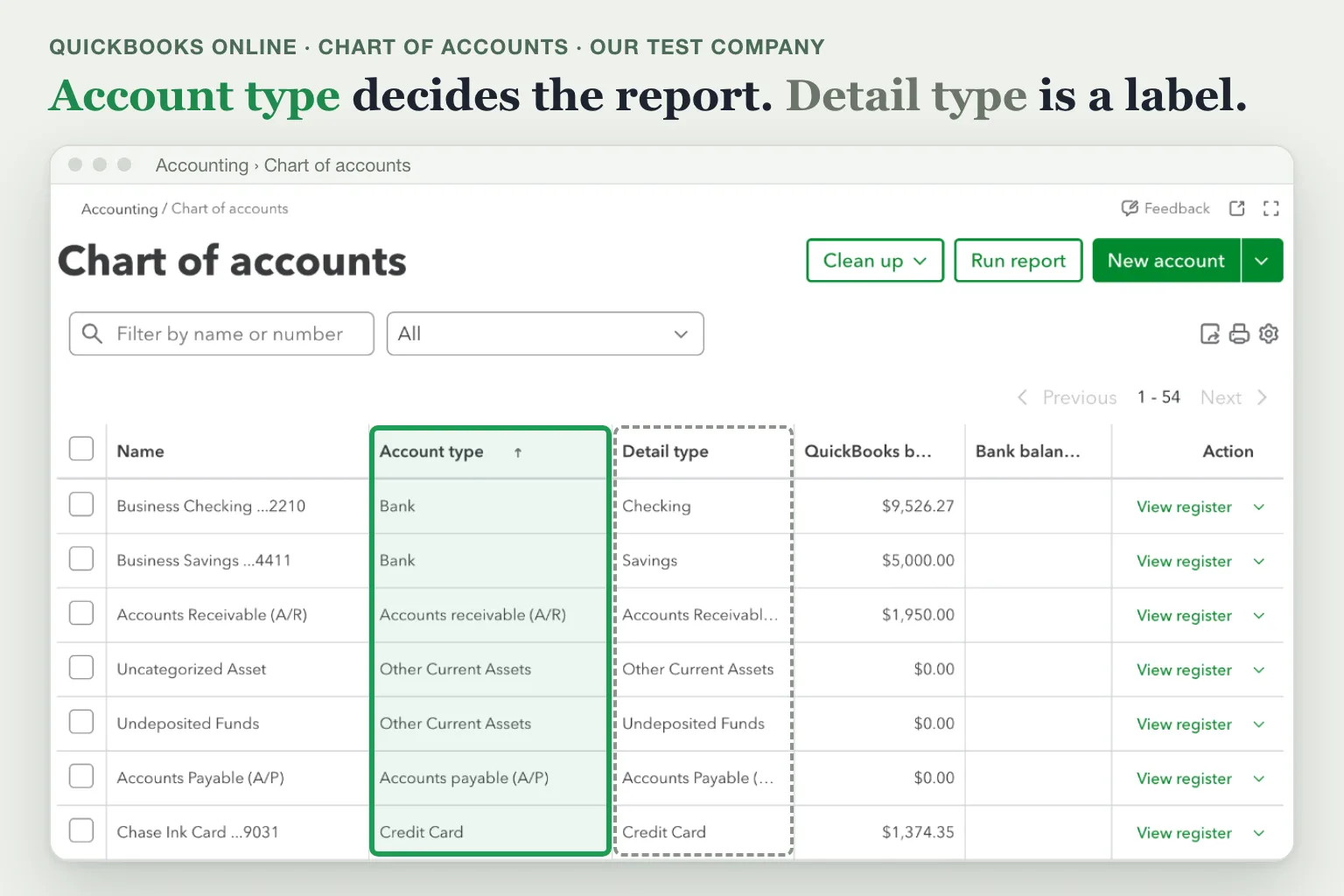
Go to All apps, then Accounting, then Chart of accounts, or select the Settings gear and then Chart of accounts⁴. Each account is listed with its name, account type, detail type, QuickBooks balance and bank balance¹.
The five main account types and where each one shows up
Every account sits under an account type, and the type decides the report. Balance sheet accounts track what the business owns and owes; profit and loss accounts track money coming in and going out³.
Group | Report | In our test company's chart |
|---|---|---|
Assets | Balance sheet | Business Checking, Business Savings, Accounts Receivable (A/R), Undeposited Funds |
Liabilities | Balance sheet | Accounts Payable (A/P), the business credit card, an SBA loan |
Equity | Balance sheet | Owner's Draw, Owner Contribution, Retained Earnings, Opening Balance Equity |
Income | Profit and loss | Sales, Wholesale Sales, Services, Interest Earned |
Expenses | Profit and loss | Materials, Advertising, Rent or Lease, Utilities |
QuickBooks splits these groups into narrower account types³; the New account panel lists 15, such as Bank, Credit Card and Cost of Goods Sold.
Inside each type, the detail type narrows the label, for example Advertising or Office Supplies under Expenses. It doesn't change the accounting or the report the account appears on³. When nothing matches exactly, pick the closest option and read its description.
Accounts QuickBooks creates for you
QuickBooks uses some accounts for its own features¹:
Accounts Receivable (A/R) and Accounts Payable (A/P), for invoices customers owe and bills you owe.
Opening Balance Equity, for the starting balances you entered.
Retained Earnings. QuickBooks moves net income into it at the start of each fiscal year.
Uncategorized Expense and Uncategorized Income, for money that still needs a category.
Undeposited Funds, also called Payments to Deposit, for payments received but not yet deposited.
Sales Tax Payable and Inventory Asset, which appear only when sales tax or inventory tracking is on, plus the payroll accounts and Reconciliation Discrepancy.
You can't make these default accounts inactive⁴. Treat Uncategorized Expense and Uncategorized Income as an inbox: on a month you've finished, both should be empty. A customer payment left in Uncategorized Income instead of matched to its invoice can count twice on an accrual report, as our cash vs accrual accounting guide shows.
A starter chart for a small business
QuickBooks gives you a starting chart; you add your bank and card accounts, loans and owner accounts, plus any cost you want to see as its own line on the profit and loss report or that your tax return asks for. Our guide to business expense categories lists the Schedule C expense lines to match your expense accounts against.
Here's a compact chart you can use as a template for a small product business, built from our test company in QuickBooks Online. Six of these accounts came with Intuit's sample accounts, and we added the other eleven (bank, card and loan names shortened):
Account | Account type | What goes there |
|---|---|---|
Business Checking | Bank | Your main business bank account |
Business Savings | Bank | Cash you set aside, such as tax money |
Accounts Receivable (A/R) | Accounts Receivable | Invoices customers haven't paid |
Undeposited Funds | Other Current Asset | Payments received but not yet deposited |
Business credit card | Credit Card | Card purchases and card payments |
Accounts Payable (A/P) | Accounts Payable | Bills you haven't paid |
SBA loan | Long Term Liability | The loan principal you still owe |
Owner's Draw | Equity | Money you take out for yourself |
Owner Contribution | Equity | Money you put into the business |
Sales | Income | Product sales |
Refunds | Income | Money returned to customers |
Materials | Cost of Goods Sold | Wax, wicks and jars that go into products |
Advertising | Expense | Ads and promotion |
Merchant Fees | Expense | Card processing fees |
Shipping & Packaging | Expense | Postage and boxes |
Software & Subscriptions | Expense | Monthly software plans |
Interest Earned | Other Income | Interest on the savings account |
Owner's Draw and Owner Contribution keep money you take out or put in off the profit and loss report; how to pay yourself from an LLC covers when to use each.
How to add an account in QuickBooks Online
Intuit's steps²:
Go to All apps, then Accounting, then Chart of accounts, and select New account.
Enter an account name.
Select an account type, then a detail type.
If it belongs under another account, check Make this a subaccount and choose the parent account.
For a Bank, Asset, Credit card, Liabilities or Equity account you set up yourself, enter an opening balance and its As of date. Skip this for a bank or card account you'll connect to online banking: QuickBooks sets the starting point when you connect it.
Add a description if you want, then select Save.
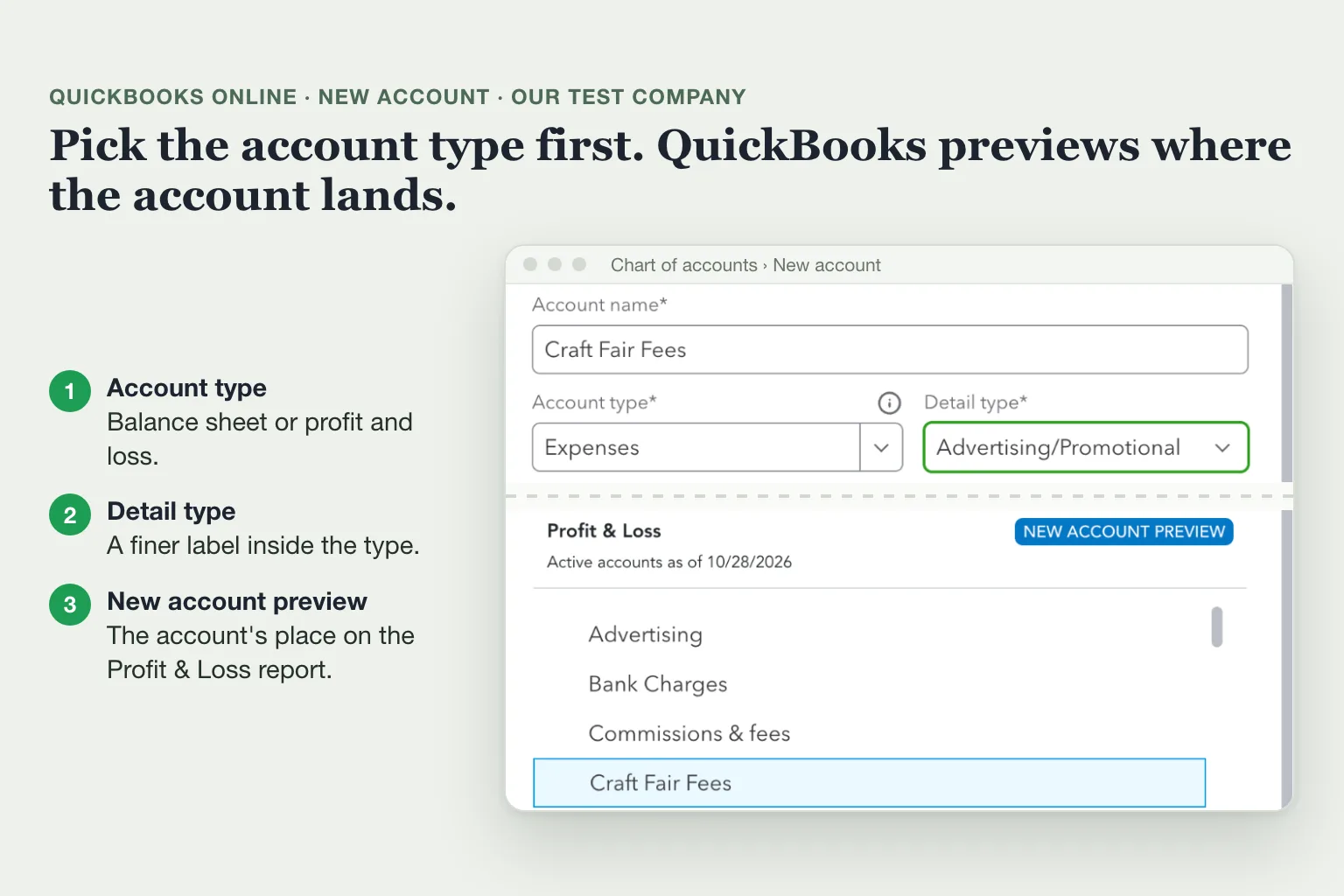
In our test company, choosing Expenses as the type opened a preview showing where the new account would sit on the Profit & Loss report.
To bring in a whole chart from a spreadsheet instead, go to Settings, then Import data, then Chart of accounts. Opening balances don't import with the accounts².
Use subaccounts when you want a total and its parts on the profit and loss report, such as Meals with Meals with clients and Travel meals under it. Then lock the parent account so it can't be picked when you post in QuickBooks¹. To set up several subaccounts at once, select Clean up, then Open chart of accounts in edit mode, and drag each account under its parent⁵.
Account numbers
Account numbers are off by default. To turn them on, go to Settings, then Account and settings, then the Advanced tab; select Edit in the Chart of accounts section, turn on Enable account numbers, and optionally Show account numbers to see them on reports and transactions⁶. To number many accounts at once, use the same edit mode; QuickBooks saves each change as you make it⁵.
Intuit recommends these ranges⁶:
Number range | Account type |
|---|---|
10000-19999 | Assets |
20000-29999 | Liabilities |
30000-39999 | Equity |
40000-49999 | Income or revenue |
50000-59999 | Job costs or cost of goods sold |
60000-69999 | Expenses or overhead costs |
70000-79999 | Other income |
80000-89999 | Other expenses |
Numbers pay off when your accountant works by number or when you want related accounts to sort together.
Clean up: make inactive, merge or lock
QuickBooks Online doesn't let you delete an account; you make it inactive or merge it into another⁴. Locking is the third option, for accounts that should stay but take no new postings¹.
Action | Use it when | What happens | Watch out for |
|---|---|---|---|
Make inactive | You've stopped using the account | Its transactions stay on your reports; you can't add new ones | If a balance sheet account still has a balance, QuickBooks posts an automatic entry that moves it to Opening Balance Equity; making it active again doesn't move the balance back |
Merge | Two accounts were created for the same thing by mistake | Past transactions move into the account you keep, and the duplicate becomes inactive; it can't be undone | Both need the same name, account type and detail type; don't merge accounts connected to online banking or accounts QuickBooks creates; if both have an opening balance, delete the newer one first |
Lock | The account should stay but get no new postings, like a parent account | Nothing moves; the account is grayed out in dropdowns, bank rules that post to it stop, and the bank feed stops predicting it | Third-party apps can still post to it |
Default accounts can't be made inactive at all. Some others need a fix first: change the account a product or service uses, invoice pending charges on an income account, unlink recurring transactions, move subaccounts to another parent, or disconnect a bank account from online banking⁴. To bring an inactive account back, select the gear in the chart of accounts, turn on Include inactive and choose Make active.
To merge a duplicate⁷:
Save the reconciliation reports for the account you'll merge away; it loses its reconciliation history, though its transactions stay reconciled.
Open the account you want to keep (Action, then Edit) and note its name, account type and detail type.
Edit the duplicate so its name and detail type match exactly.
Select Save, then Yes, merge accounts.
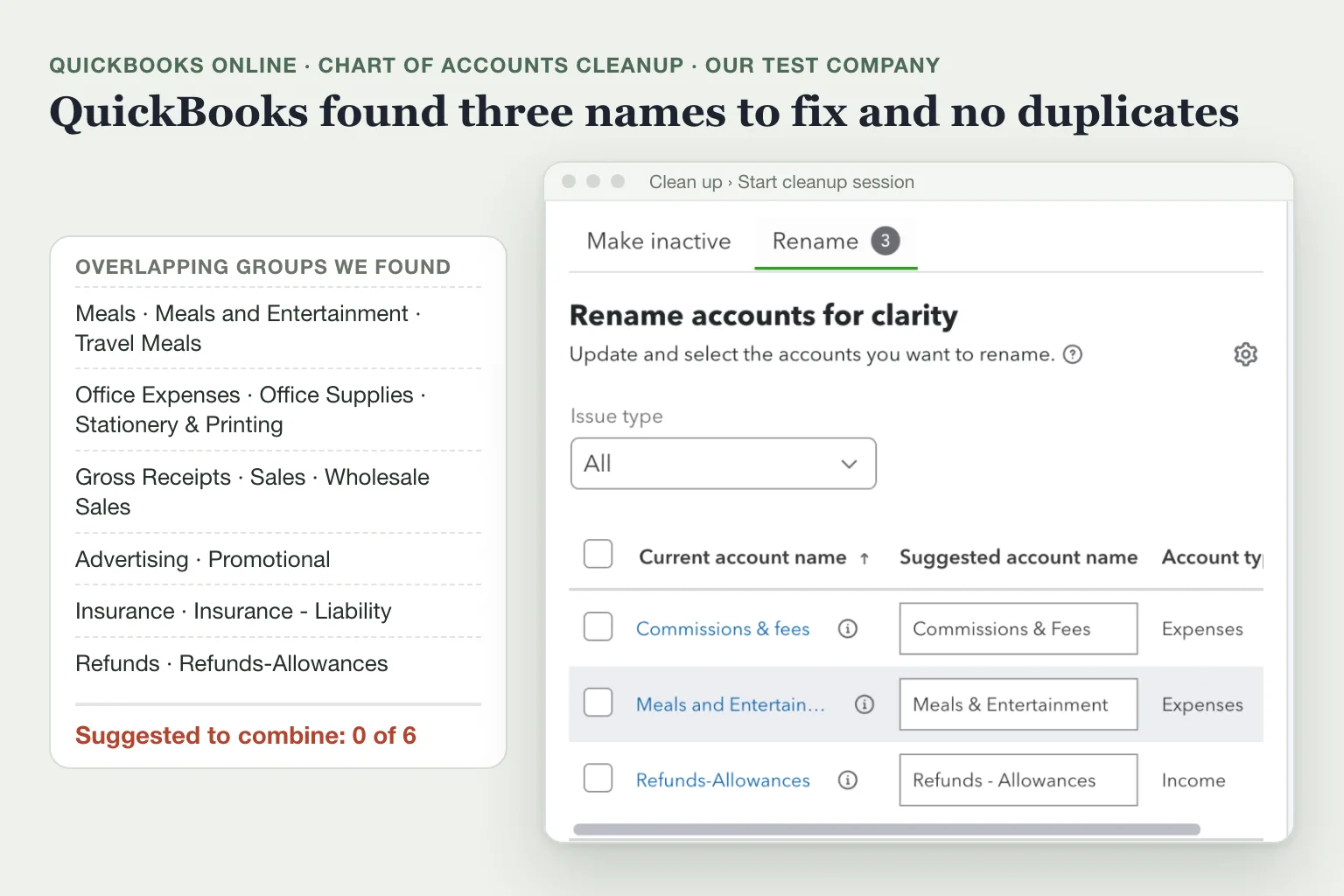
QuickBooks can also suggest fixes for you: select Clean up, then Start cleanup session. The tool can propose combining duplicate or related accounts, making accounts you haven't used in a long time inactive, fixing capitalization and spelling in names, and changing an account's type. Nothing changes until you approve a suggestion, and an approved change can't be undone. A tab appears only when QuickBooks finds something to fix, and some suggestions are only available to accountants⁵.
What a cluttered chart looks like
Our test company in QuickBooks Online is a sample candle business. It has 54 active accounts: the sample accounts Intuit provides for developer test companies, plus 15 we added in earlier tests. Six groups among them could each hold the same transaction. Five of these groups are in Intuit's sample accounts alone; our additions put a third account into three of them and created the Refunds pair.
Meals, Meals and Entertainment, Travel Meals
Office Expenses, Office Supplies, Stationery & Printing
Advertising, Promotional
Insurance, Insurance - Liability
Gross Receipts, Sales, Wholesale Sales
Refunds, Refunds-Allowances
In five of the six groups the accounts already share an account type and detail type, so merging them would only take a rename. When two accounts fit the same transaction, the money splits between them and neither profit and loss line shows the total. Intuit adds that duplicate and overlapping accounts make QuickBooks' own categorization suggestions less accurate⁵.
We ran QuickBooks' cleanup on this chart on October 28, 2026. It suggested three renames, such as Commissions & fees to Commissions & Fees, and didn't flag any of the six groups as duplicates.
Run the cleanup, then read your expense and income lists yourself. Keep one account per kind of spending or income, merge the ones created by mistake and make the rest inactive.
Where Booke fits
Your chart decides where every bank-feed line can go. Booke works inside the QuickBooks Online or Xero books you already have, with the bank feeds already connected there. It categorizes bank-feed transactions to the accounts in your chart and matches them to existing records and supporting documents, using your business's own history and corrections. Unclear transactions are flagged for your decision, and approved changes improve future QuickBooks automation. Booke automates up to 80% of manual bank-feed work for $129 per business per month. See how Booke works for small business owners.
FAQ
What are the 5 main types of accounts in a chart of accounts?
Assets, liabilities, equity, income and expenses. In QuickBooks, the first three appear on the balance sheet and the last two on the profit and loss report³.
How do I delete an account in QuickBooks Online?
You can't delete it. Make it inactive if you've stopped using it, or merge it into the account you keep if it was a duplicate. Inactive accounts and their transactions still appear on your reports⁴.
How many accounts can a QuickBooks Online chart of accounts have?
Up to 250 on Simple Start, Essentials and Plus, and unlimited on Advanced. Only active accounts count, so making unused ones inactive frees room⁸.
Sources
Intuit, Chart of accounts in QuickBooks Online, updated August 5, 2026.
Intuit, Add an account to your chart of accounts in QuickBooks Online, updated August 5, 2026.
Intuit, Account type and detail types in QuickBooks Online, updated August 5, 2026.
Intuit, Make an account inactive on your chart of accounts in QuickBooks Online, updated August 5, 2026.
Intuit, Clean up your chart of accounts in QuickBooks Online, updated October 27, 2026.
Intuit, Use account numbers in your chart of accounts, updated August 4, 2026.
Intuit, Merge duplicate accounts in your chart of accounts, updated September 1, 2026.
Intuit, Learn about usage limits, updated August 5, 2026.