
QuickBooks payroll pricing 2026: what QuickBooks Workforce costs

QuickBooks payroll is now called QuickBooks Workforce¹. It has three plans: Workforce Payroll at $50 a month, Workforce Premium at $88 and Workforce Elite at $134, plus $7, $13 or $17 for each employee². With three employees, Workforce Payroll costs $71 a month, or $852 a year.
New customers on the monthly plan get 50% off the base price for the first three months, or a 30-day free trial instead. Intuit doesn't combine the two, and the per-employee fees aren't discounted². Those fees went up in 2026, while the base prices stayed the same¹.
We build Booke AI, AI bookkeeping software for QuickBooks Online and Xero. Prices below come from Intuit's and Gusto's own pages, as of November 12, 2026.
QuickBooks payroll prices at a glance
Plan | A month | Key features |
|---|---|---|
Workforce Payroll | $50 + $7 per employee | Full-service payroll, next-day direct deposit, 1099 e-filing |
Workforce Premium | $88 + $13 per employee | Same-day direct deposit, time tracking, HR tools, certain local taxes |
Workforce Elite | $134 + $17 per employee | Expert setup, tax penalty protection, personal HR advisor |
Plan details come from Intuit's pricing page². Premium includes everything in Workforce Payroll, and Elite everything in Premium. For the first three months, the base drops to $25, $44 or $67; the per-employee fee stays the same.
How much QuickBooks payroll costs a year
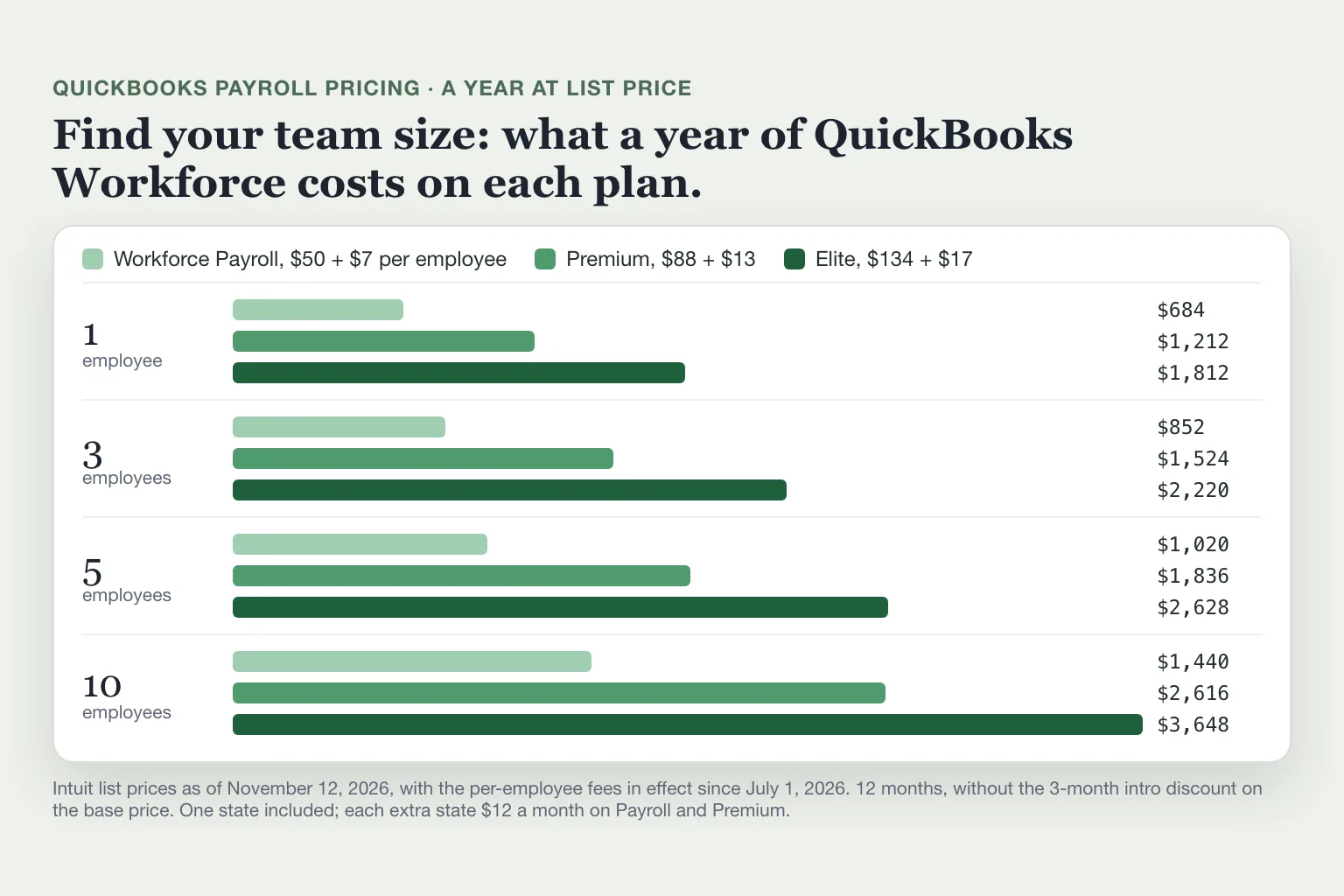
A year of QuickBooks payroll costs $684 for one employee on Workforce Payroll and $3,648 for ten employees on Elite. The per-employee fee is what grows as you hire.
Employees | Payroll | Premium | Elite |
|---|---|---|---|
1 | $684 | $1,212 | $1,812 |
3 | $852 | $1,524 | $2,220 |
5 | $1,020 | $1,836 | $2,628 |
10 | $1,440 | $2,616 | $3,648 |
Full list prices, 12 months². In the first year, the intro offer takes $75, $132 or $201 off, depending on the plan.
What changed in 2026
In May 2026, Intuit renamed QuickBooks Online Payroll to QuickBooks Workforce. Payroll Core became Workforce Payroll, Payroll Premium became Workforce Premium and Payroll Elite became Workforce Elite, and existing subscriptions switched over on their own¹.
From July 1, 2026, Intuit raised the per-employee fees. New subscriptions paid them from that day, existing ones from a renewal after it¹.
Plan | Fee per employee before | Fee from July 1 | Extra a year per employee |
|---|---|---|---|
Workforce Payroll | $6.50 | $7 | $6 |
Workforce Premium | $10 | $13 | $36 |
Workforce Elite | $12 | $17 | $60 |
The base price didn't change on any plan¹. At the new fees, a business with ten employees on Elite pays $600 a year more than before. From July 1, Intuit also offers Benefits Administration as an optional add-on for Premium and Elite, at $5 per employee a month. As of November 2026, it's only for businesses with 20 or more employees¹,².
Tax payments changed too. Since July 1, 2026, Workforce pays and files on its own every tax it supports on your plan once tax setup is done; for customers who joined after November 15, 2025, that was already the case. You can no longer turn automated taxes off or pay those taxes by hand in the Workforce Tax Center. Local taxes on Workforce Payroll, and the few taxes Intuit doesn't support, such as Pennsylvania's Local Services Tax, you still pay and file yourself³.
Which QuickBooks Workforce plan do you need?
Workforce Payroll covers the basics of paying a few people: full-service payroll, federal and state tax payments and filings, next-day direct deposit and 1099 e-filing for contractors². It doesn't pay or file local payroll taxes; Premium and Elite handle certain local taxes²,⁴. Auto payroll runs on its own after your first payroll, for salaried staff or hourly staff on default hours with direct deposit set up².
Premium is worth the extra $38 a month plus $6 per employee if you need:
certain local payroll taxes paid and filed for you;
same-day direct deposit;
time tracking, with schedules and a phone app for clocking in;
hiring, onboarding and time-off tools².
Elite adds an Intuit expert who sets up payroll for you, a personal HR advisor and tax penalty protection². If you get a payroll tax penalty from an error made while using Elite, Intuit says it will reimburse the penalty and interest, up to $25,000 a year, no matter who made the error. You have to send Intuit the notice within 15 days and meet its other requirements, and you still owe the tax itself⁴.
Extra QuickBooks payroll fees
Every plan includes tax filing in one state. Each additional state costs $12 a month on Workforce Payroll and Premium; Intuit lists no extra-state fee for Elite⁴. Intuit bills the per-employee fee for everyone set to active in payroll during the billing period, even people you didn't pay that month. To stop paying for someone who has left, terminate them and set their status to inactive⁵.
The intro discount doesn't apply to per-employee fees, contractor fees or state tax filing fees². Intuit also charges a fee for paying contractors by direct deposit⁴. Health benefits, 401(k) plans and workers' comp come from partners such as Allstate, Vestwell and Next, and cost extra².
QuickBooks Online plus payroll for a small business
Payroll is a separate subscription from QuickBooks Online. On Intuit's pricing page, it's an optional second step after you pick an accounting plan⁶. Our QuickBooks pricing guide covers the accounting plans.
Take a small bakery with three employees that keeps its books in QuickBooks Online Simple Start. Simple Start costs $38 a month and Workforce Payroll $71 with three employees, so the pair costs $109 a month, $1,308 a year. In the first year, the two intro offers bring that to $1,176⁶,².
QuickBooks payroll vs Gusto
At list prices, Gusto Simple and Plus cost less than Workforce Payroll and Premium at every team size, and Gusto connects to QuickBooks Online. Gusto Premium, at $180 a month plus $22 per person, costs more than Workforce Elite. Gusto Simple costs $49 plus $6 per person, and Plus $80 plus $12⁷.
Employees | Workforce Payroll vs Gusto Simple | Workforce Premium vs Gusto Plus |
|---|---|---|
3 | $852 vs $804 | $1,524 vs $1,392 |
10 | $1,440 vs $1,308 | $2,616 vs $2,400 |
A year at list prices²,⁷. Gusto Simple runs payroll in one state only. It doesn't include next-day pay, which Workforce Payroll does; Gusto charges $15 a month plus $3 per person for it, which brings Simple to $1,092 a year for three employees. Plus adds multi-state payroll, next-day pay and time tracking⁷.
When you connect Gusto, it sends a journal entry to QuickBooks Online each time you run payroll⁸. With Workforce, payroll runs inside QuickBooks, so there's no second app to connect¹.
Payroll in your QuickBooks bank feed
Every payroll paid from a bank account connected to QuickBooks shows up twice: once as payroll records in QuickBooks, and again as withdrawals in your bank feed: the direct-deposit net pay and the tax payments Workforce makes on its own³. With Workforce, match those lines in Bank transactions to the paychecks and tax payments already there instead of categorizing them as new expenses. Intuit says matching "prevents duplicate entries"⁹. Categorizing them again would count the same wages twice.
Where Booke fits
Booke goes through your bank transactions in QuickBooks Online every day. It categorizes and matches the new lines, adds the ones it's sure about to your books and asks you about the rest. It works with the bank feeds already connected to QuickBooks Online, so you don't connect your bank again.
Booke automates up to 80% of the manual bank-feed work for $129 a month per business. See how Booke works in QuickBooks Online.
FAQ
What is QuickBooks payroll called now?
QuickBooks Workforce. Intuit renamed QuickBooks Online Payroll in May 2026, and the plans are now Workforce Payroll, Workforce Premium and Workforce Elite¹.
Is payroll included with QuickBooks Online?
No. Payroll is a separate subscription that you add to a QuickBooks Online plan at checkout or later⁶,².
Is there still a QuickBooks Desktop payroll?
Existing Desktop Payroll subscribers can renew, but Intuit stopped selling Desktop Enhanced Payroll to new US customers after September 30, 2024¹⁰. Our QuickBooks Desktop vs Online guide covers moving payroll to Workforce.
Do I need payroll to pay contractors?
No. Contractors aren't on payroll, but you may need to file 1099s for them, and every Workforce plan includes 1099 e-filing². Our 1099 rules guide explains the 2026 threshold. Paying yourself is a separate question; see how to pay yourself from an LLC.
Sources
Intuit Firm of the Future, QuickBooks Payroll pricing changes: Client payroll and HR management in QuickBooks, May 14, 2026.
Intuit, QuickBooks Workforce pricing, retrieved November 12, 2026.
QuickBooks Community (Intuit Community Manager), Updates to QuickBooks Workforce Taxes, March 27, 2026.
Intuit, QuickBooks Workforce and Intuit Payroll General Services Disclosures, retrieved November 12, 2026.
Intuit, Understand the per employee fee in QuickBooks Online Payroll, updated September 9, 2026.
Intuit, QuickBooks Online plans and pricing, retrieved November 12, 2026.
Gusto, Gusto pricing, retrieved November 12, 2026.
Gusto Help Center, Integrate with QuickBooks Online, retrieved November 12, 2026.
Intuit, Match your bank and credit card transactions, updated August 14, 2026.
Intuit, Learn what the QuickBooks Desktop stop-sell means for your business, updated October 16, 2026.

