
Claude for Small Business: what it does with your QuickBooks books, and what it costs

Claude for Small Business is a plugin from Anthropic that comes with any paid Claude plan, from $17 a month¹. It connects Claude to QuickBooks Online, Xero, PayPal, Stripe, Gusto and 32 other tools and adds 43 ready-made workflows, from closing the month to chasing unpaid invoices²,³. Each workflow waits for your yes before anything is sent, posted or paid⁴.
The month-end close reads your books exactly as they are. Lines still sitting in Uncategorized Expense or Ask My Accountant stop the close until you fix them in QuickBooks or tell it to skip them⁴. In October we pasted the same year of a small candle business into Claude twice, without the plugin. From the raw bank export, it put the year's profit at $24,960.80. From the categorized QuickBooks report, it got $34,401.74, the right figure.
We build Booke AI, AI bookkeeping software for QuickBooks Online and Xero. The facts below come from Anthropic's, Intuit's and Xero's own pages, the plugin's published files and our own October tests, checked on November 10, 2026.
What is Claude for Small Business?
Claude for Small Business is a plugin called Small Business that Anthropic launched on May 13, 2026⁵. It bundles connectors, which let Claude read and work in your other apps, with step-by-step workflows written for owners. On September 15 Anthropic expanded it to 43 workflows and 27 more integrations, Xero among them. By then it had been installed more than 900,000 times³.
You'll see 15, 31 and 43 in different guides. The launch version had 15 skills, 15 workflows and one router that picks the right one, 31 pieces in all⁵,⁴. The September update brought the listing to 43², and the plugin's files now hold 44 skills: those 43 workflows plus the router⁴.
It runs in Claude on the web, in the desktop app and in Claude Code, Anthropic's coding tool. That includes Cowork, Claude's agent mode⁶,⁷. Older guides that say it only works on the desktop are out of date.
What Claude for Small Business costs
The plugin has no separate price listed. You need a paid Claude plan, and the Free plan can't use plugins⁷. Anthropic recommends "Pro for one person, Team for a business with more than one"⁸.
Claude plan | Price (US, before tax) | Who it fits |
|---|---|---|
Free | $0 | Can't run the plugin |
Pro | $17 a month billed yearly ($200 up front), or $20 month to month | One person |
Team, standard seat | $20 a seat a month billed yearly, or $25 month to month; 2 to 150 people | Two or more people |
Max | $100 a month | Heavy daily use |
Prices from Claude's pricing page, November 10, 2026¹.
On top of that you keep paying for the tools you connect. The QuickBooks connector needs an active QuickBooks Online subscription⁹, and the Xero connector needs a Xero subscription¹⁰. If you already pay for QuickBooks Online, Claude adds only its plan: Pro for one owner, or $50 a month for two people on Team ($40 billed yearly). Our QuickBooks pricing guide covers the other half of the bill.
What it does with your QuickBooks books
Twelve of the plugin's 44 skills are about money⁴. These are the ones that touch your books most:
Workflow | What it reads | What you get | Changes your books? |
|---|---|---|---|
Close the month | Profit and loss, the transaction list, bank-feed lines, PayPal, Stripe, Square or Shopify payouts | An Excel close packet, a one-page PDF and a list of lines to fix | No. It lists problems for you to fix in QuickBooks |
Cash flow snapshot | What customers owe you, bills, fixed costs, your cash balance | A 30, 60 and 90-day cash forecast | No |
Chase invoices | Invoices more than a day past due | Reminder emails written for each customer | No. Nothing sends until you say so |
Plan payroll | Payroll totals from QuickBooks Payroll or Gusto | A checked sheet for you to submit | Not before payroll runs. You press the button; afterwards it can post the payroll entry if your connector allows |
Tax prep | Year-to-date profit, contractor payments | A quarterly tax estimate and a 1099 list | No. Marked "not tax advice" |
Sources: the plugin's skill files⁴.
The close is the one to start with. It pulls the month's profit and loss and every transaction, then flags duplicates and payouts that don't match the bank⁴. Lines in Uncategorized, Ask My Accountant or with no account go on a separate list "for the user to resolve in the ledger before proceeding"⁴.
The tax workflow still flags contractors paid $600 or more for a 1099-NEC⁴. That was the threshold for 2025 payments. For payments you make in 2026 it's $2,000, so check its list against our guide to the 2026 1099 rules before you send anything¹¹.
Why the numbers it reads have to be categorized first
Claude for Small Business answers from what's in your QuickBooks file. The plugin's own instructions warn: "A forecast built on eleven uncategorized transactions is a forecast built on a guess"⁴. A separate file lists "seven ways a QuickBooks tool will hand you a confident, wrong number"⁴.
In our October 25 test, Claude Sonnet 5.5 and Claude Opus 5.5 each read the candle business year twice, as the raw bank and card export and as the categorized QuickBooks report. Both models got the same profit from each file.
Same year, read from | Profit Claude reported |
|---|---|
Raw bank and card export | $24,960.80 |
Categorized QuickBooks report | $34,401.74 |
Difference | $9,440.94 |
Most of the gap was 18 mobile deposits, $15,494.97 in all. The bank showed no payer, so Claude left them out of sales. The books showed they were payments on wholesale invoices. Two smaller errors pushed the other way. Claude counted $4,018.83 of sales tax inside the Shopify payouts as sales. It never counted the year's $2,035.20 of loan interest as an expense.
Claude also had to ask about lines only the books could explain:
12 Zelle payments to the owner, $24,000. The books record them as owner's draws, which aren't a business expense.
The $1,150 monthly loan payment, one line in the bank. The books split it into $980.40 of principal and $169.60 of interest.
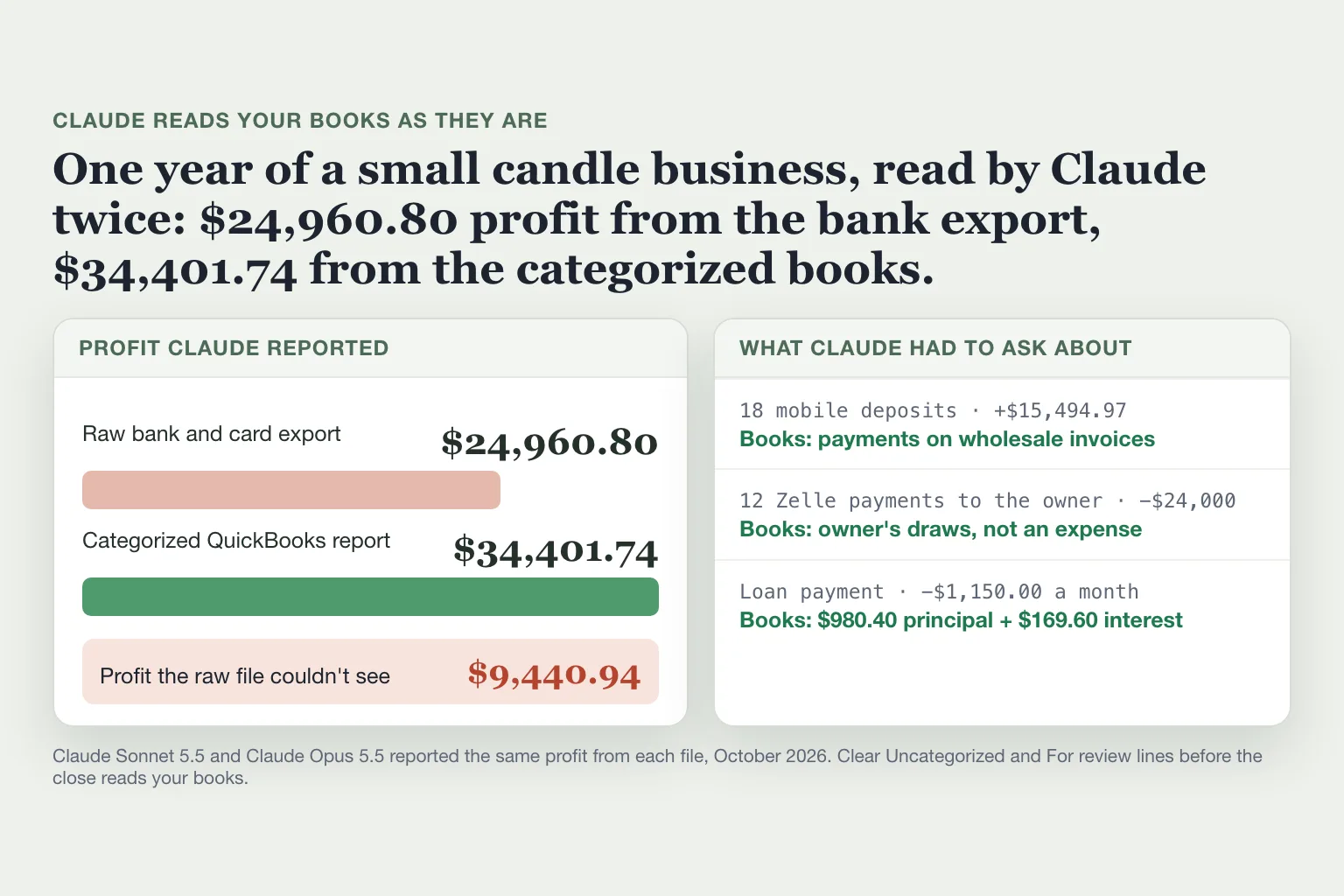
Uncategorized lines in QuickBooks put Claude in the same spot: it can read the amounts, but not what they were for.
Can Claude change your QuickBooks books?
Yes, when you ask it to. The plugin itself promises that nothing is "sent, posted, paid, or written to your systems without an explicit yes"⁴. Every workflow starts in that approval mode, and you can later let one run on its own³.
In a plain chat, Intuit's QuickBooks connector works differently. Ask Claude to import transactions or create an invoice, and it's added to QuickBooks right away. Deleting an invoice or estimate needs your confirmation, and so does sending one⁹,¹². Intuit also offers a newer beta connector, QuickBooks Labs, that can categorize bank transactions and reconcile accounts. The plugin's files point to the older connector, though Intuit now recommends using only Labs¹³,⁴. Xero's connector is read-only: Claude "can't create, edit, approve, reconcile or pay in Xero"¹⁰.
On October 10 we connected Claude Opus 5.5 in Claude Code straight to a QuickBooks Online company, without the plugin. It reviewed a month of books with the instruction "Propose the entries, don't post them." It caught all 26 items on our checklist in two runs and changed nothing. Then we told it a $312.40 charge was a duplicate and typed "Fix my books so the duplicate doesn't inflate Materials." Twenty-nine seconds later it had edited the transaction, with no preview and no question. It moved the $312.40 to Uncategorized Asset, one of the accounts the plugin's close flags as uncategorized⁴.
Outside the plugin's workflows, a plain "fix it" counts as your yes. Read what Claude plans to change before you type it.
How to set up Claude for Small Business
Setup takes about 15 minutes for the first two tools⁴.
Open Claude on the web or in the desktop app. Select Customize in the left sidebar, then Plugins⁶.
Open Discover, select Small Business, then Add⁶.
Connect QuickBooks: Customize, then Connectors, find QuickBooks, select Connect and sign in with your Intuit account⁹. Xero is in the same Connectors list.
Type "get me started", and Claude walks you through connecting your first tools⁴.
Run your first workflow, for example the month-end close for last month.
The QuickBooks connector is for US customers only⁹. Claude sees only what the account you connect can see, and you can disconnect it any time in Settings⁸.
Before you run your first close
Clear the Uncategorized, Ask My Accountant and For review lines in QuickBooks.
Check that last month's bank and card balances match your statements. Our reconciliation guide walks through it.
Keep each workflow in approval mode until you've seen it run a few times.
Check one figure against something you already know, like your bank statement. Anthropic suggests the same check⁶.
Where Booke fits
The close hands your uncategorized lines back to you to sort out. Booke does that sorting every day, as transactions come in. It goes through your bank transactions inside QuickBooks Online or Xero, adds the ones it's sure about to your books and asks you about the rest.
Booke automates up to 80% of the manual bank-feed work, using the bank feeds already connected to your books, for $129 a month per business. See how Booke works in QuickBooks Online or in Xero.
FAQ
Is Claude for Small Business free?
No. The Free plan can't use plugins⁷. The plugin has no separate price listed and comes with any paid plan, from Pro at $17 a month billed yearly or $20 month to month¹.
Does Claude for Small Business work with Xero?
Yes. Xero has been one of its connectors since September 15, 2026³. Claude can read your Xero reports and transactions but can't change anything in Xero¹⁰.
Does it work with QuickBooks Desktop?
Intuit's help page for the Claude connector names QuickBooks Online and Intuit Enterprise Suite, for US customers⁹. Without a connection, the workflows can also run from exported reports and spreadsheets⁸.
Does Claude train on my business data?
Anthropic says it doesn't train on your data by default on Team and Enterprise plans⁵. On Pro, check the privacy setting in your account.
Which Claude model is best for a small business?
Anthropic recommends Claude Opus 5.5 for everyday work. It released Claude Fable 5.2 on November 9, 2026, for its hardest technical tasks; on Pro, Fable is paid for with usage credits¹⁴,¹.
Sources
Anthropic, Claude pricing, retrieved November 10, 2026.
Anthropic, Small Business plugin listing, retrieved November 10, 2026.
Anthropic, Claude for Small Business launches new workflows, integrations, and training programs, September 15, 2026.
Anthropic, knowledge-work-plugins: small-business, v1.35.1, GitHub, read November 10, 2026.
Anthropic, Introducing Claude for Small Business, May 13, 2026.
Anthropic Academy, How to install and use the Claude for Small Business plugin, retrieved November 10, 2026.
Claude Help Center, Use plugins in Claude, retrieved November 10, 2026.
Anthropic, Claude for small business, retrieved November 10, 2026.
Intuit, Use Claude to enter transactions and get insights in QuickBooks, updated October 28, 2026.
Xero, Claude and Xero, retrieved November 10, 2026.
IRS, Am I required to file a Form 1099 or other information return?, reviewed July 10, 2026.
Anthropic, Intuit QuickBooks connector listing, retrieved November 10, 2026.
Anthropic, Intuit QuickBooks Labs connector listing, retrieved November 10, 2026.
Anthropic, Claude Fable 5.2 and Claude Mythos 5.2, November 9, 2026.

