
How to connect QuickBooks to ChatGPT, and the catch in its answers

To connect QuickBooks to ChatGPT, open Plugins in the ChatGPT sidebar, search for Intuit QuickBooks, select Connect Intuit QuickBooks and sign in to QuickBooks Online¹. It's available to US QuickBooks Online customers¹, and Intuit launched it on ChatGPT Free, Plus and Pro². ChatGPT can then answer questions about your books and create and send invoices from the chat³.
The catch is that ChatGPT answers from your books as they are. Take a small online candle business. Its September books show a $4,042.08 loss. Fix its transfers, the owner's money and one payment counted twice, and September made a $1,800.50 profit, if one $1,850 deposit was a sale. Ask ChatGPT for September's profit, and the books it reads show the loss.
We build Booke AI, AI bookkeeping software for QuickBooks Online and Xero. Plugin details below are from Intuit's and OpenAI's pages as of November 4, 2026.
How to connect QuickBooks to ChatGPT
You need an active QuickBooks Online subscription and a ChatGPT account¹. The connection is a plugin, ChatGPT's word for an add-on that links another app. Intuit also calls this QuickBooks ChatGPT integration the QuickBooks app or connector.
In ChatGPT, select Plugins in the left sidebar. Search for Intuit QuickBooks, or go to chatgpt.com/plugins/quickbooks.
Select Connect Intuit QuickBooks and sign in to your QuickBooks Online account. ChatGPT opens again after you sign in.
Select Start chat.
To check that it works, ask "What's my company name in QuickBooks?" or "Show me my open invoices." If the answer comes from your account, you're connected¹.
If it won't connect, disconnect and reconnect the plugin from ChatGPT's plugins list. Check that you're signed in to the right QuickBooks company. Then allow pop-ups and third-party cookies for chatgpt.com and quickbooks.intuit.com. If it still fails, contact QuickBooks Support¹. In a ChatGPT workspace your company manages, an admin may need to set up or approve the plugin first⁴.
What the QuickBooks plugin in ChatGPT can do
The QuickBooks plugin reads your reports and, since July 28, 2026, can also create and send invoices³. Intuit launched it in ChatGPT on February 5, 2026, for questions and reports only².
Job | What you can ask or do in the chat |
|---|---|
Reports | Profit and loss, cash flow, balance sheet, who owes you and whom you owe⁴ |
Invoices | Create, update, send and delete invoices; set up recurring ones; send reminders on overdue ones³ |
Estimates | Create, send and copy estimates³ |
Getting paid | Payment links a customer can pay through, if you use QuickBooks Payments (US only)³ |
Customers and products | Add new ones and search your lists³ |
Payroll | Who's on payroll, past paychecks, benefits, time-off rules³ |
Loans | What similar businesses borrow through QuickBooks Capital, Intuit's lending service, and at what rates³ |
Comparisons | Your profit against similar businesses in your industry and region⁴ |
One job is on neither list: reviewing and categorizing the transactions your bank sends into QuickBooks³,⁴. That's the work that decides what your reports say.
The catch: ChatGPT answers from your books as they are
Questions about your business are answered from what's recorded in your QuickBooks account², unless you paste in other numbers⁴. If last month's bank transactions aren't sorted yet, ChatGPT works with unsorted numbers. Here is the candle business's September, checked against three questions an owner would ask.
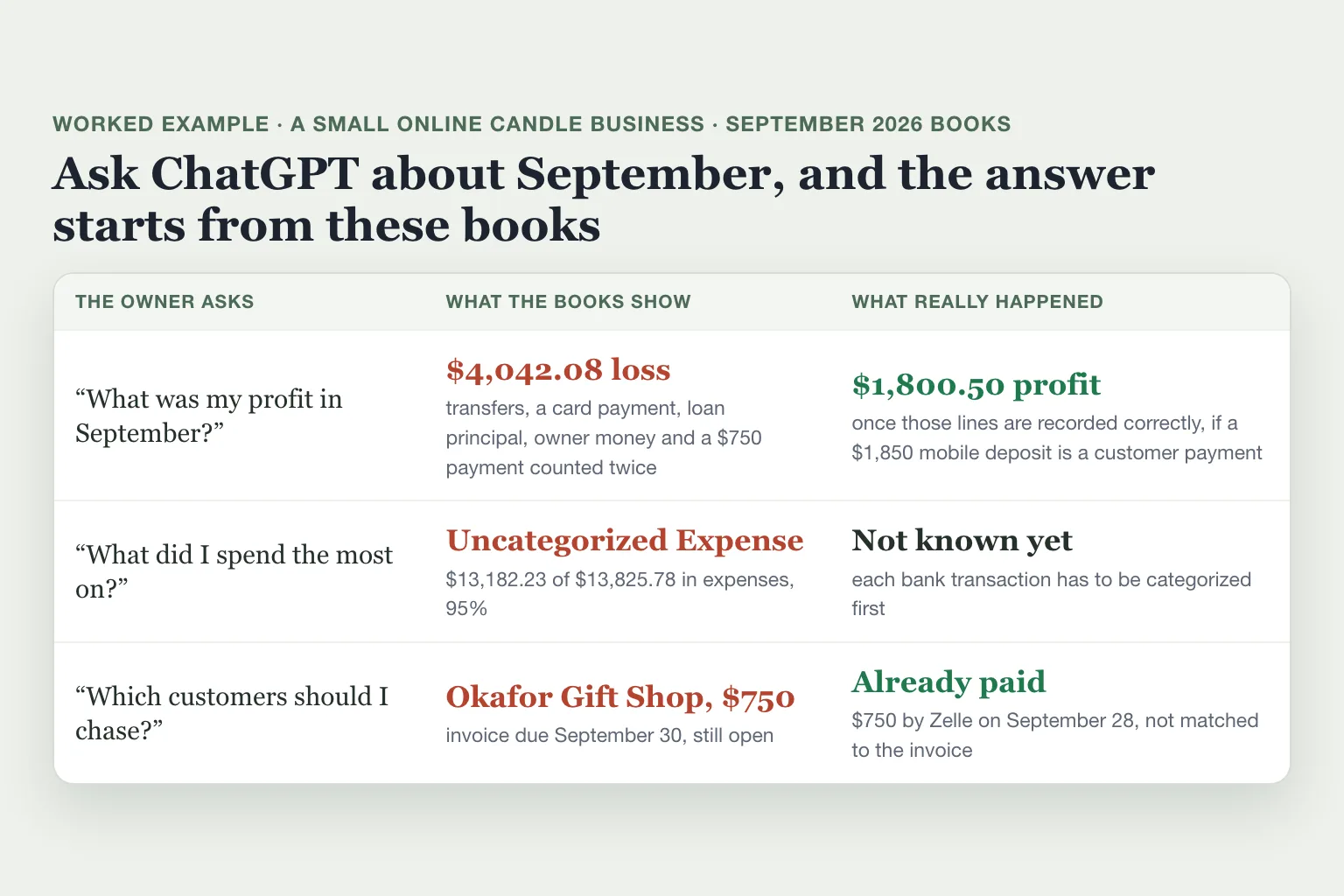
"What was my profit in September?"
The books show a $4,042.08 loss. Several lines that don't belong in profit were recorded as income or expenses:
two $1,500 transfers to savings;
a $3,412.18 credit card payment;
$980.40 of loan principal, the part of a loan payment that pays down the debt;
$4,200 the owner took out, including $2,200 of personal estimated tax;
the $5,000 the owner put in, and one $750 customer payment counted twice.
Record those as transfers, owner contributions and owner draws, and remove the duplicate. September then made a $1,800.50 profit, if one $1,850 mobile deposit is a customer payment. Only the owner knows that one. Our balance sheet vs income statement guide walks through each line.
"What did I spend the most on?"
The largest expense in September is Uncategorized Expense, QuickBooks' catch-all for transactions without a real category. It holds $13,182.23 of $13,825.78, or 95%.
"Which customers should I chase?"
QuickBooks shows two unpaid invoices. Okafor Gift Shop owes $750, due September 30, and Juniper Home Goods $1,200, due October 20. Okafor paid its $750 by Zelle on September 28. The payment is in the books, but it isn't matched to the invoice, so the invoice still shows as unpaid.
The plugin comes with a ready-made routine, which OpenAI calls a skill, for chasing overdue invoices⁴. It can also send reminders³. A reminder built from this list would go to a customer who already paid.
Before you trust an answer, check four things
Look these up in QuickBooks before you ask about a month:
How much of the month sits in Uncategorized Income or Uncategorized Expense?
How many transactions are still waiting on the For review tab of your Bank transactions page?
Are moves to savings and card payments recorded as transfers, and money you put in or took out as owner contributions or draws?
Does every customer payment show against its invoice?
Is it safe to connect QuickBooks to ChatGPT?
Intuit says your QuickBooks data stays in its systems and isn't used to train foundation models, the large AI models behind chatbots³. The chat is a separate matter, because numbers the plugin pulls into a chat become part of it. On ChatGPT Free, Plus and Pro, OpenAI may use your conversations to train its models⁵. To stop that, turn off Improve the model for everyone under Settings, then Data controls.
Even after you opt out, a thumbs up or down on a reply lets OpenAI use that whole conversation. Temporary chats aren't used for training⁵.
The plugin can also act: it creates, sends and deletes invoices and estimates when you ask³. Intuit says every action is reviewable, so read each invoice before it goes out. To cut the connection, disconnect Intuit QuickBooks in ChatGPT's plugins list¹.
An AI agent with full QuickBooks access is a different setup. Our test shows what an AI agent changed in QuickBooks without asking.
Where Booke fits
Booke works inside QuickBooks Online, in the bank feeds you've already connected. Every day it reviews the new transactions, categorizes them and matches them to invoices and receipts. A payment like Okafor's $750 Zelle gets matched to its open invoice. An unclear deposit like the $1,850 comes to you for a decision.
So when you ask ChatGPT about last month, the books it reads are up to date. Booke automates up to 80% of the manual bank-feed work for $129 a month per business. See how Booke works for business owners.
FAQ
Can ChatGPT connect to QuickBooks Online?
Yes, through Intuit's QuickBooks plugin. It works in ChatGPT on the web and on mobile².
Is the QuickBooks plugin in ChatGPT free?
You need an active QuickBooks Online subscription and a ChatGPT account¹. Intuit launched the plugin on ChatGPT Free as well as the paid plans², and neither Intuit nor OpenAI lists a separate price for it. Payment links need QuickBooks Payments³.
Does ChatGPT work with QuickBooks Desktop?
Not through this plugin. It connects to QuickBooks Online, and Intuit's setup article covers QuickBooks Online only¹.
Can I use the QuickBooks plugin outside the US?
Intuit says the plugin is currently available to QuickBooks Online customers in the US¹.
Can ChatGPT categorize my bank transactions in QuickBooks?
That job isn't on Intuit's or OpenAI's list of what the plugin does³,⁴. OpenAI describes pasting transactions into the chat as a way to analyze them⁴. For what ChatGPT can and can't do with your books, see our guide to ChatGPT for bookkeeping.
Can I connect QuickBooks to Claude too?
Yes. In Claude, open Customize, then Connectors, search for QuickBooks and select Connect³. Intuit added the same invoicing, payroll and lending features there on July 28, 2026³.
Sources
Intuit, Connect QuickBooks Online to ChatGPT, updated August 26, 2026.
Intuit, Intuit's financial intelligence apps in ChatGPT are live, February 5, 2026, updated March 5, 2026.
Intuit, QuickBooks Expands Connector in Claude and Plugin in ChatGPT with New Sales Invoicing, Payroll, and Lending Features, July 28, 2026.
OpenAI, Intuit QuickBooks plugin for ChatGPT, retrieved November 4, 2026.
OpenAI Help Center, How your data is used to improve model performance, retrieved November 4, 2026.

