
QuickBooks Payments fees 2026: what QuickBooks charges per payment

In QuickBooks Online, QuickBooks Payments has no monthly fee. Intuit takes a share of each payment instead: 2.99% when a customer pays an invoice by card, Apple Pay, PayPal or Venmo, 1% when they pay by bank transfer (ACH), 2.5% for a card payment in person and 3.5% for a card number you type in¹. On a $1,200 invoice, that's $35.88 by card or $12 by bank transfer.
The rate is the same for Visa, Mastercard, Discover, American Express and corporate cards. To take payments in QuickBooks Online, you need a QuickBooks Online subscription, and Intuit approves each Payments account¹.
We build Booke AI, AI bookkeeping software for QuickBooks Online and Xero. Rates below come from Intuit's rates page, pricing schedule and help articles, checked on November 13, 2026.
QuickBooks Payments fees at a glance
How the customer pays | Fee | On a $1,200 invoice |
|---|---|---|
Card, Apple Pay, PayPal or Venmo, through the invoice | 2.99% | $35.88 |
Bank transfer (ACH), through the invoice | 1% | $12.00 |
Card in person, with a card reader or Tap to Pay on iPhone | 2.5% | $30.00 |
Card number you type in | 3.5% | $42.00 |
Intuit's rates as of September 18, 2026¹. Its pricing schedule adds 1% for international cards and international PayPal, and charges 3.5%, the typed-in rate, on card payments that other apps process through QuickBooks Payments².
ACH has no cap on Intuit's standard pricing schedule, which covers accounts approved or first used on or after September 12, 2023. Older accounts and accounts whose rates Intuit has reviewed can have different terms; your QuickBooks Payments statement shows the rates you pay².
How much QuickBooks Payments costs a year
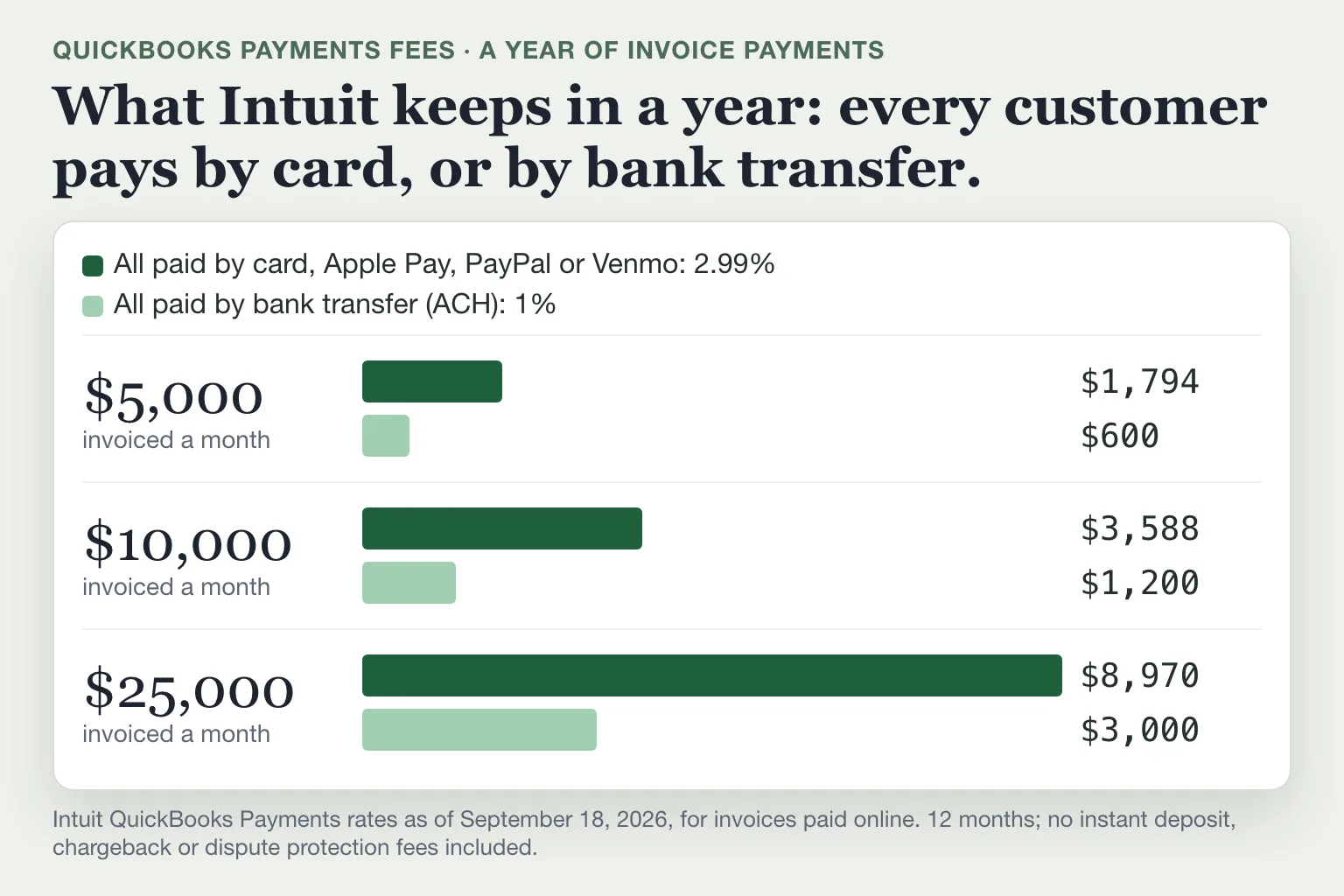
Take a small landscaping company that invoices $10,000 a month. If every customer pays by card, QuickBooks Payments keeps $3,588 a year. If every customer pays by bank transfer, it keeps $1,200, or $2,388 less.
Invoiced a month | All paid by card | All paid by bank transfer |
|---|---|---|
$5,000 | $1,794 | $600 |
$10,000 | $3,588 | $1,200 |
$25,000 | $8,970 | $3,000 |
A year of invoice payments at Intuit's rates¹.
How to get more customers to pay by bank transfer
Every QuickBooks invoice has its own payment options. On the invoice, select Manage, open the payment options and turn off cards, PayPal and Venmo while ACH bank payment stays on. You can also say how you'd like to be paid in the Payment instructions field³.
Can you pass QuickBooks Payments fees to customers?
Yes, in two ways: a surcharge, which is an extra percentage the customer pays on card and ACH payments, or a flat convenience fee on bank transfers.
Surcharge
QuickBooks Online has a setting called Percentage based surcharging, under Settings, Account and settings, Sales, Invoice payments. It adds a surcharge to online invoice payments by Visa, Mastercard or ACH, including recurring invoices. QuickBooks sets the rate, and you can't change it. Intuit is rolling the setting out gradually, so if you don't see it, your account doesn't have it yet⁴.
On a surcharged invoice, customers can't pay with debit cards, prepaid cards, Apple Pay, American Express or Discover. PayPal, Venmo and Affirm stay available with no surcharge, and you pay the normal fee on those. The surcharge shows on the receipt as its own line and goes to an income account⁴.
Intuit lists surcharges as prohibited when your customer is in Connecticut, Maine, Massachusetts or Puerto Rico, and California, Colorado, Florida, Kansas, Minnesota, New Jersey, New York and Oklahoma have their own conditions, such as disclosure rules or caps. Visa, Mastercard and the other card networks can fine a business $1,000 or more per violation of their surcharge rules⁴.
Convenience fee on bank transfers
If you turn off all online payment options on an invoice and check "Your customer pays the fee," the customer can still pay online by bank transfer and pays a flat $25 convenience fee. It works on invoices over $125 and under $100,000, and customers can't pay part of the invoice this way³. You can't charge a surcharge and a convenience fee on the same ACH payment⁴.
The $25 is more than the 1% you'd pay yourself on any invoice under $2,500. On a $1,200 invoice, your customer pays $25 to save you $12. Intuit's own advice is to turn payments on and build the cost of payment processing into your prices³.
Other QuickBooks Payments fees
Fee | Cost | When you pay it |
|---|---|---|
Instant deposit | 1.75% of the amount | Money in your bank within about 30 minutes instead of one or more business days; free into a QuickBooks Checking account |
Chargeback | $25 plus the disputed amount | A customer disputes a card payment with their bank |
Returned bank payment | $25 | A customer's ACH payment is rejected |
Payments Dispute Protection | From 0.99% of every card payment | Optional cover for chargebacks |
Fees from Intuit's rates page, pricing schedule and help articles¹,²,⁵,⁶. The instant deposit fee comes on top of the processing fee. With next-day deposit, which Intuit offers to eligible accounts, payments processed before 3:00 PM Pacific usually reach your bank the next business day¹.
Payments Dispute Protection covers card payments only, up to $10,000 per chargeback and $25,000 a year, and waives the $25 chargeback fee⁶. On $10,000 a month of card payments, it costs $1,188 a year at the lowest rate, 0.99%.
How QuickBooks records the fees
QuickBooks Online records QuickBooks Payments deposits and fees automatically⁷. Under Settings, Account and settings, Payments, you choose the deposit account and the account for processing fees. Intuit says the deposit account should be the bank account the money actually goes to, the same one the fees come out of⁷.
In your bank feed, the deposit is often smaller than the invoice. Depending on how your deposits are set up, the processing fee either comes out before the money reaches your bank⁸ or shows up later as a separate withdrawal⁵,⁷. When your bank feed is connected, QuickBooks usually matches these deposits and fees itself⁷. If one is still waiting in For review, match it to the payment already in QuickBooks instead of adding it as new income and a new expense. Intuit says matching "prevents duplicate entries"⁹.
If a deposit doesn't match because the fee came out first, Intuit's community team suggests adding a line for the processing fee so the record equals what arrived in your bank, then matching it⁸. Our guide to reconciling in QuickBooks Online covers the month-end check.
Where Booke fits
QuickBooks matches bank transactions automatically only for its own products, such as QuickBooks Payments, Payroll and Bill Pay, and not for every transaction or in every account¹⁰. The rest of your bank feed still waits for you: checks you deposited, money from other payment apps, card purchases and bills you paid outside QuickBooks.
Booke goes through your bank transactions in QuickBooks Online every day. It categorizes and matches the new lines, adds the ones it's sure about to your books and asks you about the rest. It works with the bank feeds already connected to QuickBooks Online, so you don't connect your bank again.
Booke automates up to 80% of the manual bank-feed work for $129 a month per business. See how Booke works in QuickBooks Online.
FAQ
Does QuickBooks charge for ACH payments?
Yes. A bank transfer through a QuickBooks invoice costs you 1%¹, with no cap on Intuit's standard schedule². If you turn off all online payment options and check "Your customer pays the fee," the customer pays a flat $25 convenience fee instead, on invoices over $125 and under $100,000³.
Is there a monthly fee for QuickBooks Payments?
Not in QuickBooks Online. You pay a fee per payment, plus extras such as instant deposit or chargebacks when they apply, and you need a QuickBooks Online plan¹. QuickBooks Desktop also offers an optional $20-a-month plan². Our QuickBooks pricing guide covers the plans.
Can you negotiate QuickBooks Payments rates?
Intuit advertises up to 25% off for businesses new to QuickBooks Payments that take more than $2,500 a month in payments and ask when they apply. Existing customers can call Intuit at 1-833-286-8202 to check whether they qualify for a discounted rate¹.
What does QuickBooks Payments cost with QuickBooks Desktop?
Desktop has its own rates. On the pay-as-you-go plan, an invoice paid by card costs 3.5% and a card reader payment 2.4%. A $20-a-month plan lowers those to 3.3% and 1.6%. ACH is 1% on both, and both plans add a $0.30 fee to each transaction². Our QuickBooks Desktop vs Online guide covers the other differences.
Why is my QuickBooks Payments deposit less than the invoice?
Because the processing fee often comes out before the money reaches your bank. If the amounts differ, add a line for the processing fee so the record equals what arrived, then match it⁸. With instant deposit, the full amount arrives first, and Intuit takes the fees later, in a separate withdrawal⁵.
Sources
Intuit, QuickBooks Payments processing fees, rates as of September 18, 2026, retrieved November 13, 2026.
Intuit, Intuit Payments Standard Pricing Schedule (U.S. only), last updated September 12, 2023, retrieved November 13, 2026.
Intuit, Add a convenience fee to customer invoice payments made by ACH bank transfer, updated August 11, 2026.
Intuit, Add a surcharge to customer invoice payments with QuickBooks Payments, updated August 25, 2026.
Intuit, Get instant deposits in QuickBooks Online, updated August 2, 2026.
Intuit, QuickBooks Payments Dispute Protection overview, updated August 3, 2026.
Intuit, Record QuickBooks Payments deposits and fees in QuickBooks Online, updated August 4, 2026.
QuickBooks Community (Intuit Community Manager), Why won't my QuickBooks Online deposit match my invoice when a payment processing fee changes the amount?, answer of August 20, 2026.
Intuit, Match your bank and credit card transactions, updated August 14, 2026.
Intuit, Automatically match QuickBooks Online product transactions, updated September 9, 2026.

