Invoice OCR: how it reads a bill, and what to check before it hits QuickBooks or Xero
Invoice OCR (optical character recognition) reads a bill or receipt and turns the printed text into fields your books can use: who the supplier is, their tax number, the date, each line, the tax and the total¹. You forward or upload the document, the software fills in the fields, and you check the few it isn't sure about. Worth a second look: the supplier, the tax, the date and whether the bill is a duplicate.
QuickBooks Online and Xero both read receipts and bills on their own²˒³. We build Booke AI, invoice capture software for QuickBooks and Xero that categorizes each line item, matches the document to your bank feed and can approve routine bills.
One bill, read field by field
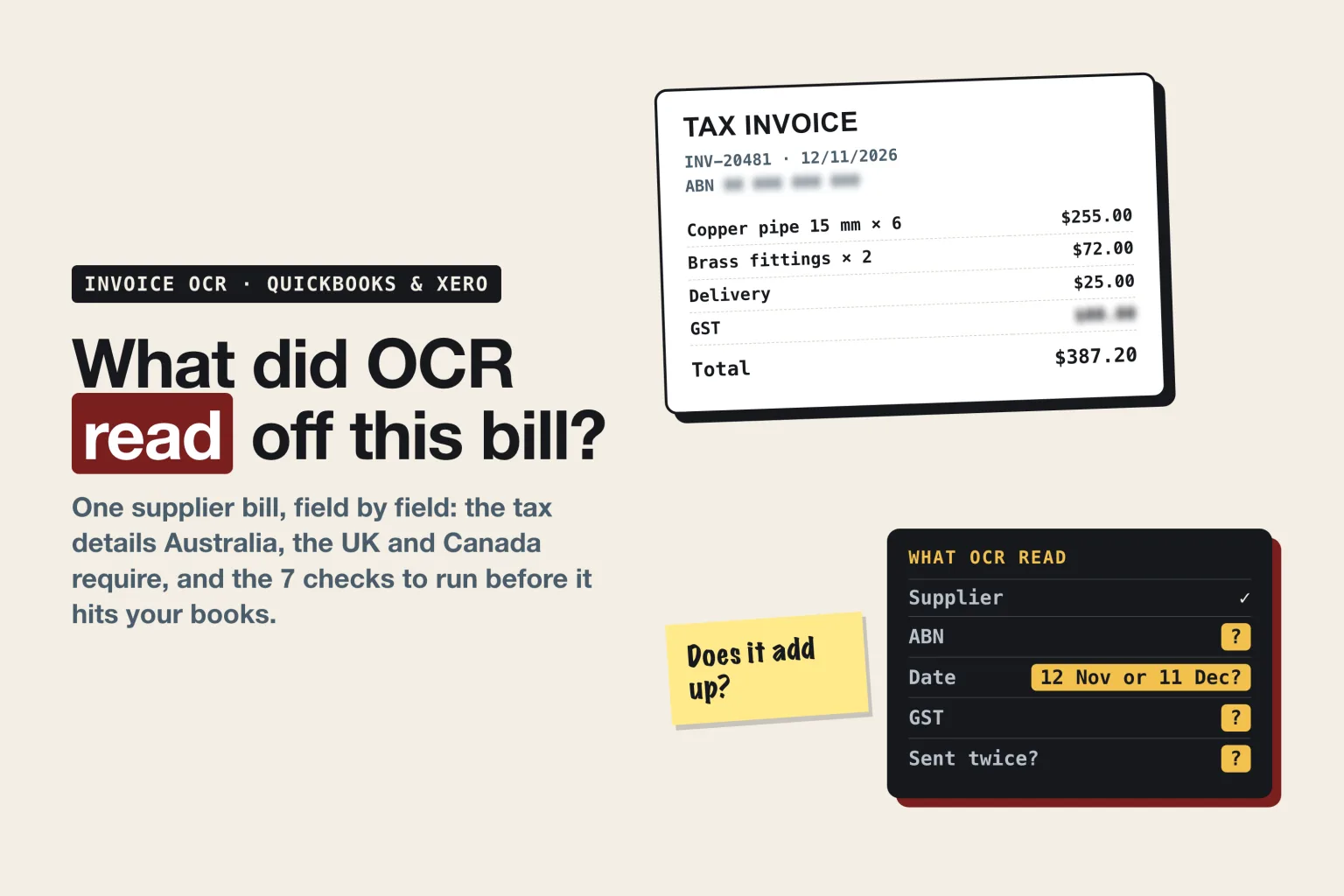
Take a small plumbing business in Brisbane. Its trade supplier emails a PDF tax invoice for copper pipe, brass fittings and delivery. Here is what invoice OCR pulls off that one page, and why each field matters.
Field on the bill | What OCR reads | Why you need it |
|---|---|---|
Supplier name | the trade supplier's name at the top | Picks the supplier in QuickBooks or Xero |
Supplier ABN | the 11-digit number under the name | Required on an Australian tax invoice⁴ |
Invoice number | INV-20481 | Spots the same bill sent twice |
Invoice date and due date | 12/11/2026, due 26/11/2026 | Puts the expense in the right period and sets the payment date |
Line 1 | Copper pipe 15 mm × 5.5 m, 6 at $42.50 = $255.00 | One line, one category |
Line 2 | Brass fittings, 2 boxes at $36.00 = $72.00 | Could go to a different category than the pipe |
Line 3 | Delivery, $25.00 | Freight is often its own category |
Subtotal | $352.00 | Checks the lines add up |
GST | $35.20 (10%)⁴ | The GST credit you claim |
Total | $387.20 | The amount that leaves your bank account |
Three of these fields are easy to miss and matter for the GST claim: the supplier's ABN, the GST amount and the date. A valid tax invoice also needs the supplier's name and what was supplied⁴. If the ABN is missing from the bill itself, nothing in your books looks wrong. But in Australia you can't claim the GST credit until you hold a valid tax invoice⁴. A blank ABN field after OCR is your cue to look at the document.
What a valid tax invoice must show in Australia, the UK and Canada
Invoice OCR is only as useful as the fields it captures, and each country asks for different ones before you can claim back tax. This table compares the rules for an ordinary business purchase.
Australia (GST) | United Kingdom (VAT) | Canada (GST/HST) | |
|---|---|---|---|
Supplier's tax number | ABN⁴ | VAT registration number⁵ | GST/HST registration number, from $100⁶ |
Supplier name | Yes⁴ | Yes, with address⁵ | Yes⁶ |
Date | Date issued⁴ | Date of supply (tax point)⁵ | Invoice date⁶ |
Description | What was supplied, with price and quantity where relevant⁴ | Goods or services, with quantity per item⁵ | Brief description, from $500⁶ |
Tax shown | GST amount for each supply, or enough to work it out⁴ | VAT rate and net amount per item, plus total VAT⁵ | GST/HST charged, or a statement that it's included, from $100⁶ |
Your business named | From $1,000 total⁴ | Customer name and address⁵ | Buyer's name, from $500⁶ |
Invoice number | Not in the Act's list⁴ | Unique sequential number⁵ | Not in the CRA list⁶ |
Shorter rule for small amounts | No tax invoice needed at $75 or less before GST ($82.50 with GST)⁴˒⁷ | Simplified invoice allowed up to £250 including VAT⁵ | Under $100: supplier name, date and total only⁶ |
In the US there is no national VAT or GST, so there is no national tax-invoice format; check the sales tax line if the supplier charged it. The checks below still apply.
How invoice OCR works
OCR invoice processing has four steps. Only the second, reading, is character recognition itself.
Capture: the document arrives as a PDF, a photo or a scan. A clean PDF from the supplier reads better than a phone photo. Small print is one known limit: one widely used invoice model asks for text of at least about 8 point at 150 dpi¹.
Read: OCR turns the image into text, then finds the fields: supplier, tax number, dates, lines, tax and total¹.
Check: the software compares the fields with each other and with your books: do the lines add up, is this supplier already set up, has this invoice number come in before?
Post: the bill or expense is created in QuickBooks Online or Xero, matched to the payment in the bank feed, with the original file attached.
Is invoice OCR the same as AI invoice processing?
No. OCR reads the text. AI invoice processing is what happens after: choosing the category for each line, recognizing a supplier you've bought from before, and deciding which bills are routine enough to approve and which need you.
Seven checks that catch invoice OCR mistakes
These seven checks catch the usual problems, a wrong vendor, missing tax or a bill recorded twice, before they reach your books.
Does the total equal the lines plus tax? On the plumbing bill, $255.00 + $72.00 + $25.00 = $352.00, plus $35.20 GST is $387.20. If the numbers don't add up, a line or the tax was misread.
Is the supplier right? OCR can pick up your own business name from the "Bill to" box, or the payment company's name on a receipt.
Is the tax amount there, at the rate printed on the bill? A tax field read as zero turns a claimable credit into a plain expense.
Is the supplier's tax number captured? Without the ABN, VAT number or GST/HST number, the bill may not support your tax claim⁴˒⁵˒⁶.
Is the date the right way round? 03/04 is 3 April in Australia and the UK, and can be March 4 on a US-format bill. Canadian bills can use either.
Is it a duplicate? The same bill often arrives twice: once by email, once uploaded from a phone. Search for the invoice number before you approve.
Is the original attached? Keep the PDF or photo on the transaction. It's the record you show if the tax office asks.
To try a tool before you rely on it, send it five of your own documents: a faded receipt photographed on your phone, one PDF holding two invoices, a bill dated 03/04, a bill with tax and delivery on separate lines, and a bill from a supplier you've never used. Then run the seven checks on what comes back.
What QuickBooks Online and Xero do with a bill
QuickBooks Online
Take a photo in the mobile app, upload from your computer or Google Drive, or forward to an email address set up in QuickBooks². QuickBooks pulls the details from each receipt and shows any existing transactions that match. You pick the match, or create a new bill or expense²˒⁸. In the UK, Australia and Canada, receipt capture also reads foreign-currency receipts and the tax rate on each line⁸. In the US, the feature is limited on QuickBooks Online Free and Lite².
Xero
Smart document capture reads receipts and bills sent from the Xero app, forwarded by email or dragged in on the web³. It fills in the amount, date and other details, suggests matching bank transactions and flags duplicate uploads³. In September 2026 Xero said it now pulls the local tax rate from uploaded documents⁹. Availability can differ by country and plan.
That covers getting a bill into your books. The work that remains is deciding the category for each line and approving the routine bills.
Where Booke fits
Booke AI works inside the QuickBooks Online or Xero account you already use, with the bank feeds already connected there.
Send an invoice or receipt to your business's Booke AI email address or upload it. OCR AI reads the vendor, dates, totals, tax and line items, and categorizes each line item based on your history. If the same file comes in twice, or two documents have the same invoice number, date and amount, Booke AI marks them as duplicates and holds the new copy for your review instead of approving it automatically. AI Bookkeeper then matches the document to the bank feed transaction in QuickBooks Online or Xero and attaches the original file.
Routine bills from vendors in your history can be approved automatically. New vendors and anything it isn't sure about come to you, with a confidence level on every field. Correct a category and Booke AI learns from it for that vendor's next documents. Booke automates up to 80% of manual bank-feed work in QuickBooks Online and Xero.
See how invoice capture works in QuickBooks Online and Xero.
FAQ
Is invoice OCR 100% accurate?
No OCR tool reads every document perfectly. Faded receipts, photos taken at an angle and very small print are the hard cases, which is why the invoice model mentioned above asks for one clear photo or scan per document and a minimum text size¹. Good tools show how sure they are about each field and send the doubtful ones to a person. Run the seven checks above on anything flagged.
Do I need a separate OCR app if I use QuickBooks Online or Xero?
Not to get bills into your books: both platforms already read them and suggest a match²˒³. A separate tool helps when you want more done after the read, such as categorizing each line item, catching duplicates by invoice number, or approving routine bills without you. If you're weighing Dext, our Dext alternatives comparison compares prices and what each tool does.
What's the difference between receipt OCR and invoice OCR?
Receipt OCR reads a short till slip, usually a photo, with a total, the tax and sometimes a few lines. Invoice OCR reads a supplier bill, usually a PDF, with an invoice number, a due date and more lines. The tax rules differ too: small receipts can use the shorter rules in the table above⁵˒⁶˒⁷.
Can invoice OCR read line items?
Yes. One widely used invoice model reads each line's description, quantity, unit price and tax¹. QuickBooks Online reads the tax rate on each line in the UK, Australia and Canada⁸, and Xero says its capture extracts itemised lines¹⁰. Line items matter when one bill covers things that belong in different categories, like the pipe and the delivery on the plumbing bill.
Can ChatGPT do OCR on an invoice?
It can read a photo you upload. ChatGPT takes images on Free and paid plans, within each plan's usage limits, and can analyze documents¹¹. OpenAI's own page says it may misread rotated or upside-down text, advises enlarging small text, and warns of incorrect descriptions in some cases¹¹. Reading a photo in a chat doesn't record the bill in your books on its own. Our guide to connecting QuickBooks to ChatGPT covers what the QuickBooks app in ChatGPT can do.
What happens after OCR reads the bill?
The bill or expense still has to be categorized, approved and matched to the payment in your bank feed. Our guide to bank reconciliation walks through the month-end check against your bank statement, step by step.
Sources
Microsoft Learn, Invoice data extraction – Document Intelligence, updated August 15, 2026; field list in Microsoft's invoice model schema (2024-11-30 GA).
Intuit QuickBooks, Upload your receipts to QuickBooks, updated August 17, 2026; Email receipts and bills, updated August 5, 2026.
Xero, Smart document capture, retrieved November 27, 2026.
Federal Register of Legislation (Australia), A New Tax System (Goods and Services Tax) Act 1999, sections 9-70, 29-10(3), 29-70 and 29-80(1), compilation in force from January 1, 2026.
HMRC, Record keeping (VAT Notice 700/21), section 4, updated March 18, 2024.
Canada Revenue Agency, Input tax credits, modified October 14, 2026.
Federal Register of Legislation (Australia), A New Tax System (Goods and Services Tax) Regulations 2019, section 29-80.01, compilation of November 1, 2025.
Intuit QuickBooks, Upload your receipts to QuickBooks: UK, Australia, Canada, retrieved November 27, 2026.
Xero Blog, Files is now called Documents, September 18, 2026.
Xero Blog, Faster record-keeping with smart document capture, July 2, 2026, updated October 28, 2026.
OpenAI Help Center, ChatGPT Image Inputs FAQ, retrieved November 28, 2026.