Cash vs accrual accounting: which method fits your small business

Cash vs accrual accounting comes down to timing. Cash accounting records income when the money arrives and expenses when you pay them; accrual accounting records them when you send the invoice or get the bill¹. Cash shows what went through the bank. Accrual shows what the business earned. The IRS lets most small businesses choose either method², and QuickBooks Online and Xero can show your reports both ways.
We build Booke AI, AI bookkeeping software for QuickBooks Online and Xero.
Cash basis vs accrual basis at a glance
Cash basis | Accrual basis | |
|---|---|---|
Income counts when | the payment reaches you | you send the invoice |
Expenses count when | you pay | the bill arrives |
$2,000 invoice sent December 15, paid January 10 | January income | December income |
Supplier bill dated March 28, paid April 5 | April expense | March expense |
Unpaid invoices and bills | left off the profit and loss report | on the profit and loss report |
Taxes follow the same timing. On the cash method you report income when you receive it and generally deduct expenses when you pay them³, so that December invoice paid in January counts toward next year's return.
What the difference looked like in our test books
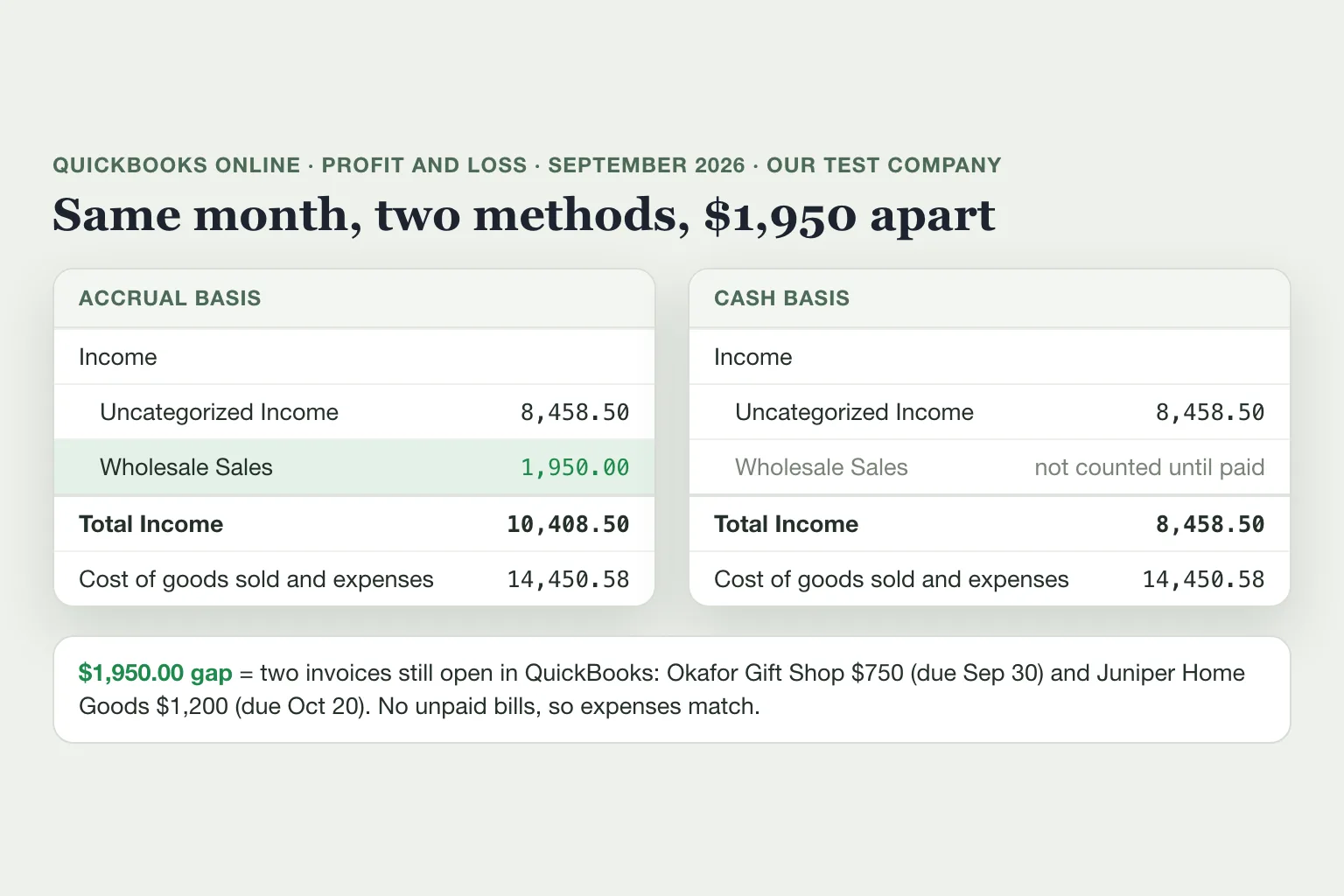
We ran the September 2026 profit and loss report for our QuickBooks Online test company, a candle business with made-up books, once on each method. Most of its September deposits still sit in Uncategorized Income; the two reports differ only in the invoice lines.
September 2026 | Accrual | Cash | Difference |
|---|---|---|---|
Income | $10,408.50 | $8,458.50 | $1,950.00 |
Cost of goods sold and expenses | $14,450.58 | $14,450.58 | $0.00 |
So the accrual report showed $1,950 more profit for the month. That $1,950 is two September invoices that were still open in QuickBooks:
Okafor Gift Shop, $750, dated September 2, due September 30.
Juniper Home Goods, $1,200, dated September 20, due October 20.
The accrual report counts both as September sales. The cash report leaves them out until the money arrives, which is how a month can look better on the accrual report than in your bank account. Expenses came out the same on both because the company had no unpaid bills. If you pay for everything when you buy it, the expense side of the two reports looks alike, and the gap comes from your invoices.
The $750 that counted twice
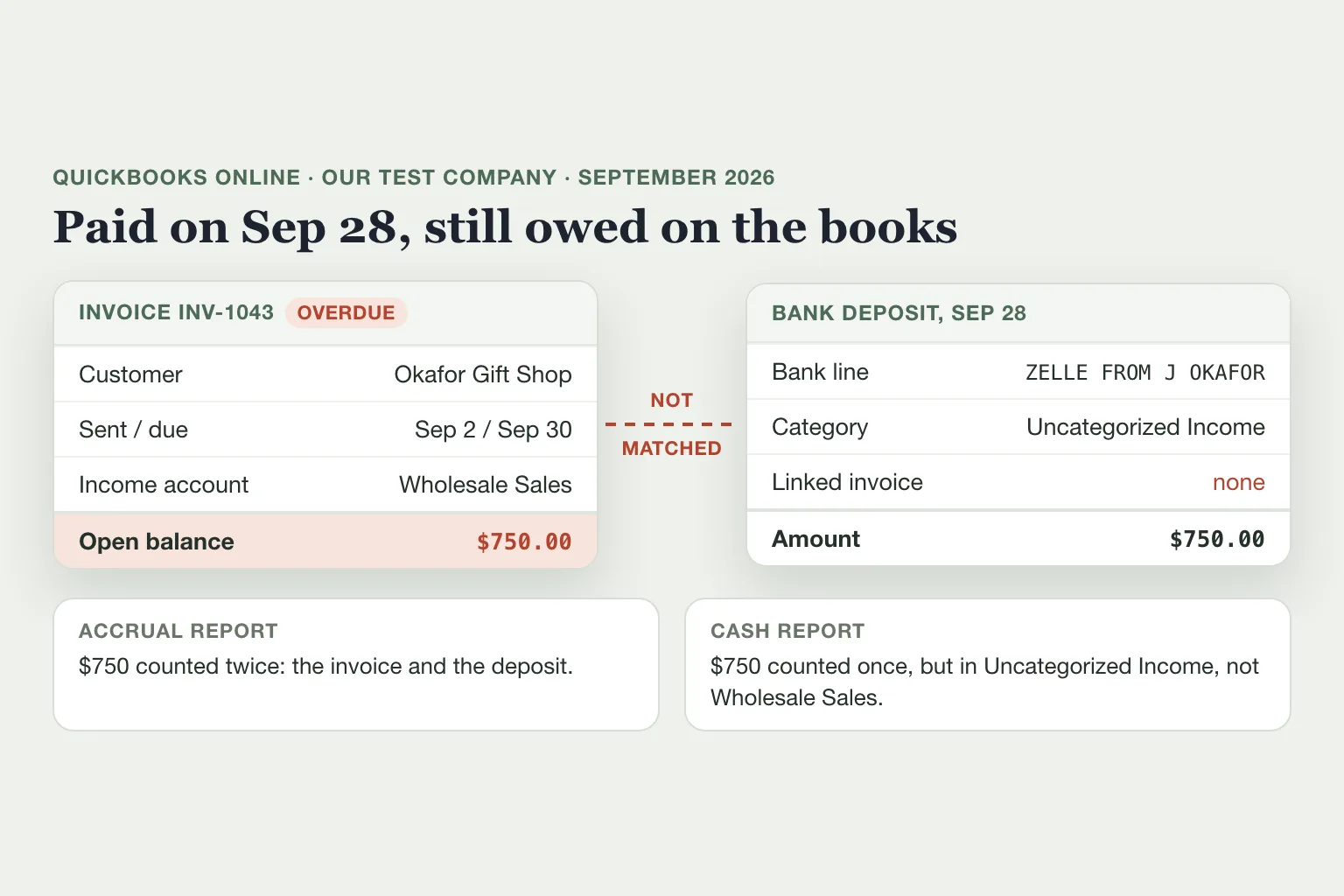
One of those open invoices was already paid: Okafor sent the $750 by Zelle on September 28, two days before the due date. The payment was recorded as new income in Uncategorized Income instead of being matched to the invoice, the same result you get when a deposit from the bank feed is added rather than matched.
On the accrual report, the $750 counts twice: once as the invoice in Wholesale Sales and again as the deposit. Income is $750 too high, and Okafor still shows as owing you money.
On the cash report, the $750 counts once, so the total is right, but it sits in Uncategorized Income instead of Wholesale Sales.
Neither report flags it. To catch it, check each open invoice against your bank deposits and look for customer payments sitting in Uncategorized Income, the holding account for deposits nobody has sorted yet. Our QuickBooks chart of accounts guide explains how to keep it clear.
If the deposit came from the bank feed and was added as income, undo it in QuickBooks Online: go to Bank transactions, select the account's tile, find the deposit on the Posted tab, select the blue link in the Added column, then select Undo in the Action column. The bank line goes back to the Pending tab, where you match it to the invoice⁴.
Which method should you use?
Cash suits a business where customers pay at the time of sale, by card or transfer, and most costs are paid right away. The profit and loss report then follows your bank balance closely, which makes it easy to read.
Accrual is the better view when you invoice customers on terms like net 30, buy supplies on credit or hold stock for months before it sells. It puts a sale and the cost of making it in the same month, so you can see whether a month made money, and it keeps unpaid invoices and bills in view. Most banks and lenders prefer accrual reports for the same reason: they show what customers owe you and what you owe suppliers².
QuickBooks Online and Xero keep one set of transactions and can run the profit and loss and balance sheet on either basis, so you can keep the tax method you chose and still check the other view when you need it. If you want to work out profit from your balance sheet instead, see how to calculate net income.
What the IRS requires in 2026
For taxes, you choose your method when you file your first return³, and QuickBooks reminds owners that the IRS expects the same method from year to year¹. The limits on the cash method apply to certain businesses only:
Your business | Cash method for taxes |
|---|---|
C corporation, or a partnership with a C corporation as a partner | Allowed if average annual gross receipts for the 3 prior years are $32 million or less, for tax years beginning in 2026⁵; the figure rises with inflation each year |
Qualified personal service corporation, such as a law or medical practice that meets the IRS tests | Allowed³ |
Tax shelter | Not allowed |
Sole proprietor, S corporation, or partnership with no C corporation partner | Not covered by that limit unless it's a tax shelter; the inventory rules below still apply |
Business with inventory and average gross receipts of $32 million or less | Can choose not to keep an inventory, but must still account for stock in a way the IRS allows, such as treating it as non-incidental materials and supplies |
Business with inventory above that | Keeps an inventory and uses accrual for purchases and sales |
You can also mix methods, for example accrual for purchases and sales of stock and cash for everything else, if the combination clearly reflects income and you use it consistently. Two limits apply: if you use cash for income, you must use cash for expenses, and if you use accrual for expenses, you must use accrual for income³.
Changing the method on your tax return generally needs IRS approval, which you request on Form 3115⁶. Switching a report in QuickBooks or Xero doesn't change your tax method, so talk to your tax preparer before you change the one on your return.
How to switch between cash and accrual in QuickBooks Online and Xero
To change the default for every report in QuickBooks Online¹:
Select the Settings gear, then Account and settings.
Open the Advanced tab and select Edit (the pencil) in the Accounting section.
Under Accounting method, choose Cash or Accrual, then select Save and Done.
To check one report without changing the default:
Go to Reports, then Standard reports, and open the report, such as Profit and Loss.
Under Accounting method, select Cash or Accrual.
Select Run report.
Xero supports both cash and accrual reporting, and you can run a report under either method to compare the numbers².
Accrual numbers come from the invoices and bills recorded in your books. If you record sales only as bank deposits, the accrual report will look just like the cash one, so start by creating an invoice each time you bill a customer.
Where Booke fits
Both reports depend on each payment being matched to the invoice it pays. In our test books, one unmatched Zelle payment put $750 in the wrong place on both. Booke works inside the QuickBooks Online or Xero books you already have, with the bank feeds already connected there. Every day it categorizes new bank-feed transactions and matches customer payments to the invoices they pay, and other payments to your bills and receipts. Unclear transactions come to you for a decision. Booke automates up to 80% of manual bank-feed work for $129 per business per month. See how Booke works for small business owners.
FAQ
Is cash accounting GAAP compliant?
No. GAAP, the standard US accounting rules for formal financial statements, uses accrual accounting, and cash basis falls outside it². Most small businesses can still use cash for taxes; accrual matters when a lender or investor asks for GAAP statements.
How do I convert accrual basis to cash basis?
For reports, change the accounting method on the report in QuickBooks Online or Xero; your transactions stay the same. For your tax return, a change of method generally needs IRS approval on Form 3115.
Should an LLC use cash or accrual accounting?
An LLC taxed as a sole proprietorship, an S corporation or a partnership with no C corporation partner isn't covered by the IRS limit on the cash method, unless it's a tax shelter or carries inventory above the $32 million test. An LLC taxed as a C corporation follows the C corporation rule. For your own reports, pick the view that matches how you get paid, and confirm the tax method with your preparer.
When should you switch from cash to accrual?
For your own reports, when invoices on terms or bills you pay later make the cash report hide what a month earned. For taxes, a C corporation or a partnership with a C corporation partner has to move to accrual once its 3-year average gross receipts pass $32 million, the 2026 figure, unless an exception such as the one for qualified personal service corporations applies.
Sources
Intuit, Choose between cash and accrual accounting methods in QuickBooks Online, updated August 5, 2026.
Xero, Cash vs accrual accounting: what's the difference?, October 6, 2026.
IRS, Publication 538, Accounting Periods and Methods, revised January 2022.
Intuit, Unmatch or move downloaded bank transactions, updated August 3, 2026.
IRS, Revenue Procedure 2025-32, section 4.30, October 2025.
IRS, About Form 3115, Application for Change in Accounting Method, reviewed March 30, 2026.