Meta Muse and QuickBooks: what the AI agent can do in your books
On September 29, 2026, Meta connected its AI agent, Muse, to QuickBooks. According to Intuit, it can send your invoices and chase late payers. Closing the books stays in QuickBooks itself.
QuickBooks already works inside three other AI assistants too: Claude, ChatGPT and Perplexity. We build Booke AI, an AI bookkeeper for QuickBooks Online and Xero, so we read all four official descriptions to answer a practical question: which bookkeeping tasks can these assistants handle, and which still need a plan?
What is Muse for Small Business?
Muse is Meta's personal AI agent. Muse for Small Business adds skills and connectors for running a business: Muse can connect to Intuit QuickBooks, Shopify, Stripe, Slack, Canva and ten other tools, plus your Facebook and Instagram business accounts.
Muse is available in the US and Canada, free for most of what people need, with paid plans for more. Meta's approval rule is short: "nothing publishes, sends, or spends without your approval." Muse also supports custom connectors, so a business can plug in services Meta doesn't support yet.
Meta pitches Muse to owners who do everything themselves. One of its launch quotes comes from Tom Mulholland, who owns a grocery store in Malvern, Iowa: "I work about 65 hours a week, and there are so many things where I'm the only one who can do them."
"Today, we're announcing Muse for Small Business. Muse, Meta's new personal AI agent, is one of the most important products we've built for the era of personal superintelligence." (Meta Newsroom on X)
OpenAI launched its own always-on agents, dots, the same day. We compare the two for bookkeeping in our OpenAI dots guide.
What can Meta Muse do in QuickBooks?
In its September 29 announcement, Intuit said the QuickBooks connector was live in Muse and that "Intuit defines exactly which QuickBooks capabilities are available." Its list has five jobs:
Review profit and loss (income minus expenses) and cash flow for any period.
Check the balance sheet (what the business owns and owes) and compare it with industry peers.
See which customers and products bring in the most revenue.
Create and send invoices your customers can pay directly.
Track overdue invoices and send payment reminders.
Intuit's example is a plumber asking how to bill for last week's job. With the owner's permission, Muse creates the invoice in QuickBooks and sends it with a payment link.
Intuit keeps payroll, closing the books, filing taxes and complex cash-flow planning in QuickBooks itself.
One of Meta's own sample prompts for small businesses is this:
"How was my business's financial performance this month? Find any expenses that look off."
The QuickBooks list covers reports, comparisons, sales and invoicing. Reviewing your daily bank transactions or matching payments to receipts isn't on it, so don't read that prompt as a promise that Muse will sort out your bank feed.
Why Intuit keeps adding AI front doors
Intuit is open about the strategy. It says it has built experiences "across every major AI platform" and that QuickBooks customers who connect through one of them "are engaging more with Intuit's products than those who are not connected." Intuit serves 10 million businesses, so every new assistant is another way into QuickBooks.
For an owner, what matters is who draws the line. Intuit decides which actions each assistant gets, and it keeps the compliance-heavy work, like payroll, closing and taxes, inside QuickBooks. The assistant is another way into the same books, and Intuit decides what it can do there.
Both companies say the lists will grow. For Claude and ChatGPT, Intuit lists running payroll and personalized lending offers under what's coming next. Meta's launch post says to expect more connectors and skills in the months ahead.
QuickBooks AI agents beyond Muse: Claude, ChatGPT and Perplexity
Claude
Intuit's July 28 expansion lists creating, updating, sending and deleting invoices, plus recurring invoices, reminders, estimates, payment links, customers, products and PDFs. Payment features need an approved QuickBooks Payments account and a QuickBooks Online subscription, and aren't available outside the US or in US territories. It adds payroll questions and loan comparisons with similar businesses through QuickBooks Capital. The Claude help page says US customers only, adds reports and categorizing and importing transactions you hand it into the general ledger, and says the connector is limited to the uses it lists. The two pages don't list exactly the same things, so check the help page for the action you need.
ChatGPT
The same July announcement gives ChatGPT the sales, payroll-question and loan-comparison features, with the same payment conditions. Payroll questions include who's on payroll, payslip history, benefits, time-off policies and payroll readiness. For both Claude and ChatGPT, Intuit says "every action remains reviewable and human-verified." If you're weighing ChatGPT's always-on dots, our OpenAI dots guide covers how a dot uses the QuickBooks plugin.
Perplexity Computer
Intuit's August 31 announcement lists following up on overdue invoices, setting up recurring invoices, sending payment links, pulling payslips and looking up payroll employee details. It's available to US users.
Agents you run yourself, such as Claude Code or Codex, can also reach QuickBooks through Intuit's open-source QuickBooks MCP server, which ships with every tool switched on until you add its read-only settings.
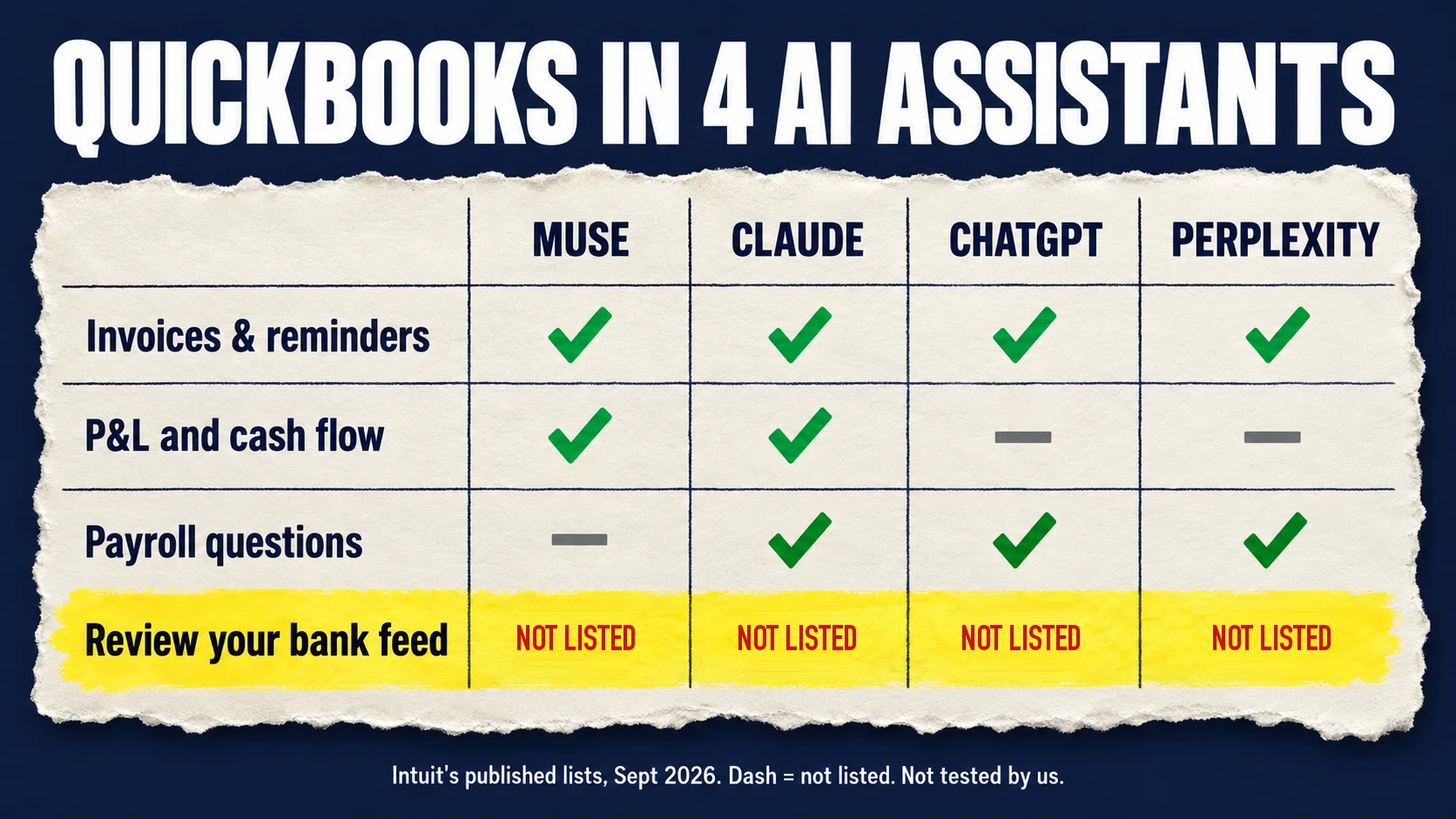
All four lists help you get paid, and some explain your numbers. None lists the daily bank-feed work: reviewing transactions, matching them to receipts or bills, and reconciling. That work is what Booke is built for, in QuickBooks Online and Xero.
Can AI reconcile QuickBooks? The bank-feed work none of the lists mention
QuickBooks uses AI to suggest bank-transaction matches and categories. Daily bank-feed review and reconciliation aren't listed for any of the four assistant connections.
Your bank feed is the list of transactions your bank sends into QuickBooks. Categorizing means putting each one in the right account. Matching means linking a bank line to the receipt or bill that explains it. Reconciling means checking that your books agree with the bank and fixing what doesn't.
None of that is asking for a report or sending an invoice. It's working out what a purchase was, finding the document, and chasing whatever is unclear.
QuickBooks already helps here. It uses AI to suggest a match or a category for each bank transaction, shows a confidence badge on suggested matches, and lets bank rules categorize repeat transactions automatically. On the Plus and Advanced plans, the subscription also includes Intuit Expert bookkeeping (Smart Expert Categorization on Plus, Expert Books Upkeep on Advanced), where an Intuit bookkeeping expert reviews and categorizes your bank transactions. Judge any extra tool by the work left after those.
That leftover work is where Booke's AI Bookkeeper sits. It matches bank lines to invoices, bills and receipts, and when an expected document is missing, it asks for it instead of reconciling without it.
What a model does with a charge it can't explain
The connectors decide what an assistant is allowed to touch. How the model reasons about an unclear charge is a separate question, and it's one we've tested ourselves.
We gave Claude Opus 5.5 and Claude Sonnet 5.5 the same made-up case: an $89 "AMZN MKTP US" charge with no receipt, written bookkeeping rules, and our expected answers kept out of the session. Without a receipt, Sonnet 5.5 left the category blank and asked the owner in all 21 runs, both with the bank line alone and with two earlier Amazon purchases coded Office supplies. Opus 5.5 made the same decisions. The full Opus test is in Claude Opus 5.5 for small business bookkeeping.
Both models also slipped in ways a reviewer would want to catch. Sonnet 5.5 left the bank transaction out of its evidence list once it had the receipt, and when it summarized a draft it folded an unexplained $247 charge into its expense total in 7 of 8 runs. That was a small synthetic test of the models, not of Booke, and not an accuracy rate. It still shows why the risk card below keeps a person in charge of the books.
Should you connect Muse to QuickBooks? Our risk card
Our recommendation is to start with one job from the published list, like reading a report or drafting a reminder, and decide separately who checks changes to the books.
Low risk: questions about your numbers, who owes you, reminder wording kept in the chat. Check the answer against QuickBooks before you act on it.
Check before you approve: creating or sending an invoice, or anything else a customer will see. Look at the recipient, the amount and the wording every time.
Keep a person in charge: category changes, posting entries, reconciliation, payroll and taxes. Keep those decisions in your books, with the supporting documents, and don't treat a chat summary as finished books.
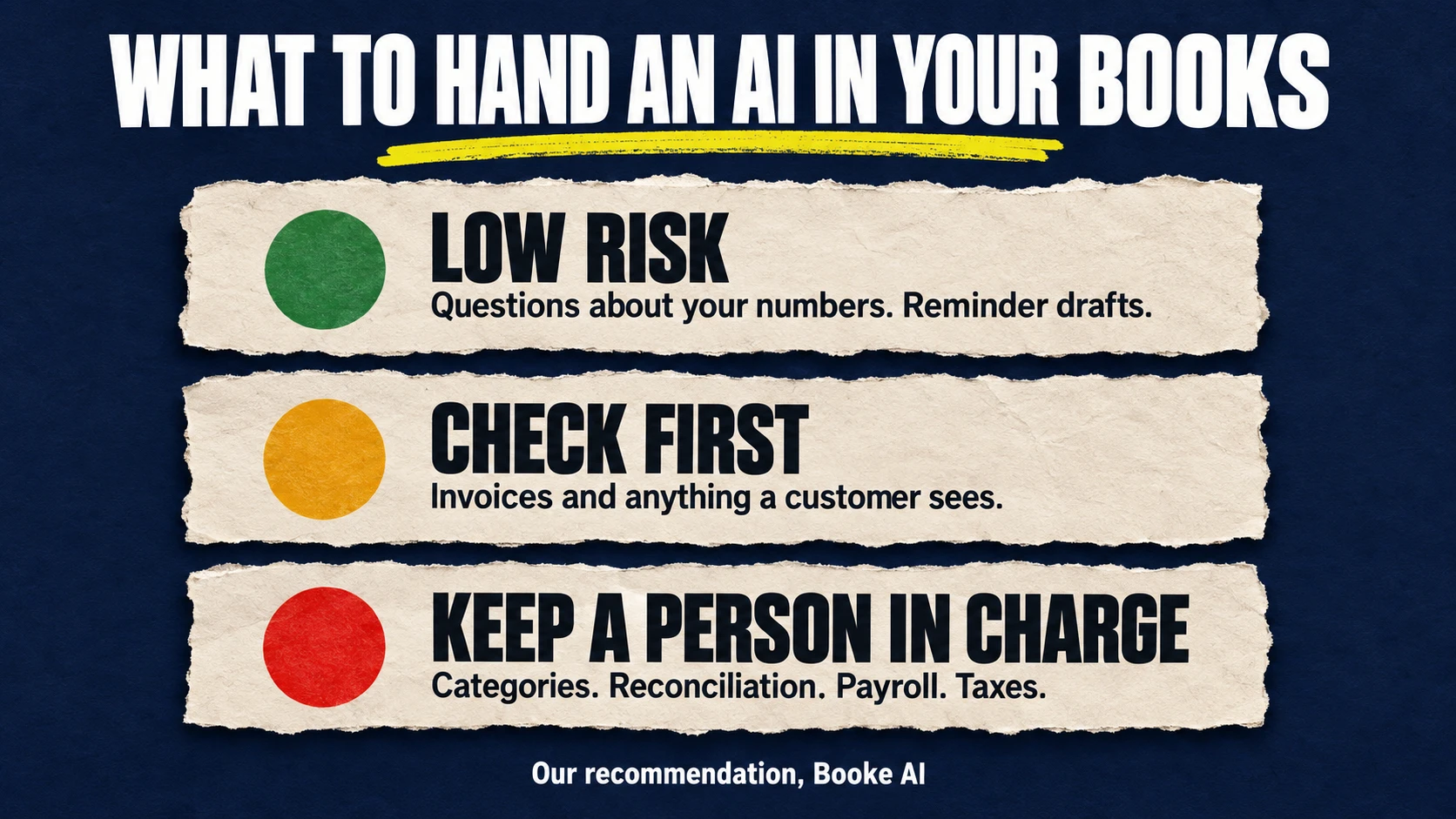
Here's how that plays out for the plumber in Intuit's example. Asking Muse for last month's P&L is low risk: it's a read, and the plumber can check it against QuickBooks. Billing last week's job is a check-before-you-approve action, because the customer gets that invoice and pays from it. An $89 charge in the bank feed with no receipt is still a keep-a-person-in-charge job. Daily bank-feed review isn't on any of the four lists, and in our test both models asked about a charge like this instead of guessing. It's also the line Booke is built to prepare, with the receipt found or requested and the decision left to the owner.
Before you connect any AI to your books
Start with a test company if you have one, or a question whose answer you can check against a report you already know.
Find the exact action on that connector's published list. One assistant's list doesn't apply to another.
Check your country and plan. Muse being available in the US and Canada doesn't guarantee the QuickBooks connection for every user there.
Check how approvals work before any action creates a record or reaches a customer.
Read what data use you're agreeing to, as well as which records the connector can see.
Keep categories, reconciliation and closing in your books, with a person responsible for anything unresolved.
Disconnect the connections you stop using.
Data use differs by connection. For Muse, Intuit says partners can use selected data to improve answers and pick the right connector only with the customer's permission, and only to help the customer do their work. For Claude and ChatGPT, Intuit says your data stays in its systems and is never used to train foundation models. The two pages describe data use differently, so read the terms for each connection.
Five starter prompts for Muse and other QuickBooks AI assistants
Each one asks for an answer or a draft in the chat and tells the assistant not to change records or send anything. Use it with the assistant named, then check the result against QuickBooks.
1. Read the month's numbers (Muse or Claude)
Show my profit-and-loss and cash-flow reports for the period I specify. State the dates and which reports you used. Explain the figures in plain language. If a figure isn't available, say so. Don't change any records.
2. Compare the business (Muse)
Show my balance sheet and the available comparison with industry peers. Keep figures from my books separate from the comparison data, and state the period. Don't estimate anything missing or make changes.
3. Find what sells (Muse)
Which customers and products brought in the most revenue in the period I specify? State the dates and mark anything that isn't available. Don't contact customers or change records.
4. Prepare the overdue follow-up (any of the four)
Which invoices are more than 30 days overdue? Show the invoice details and draft reminder wording here in the chat. Don't send reminders, set up a schedule or update the invoices. Leave any missing details for me to confirm.
5. Draft an invoice without creating it (Muse, Claude or ChatGPT)
Using the job details I give you and the customer information available, draft invoice wording here in the chat for me to review. Ask for anything missing. Don't create an invoice in QuickBooks, send anything or generate a payment request.
The last one asks the assistant to stop at a draft. Review the draft, then decide whether to approve the real invoice.
Does Muse work with Xero?
Xero isn't on Meta's connector list for this launch.
What you do have is Xero's connector for Claude. It answers questions about revenue and profit, who owes you, whom you owe, cash, your financial position and invoices. It's read-only: "Claude can't make changes to your Xero organisation." It connects one organisation at a time, and Xero's Small Business plugin for Claude needs a paid Claude plan (Pro, Max, Team or Enterprise). Xero also has a read-only plugin for ChatGPT, which our OpenAI dots guide covers. Inside Xero itself, JAX, Xero's AI feature, reconciles transactions automatically on the Growing plan and above: when it's highly confident it matches, and when it isn't, it suggests a match and leaves the final say to you.
Booke works inside Xero as well. Connect it once and it reviews the bank feed, categorizes transactions, matches bills, invoices and receipts, prepares reconciliation and flags exceptions for you. It learns from up to two years of transaction history, handles split transactions and payments that cover several invoices, and shows the reasoning and the past transactions behind each suggestion. Where the Claude connector reads your Xero data, Booke does the bank-feed work inside Xero, and low-confidence items still come to a person.
From October 1, 2026, Xero's US prices are higher for new and existing subscribers:
Early: $25 → $27 a month
Growing: $55 → $59 a month
Established: $90 → $97 a month
Prices exclude sales tax and add-ons. Existing discounts and promo codes keep applying until they expire, but the multi-organization discount is being phased out from October 1. If you run more than one Xero organisation, check your next invoice.
Where Booke fits
The assistants above are built for reading your numbers and helping you get paid. Booke AI does the part their lists leave out: the daily bank-feed work inside QuickBooks Online and Xero. Compared with a connector you chat with, a few things work differently:
Daily review. Booke reviews new bank-feed transactions every day on Booke-managed infrastructure, so your computer and browser don't need to stay open.
Existing bank feed. Your existing bank feed stays in place, with no new bank connection. You invite Booke as a user to your books, and they stay in QuickBooks Online or Xero.
Your rules. You can set thresholds such as "all transactions over $50 need receipts," and Booke brings you only the items that need attention.
Exceptions. Low-confidence or unusual transactions come to you with a suggested treatment and the reasoning behind it.
Booke is software, not a bookkeeping service, so the leftover decisions stay with you or your accountant. The AI Bookkeeper Business plan costs US$129 per business per month. Our advice: use the assistants for the reports and invoices on their lists, and judge Booke by the bank-feed work left after QuickBooks' or Xero's own features. You can get started or check the pricing.
FAQ
Is Meta Muse free?
Meta says Muse is free for most of what people need, with paid subscription plans for more. It's available in the US and Canada.
What does Meta Muse do for a small business?
Muse for Small Business connects to tools like QuickBooks, Shopify, Stripe, Slack and Canva, plus your Facebook and Instagram business accounts. Meta says it can work toward a goal you give it and proactively flag emails that need a response. Nothing publishes, sends or spends without your approval.
Can Meta Muse send invoices from QuickBooks?
Yes. Intuit's list for the Muse connector includes creating and sending invoices your customers can pay directly, and tracking overdue invoices with payment reminders. Muse asks for your permission before it sends.
Can Muse review my bank feed or reconcile QuickBooks?
That isn't on Intuit's list for the Muse connector. The list covers reports, peer comparisons, top customers and products, invoices and reminders. Intuit keeps closing the books in QuickBooks itself.
Is there an AI that works with QuickBooks?
Several. Intuit has connectors for Muse, Claude, ChatGPT and Perplexity, each with its own list of actions, and QuickBooks has built-in AI suggestions for matching and categorizing bank transactions. For daily bank-feed review in QuickBooks Online, Booke AI matches transactions to invoices, bills and receipts and brings unclear items to you.
Does Muse work with Xero?
Xero isn't on Meta's connector list for the launch. Xero has a read-only connector for Claude and a read-only plugin for ChatGPT.
Is it safe to connect Muse to QuickBooks?
Intuit says it defines which QuickBooks capabilities Muse gets, and Meta says nothing publishes, sends or spends without your approval. For Muse, Intuit says partners can use selected data only with your permission and only to help you do your work. Start with read-only questions and check every invoice before you approve it.
Do I still need a bookkeeper if I use Muse?
Muse can take reports, reminders and invoices off your plate, but categories, reconciliation, payroll and taxes still need a responsible person, whether that's you, your bookkeeper or your accountant.
Sources
Sources include evidence captured through October 1, 2026. We haven't tested Muse or any of the connectors, and Intuit says features can change without notice, so check the connector's own page before you rely on an action.