
Small business bookkeeping basics: a weekly routine for QuickBooks and Xero

Bookkeeping basics come down to three habits: keep business money in business accounts, record every transaction in the right category with its receipt, and check the books against the bank. QuickBooks Online and Xero handle the debits, credits and reports. Your part is a short weekly pass through new bank transactions. Once a month you reconcile, and a few tax dates come up each year.
Weekly works better than monthly because the questions stay small. Take a small candle business with 26 bank and card transactions in September. Checked once a week, no week brought more than 7 new transactions, and no more than 3 of them needed the owner's answer. Left until September 30, all 26 arrive at once and 10 of them wait on the owner ($12,393.02). By then a supplier's double charge is three weeks old.
We build Booke AI, AI bookkeeping software for QuickBooks Online and Xero.
The basic rules of bookkeeping
Keep business money separate. Run sales and expenses through a business checking account and a business card, not a personal one¹.
Use one list of categories. That list is your chart of accounts, and every transaction goes to one of its accounts.
Pick cash or accrual and stay with it. Cash counts income when the money arrives; accrual counts it when you invoice. Our cash vs accrual guide shows how far apart the two can land in one month.
Keep the proof. Receipts, paid bills, invoices and deposit slips are the records that back up your tax return².
Make the books agree with the bank. That's the monthly reconciliation in the task list below.
The weekly bookkeeping routine
Pick a fixed time, such as Monday morning for the week before, and go through these six steps in order.
Go through the new bank and card transactions. Categorize the vendors you pay every month, such as shipping, ads and software, and set a bank rule for the ones that never change³. On QuickBooks Free, which has no bank rules, you confirm them by hand each week.
Record money moving between your own accounts as a transfer. A savings transfer and a credit card payment aren't expenses, and if the transfer or payment is already in your books, match the bank line to it⁴. A loan payment splits in two: the principal reduces the loan, and only the interest is an expense. The loan statement shows the split.
Match customer payments to their invoices. When money for an open invoice arrives, match it to that invoice, which marks the invoice paid⁴. Added as new income instead, the invoice stays open and later shows as overdue, and on an accrual-basis report the same money counts twice.
Answer the questions only you can answer: money you put in, money you took out, a deposit with no customer name, a tax payment. Decide while you still remember.
Attach the receipts for the week's purchases. A receipt snapped in the mobile app when you pay is one less to hunt for on Monday⁵.
Check who owes you and what you owe: overdue invoices before you chase anyone, and bills due next week against what's in the bank.
Where each step lives:
Step | QuickBooks Online | Xero |
|---|---|---|
New bank transactions | All apps > Accounting > Bank transactions, Pending tab⁶ (For review on the older page⁷) | Accounting > Bank accounts > Reconcile items⁸ |
Bank rules | All apps > Accounting > Rules³ | Accounting > Bank rules⁹ |
Customer payment for an invoice | Match the deposit to the invoice on the Pending tab⁴ | Find & match the statement line to the invoice¹⁰ |
Receipts | All apps > Accounting > Receipts, or Receipt snap in the mobile app⁵ | Accounting > Documents, or + > Document in the mobile app¹¹ |
Overdue invoices | All apps > Sales & Get Paid > Invoices, Status column¹² | Sales > Invoices > Awaiting Payment¹⁰ |
Bills to pay | All apps > Expenses & Bills > Bills, Unpaid tab¹³ | Purchases > Bills > Awaiting payment¹⁴ |
What a weekly look caught in one September
Here is the candle business's September in QuickBooks Online, split into weeks.
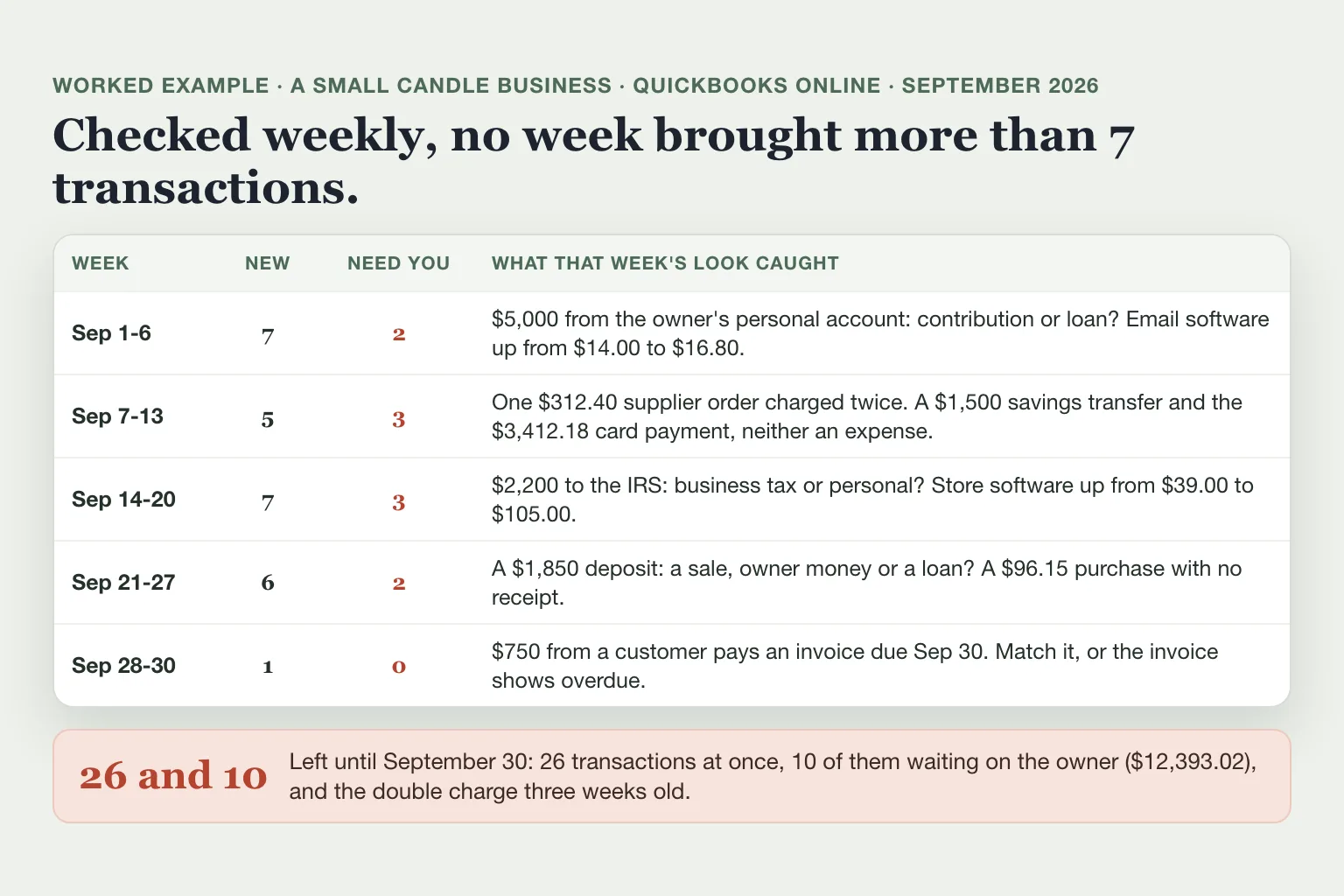
Most of what the weekly look catches costs money or time when it waits:
The same $312.40 supplier order was charged twice, on September 9 and 10. Found that week, it's a short call to the supplier for a refund.
On September 1 the owner moved $5,000 from a personal account into the business. That's an owner contribution or a loan to the business, not income. Only the owner knows which, and an owner contribution and a loan go to different accounts.
$2,200 went to the IRS on September 15, an estimated tax due date¹⁵. If it was the owner's personal estimated tax paid from the business account, it isn't a business expense. In a sole proprietorship or a single-member LLC, record it as an owner's draw.
Two $1,500 transfers to savings and the $3,412.18 card payment left checking. Recorded as expenses, they make September's profit look $6,412.18 lower than it was, and the savings account comes up $3,000 short when you reconcile in QuickBooks Online.
The email software went from $14.00 to $16.80 a month and the store software from $39.00 to $105.00. Seen the week it happens, a price change is easy to question or cancel.
On September 28 a customer paid a $750 invoice by Zelle, two days before it was due. The deposit was added as uncategorized income instead of being matched. In the business's QuickBooks that invoice still showed as $750 overdue on November 2, five weeks after it was paid. On an accrual-basis profit and loss report, the same $750 also counts twice in September income: once from the invoice and once from the deposit.
Monthly, quarterly and yearly bookkeeping tasks
Each month:
Reconcile every bank and card account against its statement. In QuickBooks Online that's All apps > Accounting > Reconcile¹⁶. In Xero you reconcile statement lines as they come in on the Reconcile tab, so at month-end check that none are left and that the statement balance in Xero matches your bank statement⁸.
Read the profit and loss report and the balance sheet. Our balance sheet vs income statement guide shows what each one tells you.
Pay yourself on a schedule and record it the same way every time.
Each quarter:
Pay estimated tax if you expect to owe at least $1,000 for the year after withholding. The last 2026 payment is due January 15, 2027¹⁵.
If you collect sales tax or run payroll, those returns have their own deadlines. Put them on the same calendar.
Each year:
File Form 1099-NEC with the IRS, and send a copy to each contractor you paid $2,000 or more for services in 2026, up from $600 the year before. Card payments and payments through third-party payment networks are reported on Form 1099-K instead, and payments to corporations generally don't need one. Both are due January 31, which moves to February 1, 2027 because January 31 falls on a Sunday¹⁷.
Keep records for at least 3 years after you file the return, and employment tax records for at least 4 years after the tax is due or paid¹⁸.
Review the year with your accountant before tax season.
Where Booke fits
Steps 1 to 3 are the same clicks every week. Booke does that work every day inside the QuickBooks Online or Xero books you already use, with the bank feeds connected there. It categorizes new bank transactions, matches them to existing or newly created records and supporting documents, and brings you only the transactions that need you. In QuickBooks Online, Booke prepares the work for reconciliation. Booke automates up to 80% of manual bank-feed work for $129 per business per month. See how Booke works for small business owners.
FAQ
Can I do my own bookkeeping?
Yes, if you keep up with the weekly pass and the monthly reconciliation above. Hand the books off when being behind starts to cost you: a lender asks for current statements, or a tax deadline arrives with months still uncategorized. A bookkeeper would still have to ask you about the 10 September transactions that only the owner could explain. Our outsourced bookkeeping guide shows when the fee pays for itself.
How much do bookkeepers charge?
At six major US bookkeeping services, plans with a human bookkeeper start at $199 to $469 a month, as of October 2026. Catch-up work for months you're behind is often priced separately.
Sources
U.S. Small Business Administration, Launch your business: open a business bank account, retrieved November 2, 2026.
IRS, Publication 583, Starting a Business and Keeping Records, page reviewed April 30, 2026.
Intuit, Set up bank rules to categorize online banking transactions in QuickBooks Online, updated September 11, 2026.
Intuit, Match your bank and credit card transactions, updated August 14, 2026.
Intuit, Upload your receipts to QuickBooks, updated August 17, 2026.
Intuit, Learn about updates to the new AI-powered banking page, updated October 11, 2026.
Intuit, Fix duplicate transactions in QuickBooks Online bank feeds, retrieved November 2, 2026.
Xero Central, Reconcile your bank account, retrieved November 2, 2026.
Xero Central, Create a bank rule, retrieved November 2, 2026.
Xero Central, Record a payment on a customer invoice, retrieved November 2, 2026.
Xero Central, Upload a file to the document library, retrieved November 2, 2026.
Intuit, Understand invoices in QuickBooks Online, updated August 5, 2026.
Intuit, Enter bills in QuickBooks Online, updated August 5, 2026.
Xero Central, View unpaid bills in Xero, retrieved November 2, 2026.
IRS, 2026 Form 1040-ES, Estimated Tax for Individuals, retrieved November 2, 2026.
Intuit, Reconcile an account in QuickBooks Online, updated August 5, 2026.
IRS, Instructions for Forms 1099-MISC and 1099-NEC (12/2026), retrieved November 2, 2026.
IRS, How long should I keep records?, page reviewed June 30, 2026.

